- Home
- /
- Community Archive - Read Only
- /
- IdeaStation : tabs.IdeaBank.tab.most-recent%25252525252525252525252525252525252525252525252525252525252525252525252525C2%25252525252525252525252525252525252525252525252525252525252525252525252525A0.title
Announcements
Visit Fusion 360 Feedback Hub, the great way to connect to our Product, UX, and Research teams. See you there!
Turn on suggestions
Auto-suggest helps you quickly narrow down your search results by suggesting possible matches as you type.
Fusion 360 IdeaStation (Archived)
This forum has been archived. Please join us on the Fusion 360 Feedback Hub
Options
- Mark all as New
- Mark all as Read
- Float this item to the top
- Subscribe
- Bookmark
- Subscribe to RSS Feed
Idea Statuses
- Gathering Support 6,035
- オートデスク今後検討 45
- Future Consideration 782
- オートデスク審査落選 252
- Implemented 565
- RUG-jp審査通過 2,073
Wouldn't it be perfect if Fusion zoomed in to the sketch after you start the "edit sketch command"? or at least keep the current zoom. This instead of zooming in on some other part of your design then the sketch you want to work on, because this is what it does now.
I inserted a screencast (what a great tool!) with the current behaviour.
Show More
The current July update busted Fusion with a host of bugs.
So I tried to uninstall and freshly re-install it
To my surprise all settings and plug-ins were still present after a new install.
Gents - when I want to uninstall make an uninstaller that removes EVERYTHING!
This is a really old complaint and should not be that rocket science 😉
Show More

 Fueler
on
09-01-2018
07:15 PM
Submitted on
09-01-2018
07:15 PM
Status:
Gathering Support
Fueler
on
09-01-2018
07:15 PM
Submitted on
09-01-2018
07:15 PM
Status:
Gathering Support
I would like to have mouse/key combination where I could sketch a line, choose a center point and have the line draw out equally in opposite directions when dragging the mouse. Example: control/left button hold/drag. This would save some clicks by not relying on constraints.
Show More

The newest version of the slicing software Cura for 3D-printing enables the creation of 3rd party plugins. Solidworks and Siemens NX have already created plugins to integrate Cura into their software, I suggest Fusion 360 do the same! For more info: https://ultimaker.com/en/blog/51439-welcome-to-ultimaker-cura-30
Show More
More flexible balloon design in the drawings is needed. I prefer to write a BOM on excel and often leave spaces between parts to signify the different stages of assembly, I've found that fusion gives very little option as to what number is assigned to each balloon. A way of detaching the balloon from the inbuilt parts list, similar to inventor, would be hugely helpful. Also a chamfer dimension option would be great!
Show More

 fardinbarekat
on
05-17-2017
01:48 PM
Submitted on
05-17-2017
01:48 PM
Status:
Gathering Support
fardinbarekat
on
05-17-2017
01:48 PM
Submitted on
05-17-2017
01:48 PM
Status:
Gathering Support
 leighCB8FK
on
03-21-2018
02:34 PM
Submitted on
03-21-2018
02:34 PM
Status:
Gathering Support
leighCB8FK
on
03-21-2018
02:34 PM
Submitted on
03-21-2018
02:34 PM
Status:
Gathering Support
Hi, It would be handy if you could copy and paste when in drawing mode, across pages. or at least have the option to copy a page, then you can edit it. this is handy if you want a complex and simplified dimension drawing.
Show More
 Scoox
on
03-18-2018
08:49 PM
Submitted on
03-18-2018
08:49 PM
Status:
Gathering Support
Scoox
on
03-18-2018
08:49 PM
Submitted on
03-18-2018
08:49 PM
Status:
Gathering Support
Fusion 360 auto hides sketches and joint origins upon consumption. For example: A sketch is automatically hidden after it's used in an extrude operation. A joint origin is automatically hidden after it's used to create a joint. At the time of this post, Fusion 360 provides an option to prevent this, but this option only applies to sketches: I would like a similar option named 'Auto hide joint origin on joint creation'. The following screencast shows two situations where it would be better to not auto hide. Better yet, a checkbox could be added at the bottom of the Joint dialogue (see below mock-up) to temporarily bypass the global setting in the Preferences. By default, the checkbox in the Joint dialog should always match the global setting in the Preferences. To temporarily achieve override the global setting, users simply toggle the checkbox to the opposite state: Her's the screencast:
Show More
Depending on the viewing angle, I often have trouble reading the height-level labels. I think color coding on the HEIGHT panel would help.
Show More
 jkelindberg
on
07-17-2016
08:26 AM
Submitted on
07-17-2016
08:26 AM
Status:
Future Consideration
jkelindberg
on
07-17-2016
08:26 AM
Submitted on
07-17-2016
08:26 AM
Status:
Future Consideration
Add possibility to define custom paper size. Very useful if you are using a PDM system to handle the title blocks.
Show More

 lance_anthony
on
03-14-2018
03:56 PM
Submitted on
03-14-2018
03:56 PM
Status:
Gathering Support
lance_anthony
on
03-14-2018
03:56 PM
Submitted on
03-14-2018
03:56 PM
Status:
Gathering Support
Right now F360 stores many preferences in the cloud with the user's account, even some obscure ones the grid color scheme (Display Settings > Environment). A few major ones, unfortunately, are not: zoom direction and button layout, to name a few. At home, I have zoom reversed, and frequently used functions in the main workspace menu rather than dropdowns. But I spend a lot of my time using Fusion in a computer lab with frozen hard drive images, so not only are these options not pulled down when I sign in, but every time I reboot (which is after every session), these settings are lost completely. This could be alleviated entirely if these settings were cloud-based.
Show More
patrik-web
on
10-04-2015
12:26 PM
Submitted on
10-04-2015
12:26 PM
Status:
RUG-jp審査通過
The current implementation of the Construct menu, where you create construction planes, axes, and points, consists of a long list of alternatives where you have to find your exact combination of planes, faces, edges, axes, or points to accomplish what you want. I think the approach used by Geomagic/Cubify is more user-friendly. Instead of forcing the user to specify how they intend to generate their object in advance, this is inferred from the selected objects. For example, if after selecting "create a plane", you: Click on a plane. The dialog assumes you want to make an offset plane and asks for the offset. If you now select an additional point, it realizes that the only alternative that makes sense is to make an offset plane going through that point. If you instead select a plane and an axis/edge parallel to that plane, it generates an offset plane going through the axis/edge, with an optional rotation angle around the axis as well. This has two big advantages from a usability standpoint: The user can just mark what they intended to without having to find that alternative in a long list first. The plane/axis/point can be edited to a different type of definition. (My impression is that in 360 right now if you have made a plane as an offset plane but realize you actually want it to be rotated, there is no way to do that except deleting the plane and creating a new one, which would break dependencies. I might be wrong about this though.) The types of planes that can be generated in geomagic/cubify seem to be: Selecting an edge: Insert plane perpendicular to the edge at the endpoint of the edge. Selecting a plane or face: Insert plane parallel to the plane/face with a specified offset. Plane/face and point: Insert plane parallel to plane/face going through point. Edge/axis and point: Insert plane either containing or normal to edge/axis going through point. Two parallel edges/axes: Insert plane containing the two adges/axes. Three points: Insert plane going through the three points. For axes: Selecting an edge: Insert axis collinear with edge. Two planes: Insert axis at the intersection of the two planes. A plane and an edge parallel to but offset from the plane: Insert axis in the plane, parallel to edge. A cylindrical face: Insert axis passing through centerline of cylinder. A plane and a point/vertex: Insert axis normal to plane going through point. Two points/vertexes: Insert axis going through the two points. For points: Selecting nothing: Insert point at a specified coordinate. Selecting an edge: Insert point on edge at a specified fraction between the endpoints. Two intersecting edges/axes: Insert point at intersection. A curved edge: Insert point at curve center point. Three nonparallel planes: Insert point at the intersection point. A plane and an axis: Insert point where axis intersects plane. Two points: Insert point on line between points at a specified fraction of the distance. A point and a plane: The point projected onto the plane, with optional offsets in the plane. (Note that several of these alternatives are currently not available in 360 at all.)
Show More
Hello Fusion 360 development Team, I am wondering if you have any plans to develop a fully functioning iPad/tablet version of Fusion 360? I have dabbled with Shapr3D on my iPad Pro and its pretty amazing but lack depth/features to the program. The benefits of using touch and pen controls are endless and this software is really intuitive and fast. Fusion 360 would be a blast to use. Also the latest iPad Pro models are so powerful that they would easily be able to cope with Fusion 360. I regularly work on 2-300 Megabite files before layers on my iPad using Affinity Photo. Are there any plans at present? Kind Regards Barry Wallis
Show More
 FangoftheCOBRAS
on
10-05-2017
08:53 AM
Submitted on
10-05-2017
08:53 AM
Status:
Gathering Support
FangoftheCOBRAS
on
10-05-2017
08:53 AM
Submitted on
10-05-2017
08:53 AM
Status:
Gathering Support
The way we design a model and how we need them to arranged to successfully print on a 3D Printer are not usually the same. I would love to see an option where you could select a face to be the bottom layer and it would orient the model so that the best surface to start a print can be set without moving the model or STL in your host software. I see this as a Select as Bottom Face option on the Export to STL dialogue box. I think this would be a great little time saver. Another idea I had involves providing a Buildplate Environment for arranging your parts for printing. It would contain all the same bodies and components of the Model Environment, but would allow you to reorient the components without affecting the layout used in the design process.
Show More
 dlewis1000
on
01-30-2019
02:34 AM
Submitted on
01-30-2019
02:34 AM
Status:
Gathering Support
dlewis1000
on
01-30-2019
02:34 AM
Submitted on
01-30-2019
02:34 AM
Status:
Gathering Support
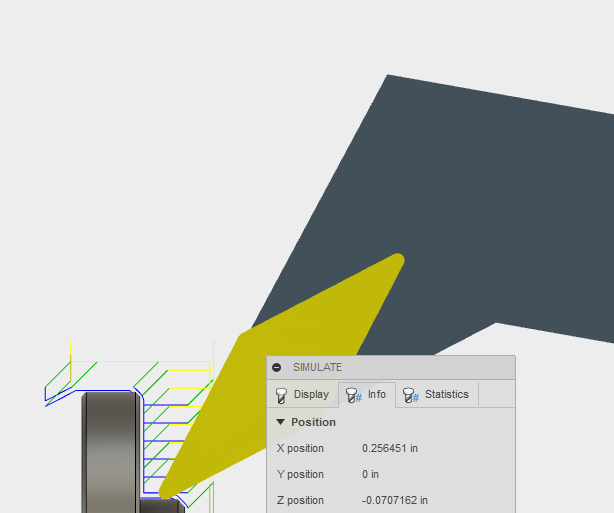
When you are doing 5-axis toolpaths it would be helpful to see the rotation angles at different points of the toolpath. In the info section when you simulate, and when you do show info on the toolpath, it shows XYZ coordinates but it doesn't show ABC rotation angles. That could be helpful to know you aren't going to overtravel your rotary.
Show More
With the July 2018 fusion update we can now assign hotkeys to most of the commands, which is really helpful! unfortunately this functionality does not extend to the timeline, which is really a shame. A big part of my modeling process is debugging models so they can be optimized for simplicity and use. This involves moving forward and back through the timeline and making changes. I think debugging models would be easier if I didn't have to constantly come back to the timeline buttons, which diverts my focus and wastes time. So It would be really awesome if I could assign hotkeys to the forward/back and start/end buttons on the timeline. Thanks!
Show More
takitish
on
01-28-2019
05:14 AM
Submitted on
01-28-2019
05:14 AM
Status:
Gathering Support
And again we raise this question created almost 2 years ago by user louis.lbnc
louis.lbnc:
"Hi, this is a request to enable constrained orbit as an option when using 3D Connexion space mouse peripherals.
While it is currently possible to set Fusion 360 to lock the horizon with constrained orbit, this setting doesn't carry over to the space mouse. Many users prefer the constrained orbit for design work as locking the horizon shows you your object as you would in the real world. You may notice a lot of users using an unconstrained orbit tool spend a lot of time rolling the camera around in order to get the horizon level."
This issue has been brought up a few times before:
https://forums.autodesk.com/t5/ideastation-request-a-feature-or/space-pilot-lock-axis/idi-p/5421537
https://forums.autodesk.com/t5/design-validate-document/lock-horizon-horizontally-for-orbit/m-p/6909...
https://forums.autodesk.com/t5/design-validate-document/lock-horizon-in-fusion-360/td-p/6909876 https://forums.autodesk.com/t5/fusion-360-ideastation/constrained-orbit-with-3d-connexion-space-mice/idc-p/8199749#M34566
VOTE Please!
Show More
Please consider investing some good will into autodesk forums website, it's incredibly slow. Inspiration can be found in this stackoverflow.com case study : http://nickcraver.com/blog/2016/02/17/stack-overflow-the-architecture-2016-edition/ Would be super useful if the forums website was working decently quick because right now most pages take seconds to return.
Show More
PinRudolf
on
03-05-2018
07:35 AM
Submitted on
03-05-2018
07:35 AM
Status:
Gathering Support
Hi all, I've read on the Product Roadmap that a new Hole tool is coming our way soon, I'm very excited about that! I just wanted to do a last request before the tool is released! When creating a Countersink hole the tool requests a Countersink Diameter. This does not seem to be consistent with the datasheets that fastener manufacturers deliver us; could this please be changed to the depth of the countersink hole? Below I have attached a typical countersunk-screw drawing. As you will notice the diameter of the screw head cannot be equal to the diameter of the hole as the screw would stick out (by c). It also makes it more complicated if I would like to add extra spacing to compensate for any tolerances. Please let me know what you think and feel free to add any suggestions! Cheers
Show More
Critter51294
on
01-24-2019
12:19 PM
Submitted on
01-24-2019
12:19 PM
Status:
Gathering Support
There should be a way to make Fusion's post processor output a G2/G3 on arcs rather than many small line segments. I have a 1993 Fadal VMC 4020 and the control has a hard time processing the small line segments. The smoothing function works most of the time but not always. I would like to see a check box under the passes tab (perhaps right underneath the smoothing check box) that reads "Force G2/G3."
Show More
gary.berwick
on
04-23-2017
12:12 PM
Submitted on
04-23-2017
12:12 PM
Status:
Gathering Support
hi guys, I can see that this has been asked before but still not included in the latest batch of updates. Generally speaking I would guess that most of your new Fusion 360 users will have come from some sort of Autodesk software and seeing how both AutoCAD and Inventor both have this command wouldn't it be a logical choice to include this into Fusion 360? It is a huge time saver to be able to hit the space bar without having to move position with the mouse as I'm sure you know. Hopefully we see it soon?? Thanks.
Show More
yatyas72
on
07-11-2019
06:26 AM
Submitted on
07-11-2019
06:26 AM
Status:
Gathering Support
First I want to say I LOVE Fusion 360. Over the last two years we have adopted 100% usage of Fusion and are designing and manufacturing commercial products using Fusion as well as manufacturing parts for clients. Over the last 6-8 months it seems the updates have had a few issues many of which have caused a slow down or a down right stoppage in production and most recently with the Joints going haywire. I would like to suggest a way for users to turn off automatic updates and implement them on their own schedule say 60-90 days. I don't need to have an update every month but I need to know that when I want to use Fusion it'll work as well as the last time I used it. If this has already been suggested I apologize but I didn't find it before posting. Thanks, Larry
Show More
benoitD336P
on
11-22-2016
10:42 AM
Submitted on
11-22-2016
10:42 AM
Status:
RUG-jp審査通過
This is a big problem when dealing with supplier. I usually send them a step file with a PDF drawing of the part and it confuses them to have the two files with different numbers. Let say you send the Step-v8 with the Drawing-v5 for a quote and then you send them revised files for the making that are Step-V12 and Drawing-V8, one could think that the New Drawing actually goes to the old Step. The model version is important to keep going right but the version of a blueprint does not matter as much by itself so it would a lot easier to manage files if the print number matches the model or part number. For now I loose my time to make them match manually before I send them to suppliers.
Show More
joepluess
on
01-17-2019
10:48 AM
Submitted on
01-17-2019
10:48 AM
Status:
Gathering Support
can we finally agree on making the view (perspective with ortho faces) set as (global options) in presetting’s. it changes from time to time within the project and i want that setting to be global for all items and stay so until I, my self change it
i see other people have brought that up before. So, would you mind solving that issue now!
Show More
 TrippyLighting
on
09-07-2015
06:27 PM
Submitted on
09-07-2015
06:27 PM
Status:
Future Consideration
TrippyLighting
on
09-07-2015
06:27 PM
Submitted on
09-07-2015
06:27 PM
Status:
Future Consideration
Right now when deleting a pattern as in the screenshot below the patterned objects - lines, arcs, all the purple stuff in the screenshot - remains unconstrained in the sketch. If they are not needed anymore they all have to be deleted manually.
It would be nice when deleting a pattern to be presented with a little pop-up window "delete patterned objects ? Yes/No"
Show More
madengineer13
on
06-20-2016
03:58 PM
Submitted on
06-20-2016
03:58 PM
Status:
Gathering Support
I would like to be able to select a face, and apply a fillet or chamfer to all the edges of the face. It would be really nice if it would make the fillet for all the edges possible, and just not place a fillet on edges that fail to fillet for whatever reason
Show More
 esumft
on
07-28-2018
01:03 PM
Submitted on
07-28-2018
01:03 PM
Status:
Gathering Support
esumft
on
07-28-2018
01:03 PM
Submitted on
07-28-2018
01:03 PM
Status:
Gathering Support
Just shade the tab title and the occupied ribbon area, might look nicer and highlights the fact that there are other tabs to new users. Kind of like MS Office has in their software.
Show More
mufadal89
on
04-09-2017
10:41 AM
Submitted on
04-09-2017
10:41 AM
Status:
Gathering Support
There should be an option in Motion links to Add relation between rotation of CAM shaft and Translation of Follower with respect to certain CAM profiles. eg. workflow 1. We select motion links 2. Select CAM 3. Type of motion - Simple harmonic , uniform acceleration , linear etc. 4. the CAM profile or a table with displacement values for each angle - A speerate API to generate the motion of follower. 5. Selecting the CAm axis 6. Selecting the follower plane.
Show More
I it would be great if the 2D contour CAM operation had the ability to specify dogbone cuts on all inside corners. This could be done as a simple checkbox and then a bit diameter number, then the toolpath would be generated to automatically cut a dogbone around all inside corners. Or... maybe you could select the vertical parts of all inside corners where you want it to be done. (YES, I'm aware of the dogbone add-in which puts it in the model).
Show More
Scoox
on
02-14-2018
09:46 PM
Submitted on
02-14-2018
09:46 PM
Status:
Gathering Support
Category labels next to search results: This way, typing "fillet", which currently displays both the sketch fillet and the 3D fillet, would be much easier to locate (users could search for "sketch fillet" or "fillet sketch"): Display search results in alphanumerical order. At the moment search results are displayed in some sort of semi-random order: Ensure search results are consistent: Search often finds irrelevant results, or results that don't contain all of the search terms. In below example, searching for "free orbit" and "orbit free" produces different results. Furthermore, Some of the results don't contain all of the search terms e.g. where is the string "free" in "Constrained Orbit"? Custom separators (both vertical and horizontal): Currently the toolbox is just an unstructured one-dimensional array of icons:
Show More
One of the main reasons why I use Blender is because it has parametric deformation tools which allow me to work with polygons but having a design history for certain tasks.
It would be fantastic if such a tool set could be made accessible to the TS system in Fusion.
Model something with TS and then bend twist and taper into shape while you work on a flat easy to adjust master
geometry.
Idealy those modifiers should be interactive non-destructive.
Show More
Fusion 360 should not add itself to the dock after each launch. Moreover, it should reside it the Applications directory like other apps (a shortcut would be ok) and be findable via spotlight (see image). In general, Fusion should respect the platform it's running on.
Show More
I know its been talked about for awhile, but where are we at with machine tool simulation in CAM? In 2016 the Fusion team said likely in the next few years. I know in HSMWorks you utilize Solidworks CAD, but in Fusion we already have the capability to model or import a full machine tool, set drive joints and motion links etc. We already have our "machine tool" library. Couldn't we just make an axis through cylinder at the spindle, snap tools to that point, and simulate? We could use the "motion study" to see our limits or axis' and collision check to see if the machine tool violates model fixture or stock just as we check with our tools and holders. Would it really be that much work to implement machine tools into our tool path simulation, or is it that Autodesk does not want to do this because then it would be competing against PowerMill's features at a much lower price? If that is the case, maybe it could be included with the "manufacturing extension" for extra money? Would love a firm answer on what the plan is with this, or if its not coming at all. We're getting a massive 5 axis gantry mill soon and I would gladly pay more for this feature. PowerMill is overkill for the work that I'll be doing on this machine, but still would like to have some confidence I wont crash. I can't stick with Fusion on this machine without this feature. Thanks !
Show More
ive been working with sheet plastics for almost 10 years now. when modeling with plastics in the sheet metal space in fusion (or Solidworkds, inventor etc) i always come across the same issue. You cannot have a bend radius of zero. when bending most widely used sheet plastics you do not need to compensate for the bend radius. im not entirely sure why but this has always been the case for anything up-to around 10mm thick. anything upwards of 10mm may need some compensation, but very rarely. when we bend plastics there is indeed a bend radius and they're not sharp inside. but the flat panel size needs no compensation at all. it would be nice to be able to have an option for no compensation when creating flat patterns within fusion for now the only way around it is to give a bend radius value of something like 0.001 which works OK but doesn't look realistic in renders
Show More
j_cavender
on
09-07-2017
06:37 AM
Submitted on
09-07-2017
06:37 AM
Status:
オートデスク審査落選
The Fusion team would be absolutely legendary if they implemented basic turning canned cycles into fusion.
Show More
Hi all, when we perform a Combine command the first object selected is highlighted in blue. The tool bodies are higlighted in blue too. This is a little bit confusing. I think that A and B selection in boolean operations must be differentiated. Regards
Show More
 roambotics_scot
Tons of good ideas get posted and buried because Ideastation shows «popular» by default (so most people coming here completely miss most things)
Simple fix: make the default to show «recent» rather than «popular»
Show More
This is for the UI, It bothers me that the back button in the dashboard where all the projects are shown, doesn't send you to the last folder (in case you are working with multiple folders), it sends you to the home view where all the projects are shown. It would be nice it send you to the last folder, in case you are working in a project with multiple folders.
Show More
In fusion 360 can you put options other than metal in the tool setup, specifically different species of wood, at least soft/hard woods. It would help us cnc router builders/users with feeds and speeds. I would appreciate it. Ken Young
Show More
Celcius1
on
12-20-2019
04:19 AM
Submitted on
12-20-2019
04:19 AM
Status:
Gathering Support
With the release of the RPi 4, it contains a spec that is capable of running a native version of Windows 10 yet to be tested. But in thinking of this it would be good to see if an SD Card image with a build of Fusion 360 specifically built for the RPi 4 is released, the benefits of this its gives as the RPi 4 supports dual 4k output, USB3 and Gigabit Ethernet, it makes for the perfect Pocket Design computer. So this would be good, and of course if this is built on a custom build of Raspbian designed to be resource efficient, it would make the perfect design workstation.
Show More
Hello, I love the Fusion360 concept. I see many requests for tools pertaining to developing thin walled plastic injection moulded parts. (shells, split lines, conic radii, draft, snap hooks, snap hook groove, mounting boses, vent, lip/groove, cavity, shut off surfaces, parting line etc...) It would be nice to see similar approach to Solidworks, they have two toolbars where the tools are combined together. (i) Mold Tools - http://help.solidworks.com/2015/English/SolidWorks/sldworks/c_Mold_Design.htm?verRedirect=1 (ii) Fastening Feature - http://help.solidworks.com/2015/english/solidworks/sldworks/c_fastening_features_overview.htm I know Fusion 360 has some of these tools but for example, you are unable to create a split line from an edge (only from a planar surface).
Show More
Noah_Katz
on
03-27-2017
11:16 AM
Submitted on
03-27-2017
11:16 AM
Status:
Gathering Support
Often it's difficult determine what needs to be done to fully constrain a sketch when you're almost there. Other s/w I've used had a "Show Free DOF" (degrees of freedom) function that would animate the unconstrained DOF, which was very helpful. For example, if a line lacked an angular constraint, it would rotate, and if it also lacked a linear dimension it would then translate or change length in an oscillating fashion. This would be extremely helpful.
Show More
 cekuhnen
on
08-28-2017
05:31 AM
Submitted on
08-28-2017
05:31 AM
Status:
Gathering Support
cekuhnen
on
08-28-2017
05:31 AM
Submitted on
08-28-2017
05:31 AM
Status:
Gathering Support
I think there is no way to actually import a Fusion file into a base feature which I found very surprising.
Once could export convert to DXF and the use the insert command. But this is not really a workflow you want to ask users to use.
However this again is an old issue of Fusion not providing adequate import abilities - STEP import or such should work via the insert command which is common
when like in this case it is even impossible for Fusion to insert a design from the dashboard into a base feature.
Show More
 janus2
on
12-30-2018
12:53 AM
Submitted on
12-30-2018
12:53 AM
Status:
Gathering Support
janus2
on
12-30-2018
12:53 AM
Submitted on
12-30-2018
12:53 AM
Status:
Gathering Support
What Fusion 360 is really missing is the ability to define a local coordinate system (by moving the origin) when creating a component without the need to join/assemble it first. Then you get to enjoy a re-usable component and can use the as-built joints.
Explanation: From the tutorials I learned that it is good habit to orient sketches to the origin. So I have all base axes and planes as reference. I can orient a Revolve element to the X-axis. For example. In a top down design, where I use reference points in the design for creating the new component, the origin of this new component is somewhere in nowhere. But not where I want it to be. For example: I draw a cube on the Origin. Then a new component on top of the cube, at a certain point. If the new part is a revolve element, I don't have origin as a reference here. Of course I can join/assembly the new empty component to move the origin. It would be nicer if I could set the origin to the point I like without the need to join/assemble it first..
Show More
 LibertyMachine
on
10-24-2016
04:40 AM
Submitted on
10-24-2016
04:40 AM
Status:
Future Consideration
LibertyMachine
on
10-24-2016
04:40 AM
Submitted on
10-24-2016
04:40 AM
Status:
Future Consideration
As an active participant of the CAM forum, I would say that hand's down, the most common problem we see is that of "My post failed, it said something about tool orientation"
This always comes down to one thing: People dive right into programming their part, but they never bothered to do a Setup. So when their tool is trying to mill along the Z axis, they think the solution is to turn on Tool Orientation. This is clearly wrong and the tooltip tells you what it's for, but apparently that is ignored or misunderstood.
I propose something along the lines of these options:
1) Grey out all the toolpath icons until a Setup is performed.
2) If that's not desired by the community, perhaps clicking an operation could prompt a pop-up window informing you that you haven't established your WCS yet and would you like to? This box MUST have a button to click for more information, perhaps linking to a very short video or text explaining what the WCS is for and why you need to set it up before programming
I mean, we all love the easy padding of kudos and "Your answer was accepted as solution" but I'd rather just see the community not even hit that problem in the first place
What are your thoughts @Steinwerks @HughesTooling @al.whatmough ?
Show More
When placing features on a part, such as a hole, the snap points are really nice to use to locate your feature. As the model is edited and reszied, the features don't stay tied to those snap points.
I would like a relationship created between the snap point and the feature. So that if the model is edited, the design intent is preserved.
In the attached screen cast I placed a hole that should be centered on the face the hole is being placed on. A snap point appears and makes locating that hole on the center of the face very easy. When the size of the face is updated, the hole position does not update with the dimensional change.
http://autode.sk/1J5GRUK
Show More
 josh.lopez-bind
It would be really usefull for large assemblies to invert the current selection. When I am working on a large assembly I sometimes want to only view a few components or sub-assemblies. This makes it much easier to see the components and make changes to them. If I could simply select the components I care about, invert selection, and then hide all those newely selected components, that would be great! Of course if there is another route to achieve the same thing I am fine with that too.
Show More
In this particular example, I was uploading a file (.dxf). The error I got was "Import Failed". Great, thanks. How about WHY? Error messages are useless unless they give some indication as to WHY it's an error. Was the file in an unsupported format? Was it a corrupt file? Was there something in there the sofware couldn't handle? There are plenty more areas where the errors are just generic and useless.
Show More
apachehugh.vand
Hi, I know that this subject has been discussed before but I think it's very important to put it on the table again. I'm very impressed by how Fusion takes CAD to the next level and I've been putting it in the hands of different heavy CAD users working for bigger enterprises than me, and they all loved it and only stayed with one question, "How data is managed?" For an enterprise it's unacceptable to have data into a crackable server, propriety of amazon ( a million iCloud accounts cracked a few days ago, take that amazon... ), that can be down for any reason like bugs. But it's also the main reason why they loved it, no "need" to manage the data, all computers share the same files. So what if enterprises could have a "server" version of Fusion 360 to store all data and services locally? Well, I think it will be the "killer" feature, at such a point that I don't know if Inventor could still be taken as an "upgrade" from fusion. I know it's difficult to do, but it NEEDS to be considered further, however Fusion is only going to target small enterprises with no intellectual proprieties, but hey, if it's the goal for Fusion to not cover all the market, stay that way Autodesk. Thanks for your attention, Hugues.
Show More



An addition is needed in the preferences panel: the ability to turn off the automatic changes to the 'operation' in the dialogue box. It is assumed by the program, for example, when you extrude a profile and the object happens to intersect another that a cut is required so it automatically changes the operation from 'new body' to 'cut'. However more often than not, a 'cut' is not what is required but rather a 'new body'. It should be my choice and not the programs choice. When the model is heavy this becomes more of an issue because the program switches to 'cut' then is calculating the 'cut' as you are sizing your extrusion for example and it severely slows down the operation. Whereas left as 'new body' the calculation is much much faster. I realize that this kind of automation is supposed to help but it really doesn't in this case. Many times you think a new body is going to be created because it says 'new body' by default, but later find out you performed a cut or join, then have to go back and correct it. Please add the option in the preference panel to turn off automatic changes to the 'operation' in dialogue boxes.
Show More
shortreportme
on
06-16-2019
01:12 PM
Submitted on
06-16-2019
01:12 PM
Status:
Gathering Support
I suggest to add new option in MOVE operation. It shoul be like move on path. It will help to save time. It will allow to move any body along the path and set the value of movement. If i want to move body along the path i need to set two values. It is not easy. I need to use the rectangular pattern. So the algoritm i described looks like rectangular pattern, but without deleting main (first) body.
Show More
Hi Autodesk, thank you for a great program, i have in a long time waited for a program like this, that every none could have afford to. i have wondered if it was possible to inset the feature "lofted flange" in autodesk fusion 360. woudt it be nice if autodesk hade the possiblety to do this.
Show More
fuso152
on
03-14-2017
04:49 PM
Submitted on
03-14-2017
04:49 PM
Status:
Future Consideration
It would be great if there were a CAM option in 2D tracing or 2D engraving whereby the tool could follow the center of the font, rather than running around its perimeter. The result would be akin to stick fonts. This option is available in SolidCam for SolidWorks.
Show More
Currently, when using the measure tool, the delta XYZ only shows up when selecting two points. In solidworks, the XYZ deltas shows up, even when you select two edges or even two faces (see pic below). Sometimes you just want to know the X distance (or y or z) between two parallel lines rather than the diagonal. Also, the distance line should not be green, it is easily confused with the Y delta at first glance.
Show More
dannytso
on
07-31-2015
02:21 AM
Submitted on
07-31-2015
02:21 AM
Status:
Future Consideration
Hi I come from the custom body part fitting industry. It would be great to have a function that quickly creates cross sectional curves on the body part in question which can then be lofted into a smooth surface of the object to be fitted. T spline sculpting can then be used to manipulate the surface by the practitioner or lab to get a comfortable professional fit and finish. I find the more cross sectional curves involved in the loft leads to a closer and more accurate fit. Perhaps there can be an option to choose how many cross sectional curves to be lofted and the distance between each curve? I used Rhino and they have a Contour function that creates these curves immediately. I find Fusion has a ways to go as it gets quite slow when the number of curves I make increases. I am on a Macbook Pro 2.6 Core i7 with 16 GB of RAM and 1gig video card. Love this program. Thanks a lot Autodesk and associates!
Show More
It will be great if selection would be considered an undoable action. And what I mean is when you press ctrl+z you want to pick previous selection you had. Quite often designers need to do complicated selection for chamfering/filleting of certain edges, but after doing action they undo it and you have to select all over again. All non-CAD 3d software I've used have selections as an action that you can return to. One awesome 3d software (Silo) has selections on a separate undo keyboard shortcut (ctrl+shif+z) So actions and selections are separate, and you never have to worry about your selection. That would have been an ideal. Right now your selection is not saved, it's just not recorded at all.
Show More
Fusion 360 is unable to apply the same mirror command it can use for features and bodies to a sketch object ?!
The inside sketch mirror works good when you want to mirror it along the cplane of the sketch.
But if a sketch is at a rotated custom plane and you need to mirror that along a specific axis with a different rotation you cannot do that.
In my screenshot the sketch has to be mirrored along the Y axis to the left.
Show More
madengineer13
on
07-28-2015
08:58 AM
Submitted on
07-28-2015
08:58 AM
Status:
Future Consideration
I would love to see some sort of fluid flow/ heat transfer tool added to the FEA roadmap. Its very usefull to be able to simulate the flow of air or other gasses/liquids and the heat transfer effects. I could also really use the ability to just do basic fluid CFD simulations.
Show More
big_red_frog
on
09-11-2013
07:14 AM
Submitted on
09-11-2013
07:14 AM
Status:
Future Consideration
Having been tuning designs a lot recently to minimize support implications for 3d printing I am aware of how massive a difference this tweaking can make to reduction in the support material / time / reliability of print / surface finish impact. A little effort makes a night and day difference to all these factors. What would make this so much easier, and something I don't think I have seen elsewhere is the combination of these two workflows. 1. Make it possible to export STL at the body level using any construction plane as the reference plane for down. Presently to force the orientation of parts for STL export so that my flat model face I wish to have down is aligned to a origin axis, I have to export the part out of the main design, where it may be in a complex orientation to a separate design. Host it in a new component within that design, draw a circle on the origin plane via a sketch, then using a joint defined on the "down" face of the body, joint the body to the sketch. Then I have to export from the root of the design, or it doesn't observe the intent of the orientation. If you could simply define an arbitrary plane as the "down" during the STL export of the body at the node in the browser, it would make export in place with easy orientation so easy. This is important to ensure you get absolute alignment of the down face in the slicer package you may use, Makerware for example, if you have to manually tweak you can be sure your face will not be perfectly aligned, and this means poor finish. It also empowers point 2 below. 2. Add an analysis feature that, colorizes the body faces according to angle from the selected "down" plane. Using this and a parameter that represents your printers capability to build overhangs without support, lets say 45 degrees for the purposes of this description, you can color faces that are up in relation to the down plane as "passive", faces that are down but shallow enough to not require support as "healthy", and those approaching the angle where support is required to those where it is definitely required to varying shades of "needs attention" with a good contrast where that boundary angle is crossed. You can then work directly in fusion to prep your model, where angles can be adjusted or down face chosen differently without compromising your design. This would be so much faster / convenient than the current workflow of exporting STL and examining in various external packages that visualize support output. If this already exists in fusion then please point me at it. I assume it should be similar to draft angle analysis for molded parts. Yours in hope.
Show More
cl3m.germain
on
05-11-2016
05:50 AM
Submitted on
05-11-2016
05:50 AM
Status:
Gathering Support
Hello, I am curently working in the model of a robot, working with joints and motion studies to simulate the robot's movements. The motion study is a very crutial feature and i feel like it is very shallow with fusion to do anything involving many joints. It would be great to use the motion study tool to create longer animations that can be exported as a video. The fact that we have to manipulate joints with curves for the angles makes it complicated to animate 360° turning axis (to simulate a motor). I would like to be able to loop play some curves while other curves are not loop-playing, for exemple. Cheers, Clémence
Show More
benbrandt22
on
03-06-2017
09:00 AM
Submitted on
03-06-2017
09:00 AM
Status:
Implemented
Being able to create multi-sheet Fusion drawings is an excellent feature for keeping sets of assembly and subassembly drawings together. However, this convenience breaks down when trying to export to a PDF. When exporting "all sheets" to a PDF, it generates individual PDFs for every sheet. I would like the option to preserve the whole thing as one cohesive document with multiple pages. This would make it easier to share the PDF of every drawing, and preserve it as a single collection and preserve the page order as well. Thank you for your consideration.
Show More
 dewain.zeglin
on
06-28-2018
11:27 PM
Submitted on
06-28-2018
11:27 PM
Status:
Gathering Support
dewain.zeglin
on
06-28-2018
11:27 PM
Submitted on
06-28-2018
11:27 PM
Status:
Gathering Support
Allow complete local rendering to include post processing and turntable rendering. The entire point of having a workstation and NAS server is to be able to handle high-load work. So forcing cloud rendering not only hamstrings users but turns off uses to the idea of 1-stop-shoping in Fusion360
Show More
cieslak.maciek
on
05-04-2016
08:22 AM
Submitted on
05-04-2016
08:22 AM
Status:
Implemented
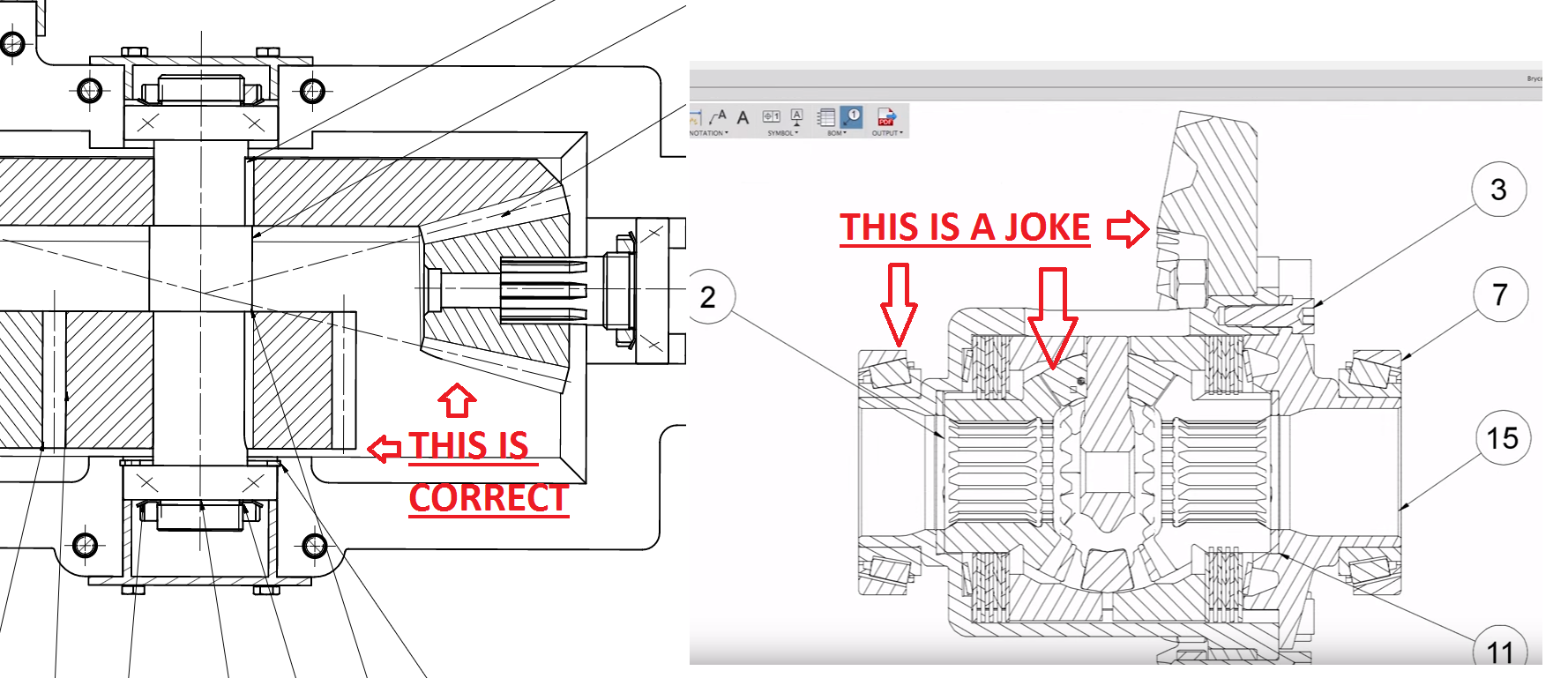
Proper representation of a bearing or a gearing on a 2D drawing requires following of specific rules. Like the surface of teeth should not be sectioned, bearing balls should not be sectioned. What we have now creates a messy 2D drawing which is hard to read for trained engineers. Since I can remember using Inventor or Fusion for drawings ended up in importing it into Autocad and correcting all of that crap. Instead of shiny features and new buttons developers should think about solving that so I could create accurate drawings faster.
If not an automated feature it should be enabled for the users to quicly cleanup the drawing after creation so that we will end up with something commonly reknowned in the industry.
Show More
Usability improvement: Don't ever automatically logout someone from the Fusion360 desktop app. People overwhelmingly have dedicated machines/accounts for themselves. Even if somebody hasn't used Fusion360 for weeks/months, that's still not a reason to log them out. Desktop apps should never ever log out. There is no possible usability benefit to an end user being prompted to log in. The better approach is to allow someone to view what other desktops are logged in and allow them to log out other instances. Usability anecdote: I personally ended up wasting a bunch of time today after not having used Fusion360 in number of weeks being asked to log back in. My password manager had autodesk account credentials from a different email address which then ended up confusing me as after I logged in, my CAD files were missing and the license was set to trial. After initial freak out that my CAD files were lost, I had to search my other email to realise I had used the wrong account. Arghhh.
Show More
A printable Glossary of Terms was requested as far back as 2014 I found. Yet nothing exists yet. We may all speak a language, lets say English as an example. However you didn't make it through school without a dictionary and you may still use one occasionally today. At least I do. I think the on screen tips are great but they are not enough. This should not be a game of stump the dummy. As I have been learning to use Fusion 360, I have watched many videos. At first I didn't get it and couldn't reproduce it. Later on I understood better. The difference is not only practicing with the tools but truly having a full definition of the tool in your mind. There is a necessary wrote component to learning how to do something and it works in conjunction with the practical experience. We don't teach English by speaking Spanish unless the students are Spanish. When we speak a language the order of the words are important. In Fusion 360 the order that you use the tools as well as why your using that tool and not a different one is often critical. The difference always with speaking or design is the result. It's one reason I don't drink and text my Wuzwife late at night. I hope this makes sense to someone because I still want and need a Fusion 360 Glossary.
Show More
cekuhnen
on
02-27-2017
10:29 PM
Submitted on
02-27-2017
10:29 PM
Status:
Future Consideration
there should be no reason why cplanes are size wise all over the place
sometimes I missed new cPlanes because they were so tiny !!!
users should be able to scale cplanes
or
make all cplanes the same size
Show More
With the convergence of gaming and visualization technologies, it would be great to have a simple way to export an entire scene/assembly or component to an FBX or OBJ file with mesh data. From an assembly or component level in the hierarchy, selecting the export menu item would allow you to select FBX or OBJ formats and a dialog would appear that allows you to specify mesh conversion and asset requirements. Ideally, for FBX exports, it would be nice to export all associated assets such as: texture map, UV coords, bump map, specular map, etc. for each object in the scene to preserve materials. Mating joints would also be great to have to preserve for motion studies/animation outside of Fusion. I know I'm echoing some of what has been mentioned before, but I really believe this is something that could make Fusion much more productive in this area. Currently, it is possible to export OBJ files and convert BREP to mesh, but the process is difficult and limited to single bodies with no other asset information. Further more, its only seems to be available in Base Feature or Direct Modeling modes. Here is a link to my earlier post with an AD solution: BREP to Mesh to OBJ Export
Show More
Hi Fusion 360 community I have a group of 16 enthusiastic extension Math students ready to start modelling 3D cars on Fusion 360. They are, however, 12 years old, and so can't access the software. I'd like Autodesk to review this, and see if there's a way, with full parental permission, the students can start modelling. Tinkercad is too simple, and not powerful/flexible enough for their needs. From a business perspective it also makes sense, as having them start out in Primary School, they would be more likely to use it in the High School (as opposed to Sketchup, which has options for under 13). Thanks for your time, and thanks for a great product. Daniel
Show More
Hey Everyone, My idea is to have Full Fusion 360 available on ARM-based processors and mobile devices, especially for concepts and products such as Samsung DeX. AS smartphones get more and more powerful, and more akin to pocket computers, It's important to be able to integrate Fusion and other CAD software on the devices that the next generation uses most often. By having a substantial mobile app capable of the full design process, rather than simply a viewer, it would allow makers of all sorts to be able to get into professional level programs, simply by downloading the app (with a license). A touch-based UI would have to be made, but I am excited to see what you guys think. Best Regards, Cole
Show More
gkopka
on
02-15-2017
03:30 PM
Submitted on
02-15-2017
03:30 PM
Status:
Gathering Support
can u guys please improve the scale tool, i would be already happy with just center mass functionality so i dont have to place everytime a point in the center of a cylinder
Show More
There should be an option for word spacing of Letter as well as Horizontal and Vertical in Text Environment. Gap between letter is constant and is not vary constantly. Add more option for Horizontal spacing and Vertical Spacing in Text Environment.
Show More
cekuhnen
on
02-09-2017
09:04 AM
Submitted on
02-09-2017
09:04 AM
Status:
Future Consideration
Loft with rails in fusion using as a blend surface tool is pretty tricky.
You need way too often rails to define the result.
In all other surfacing programs this is not needed as the code is smart enough to understand how
the edge condition should be.
you can see the issue loft is positional along the edges
to get what I want I have to add a lot of extra steps making sketches trimming and such - this works just blows up the timeline
The additional issue is that besides more work - having to make 3D sketches - in those 3D sketches it is nearly
impossible to create good and consistent aka equal blend curves for the rails
On MOI for example you just select the edges to blend between and the surface fits perfectly
notice how well the edges blend
Show More
cekuhnen
on
04-29-2014
08:32 PM
Submitted on
04-29-2014
08:32 PM
Status:
Future Consideration
it seems to me that either the constraint engine is incomplete or crippled when comparing snapping and curve creation to Rhino.
So I cannot create a perpendicular constraint with a line onto a circle ...
I cannot constraint a line to a spline ...
The video shows many of the problems I point out.
https://drive.google.com/file/d/0Byzv_NlyKp_2dFdiTUI3MFk0blU/edit?usp=sharing
will it be posisble to treat lines and splines the same way when doing constraints?
Mathwise I do not see a reason why I can create a tangent line between to circles but not between to spline arc.
All other CAD apps can at least create a curve with that snapping.
Any comment from the developers? I understand constraints in sketches are quite different than drawing in Alias but still ...
Show More
bstaser
on
06-05-2018
05:34 PM
Submitted on
06-05-2018
05:34 PM
Status:
Gathering Support
I would like to be able to import lathe tools / custom tools (or tool step files directly from manufacturers) into the cam library.
Show More
When producing drawings from a design, it would be useful to have have drawing sheets available in Portrait and Landscape orientation, across the range of sheet sizes i.e. A4, A3, A2 etc. Currently only A4 is available in both orientations.
Show More
yourlittlecncsh
I recently purchased a uniquely-shaped boring bar for my slant-bed lathe to do some concave facing work, and Fusion doesn't have a pre-packaged toolholder in the turning tool library to accommodate this. (The end of the bar has a 27.5' clearance angle from vertical, just to give an idea.) A fellow Fusion user suggested to me that I just add 10' degrees to the tool orientation angle either in the tool setup itself in the library or in the Profile operation itself. The problem I ran into with this is that Fusion seems to be doing some radius comp and the parts are coming out oversized on the OD, and undersized on their IDs. Simulation and the posted code both reflect this. If I leave the tool "as-is" with the incorrect 17.5' end angle, then the simulation and posted code are fine. (Aside from it not correctly simulating whether the insert will clear or not. Fusion Team - do you guys have any plans in the future to introduce custom lathe toolholders, or maybe expanding the pre-packaged options to include a wider range of oddball geometries? See attached for the drawing of the bar [and VBMT 21.51 insert] I'm using, as well as how the toolpaths look on a simpler dummy part with and without the tool orientation adjustment. For reference, the OD of that section of the part is 0.507".
Show More


 cekuhnen
on
01-20-2015
01:43 PM
Submitted on
01-20-2015
01:43 PM
Status:
Future Consideration
cekuhnen
on
01-20-2015
01:43 PM
Submitted on
01-20-2015
01:43 PM
Status:
Future Consideration
for being a cad tool Fusion lacks some very important drafting tools such
as drawing a line perpendicular away or to a circle/curve
or construct a line perdendicular between two curves
Rhino has these features since years.
Via tangent constraint I can make one line tangent to a circle or two and thats it in Fusion.
But it seems impossible to make a line perpendicular to a curve
https://drive.google.com/file/d/0Byzv_NlyKp_2RENYT1VQRU9YZ28/view?usp=sharing
Show More
Having an equation editor in the parameter dialogue box would be incredibly useful. The linear style of typing equations is insufficient for accurately entering complex mathematical expressions. While designing a crank-rocker four bar linkage and specifying the length of its coupler link, I found that correctly sorting out parenthesis errors took nearly as long as deriving the equation for the length of that coupler! Having the ability to type expressions as they might be written by hand (especially for fractions and exponents) would save time, increase clarity, and avoid mistakes for the designer.
Show More
master-1992
on
01-23-2017
04:28 AM
Submitted on
01-23-2017
04:28 AM
Status:
オートデスク審査落選
After the latest update the move function in fusion 360 does not support Move to a face anymore. How should I assemble anything now? Only workarrount that works sometimes is to move from point to point and move a known length in the direction I need my part.
Show More
I would like to suggest the CAM software remember where a previously posted file is located. I regularly jump back and forth between CAM files and the Output Folder only remembers the location it was pointed to the last time a file was posted. I post my CAM files in customer named folders and sub folders with part numbers.
Example
I post a file for customer "123" and then work on a CNC program for customer "456". While working on "456" I need to go back to "123" and post again. Now the Output Folder is now pointing to "456" location. Sure would be nice for the software to remember where "123" is since I have already posted to the "123" location. This would save time so I would not have to browse back to the location I want the file posted to.
Show More
tomae
on
03-20-2016
07:33 AM
Submitted on
03-20-2016
07:33 AM
Status:
Future Consideration
The Inspect tool should be enabled in CAM simulation. There is no way to make measurements after running the simulation in order to adjust toolpaths. Trial and error method of adjusting toolpaths becomes tedious and a way to make measurements after a simulation would be very useful.
Show More
cekuhnen
on
08-18-2016
06:13 AM
Submitted on
08-18-2016
06:13 AM
Status:
Gathering Support
Fusion prefers to work with full corss sections and not like Alias with half bodies. so this means 3d curves I create left I have to create right but this is a lot of extra work and would be great if I could work on one side and then mirror the 3D sketch to the other side of the sketch plane!
Show More
Hi everyone, I'm a bit stuck in the thread milling capabilities within Fusion. I've already asked in the CAM section for help, but there doesn't seem to be a solution ready. (http://forums.autodesk.com/t5/computer-aided-machining-cam/drill-point-thread-mill-programming/m-p/6814570) When thread milling, fusion is always looking at the diameter of the modeled hole, and an offset is possible. This however isn't working well when sometimes holes are sized differently. An m10 hole can be 8.5 mm (standard drill size) or 8.376 mm (the minor diameter) or simply 10 mm. What i would really like some more control over how a hole should be thread milled. Regardless of the hole size, or even a point should be enough to thread mill. We need a few things: D (Major diameter) d (minor diameter) Depth Pitch Angle (for tapered threads) Climb/conventional milling Type of radius compensation Type of feedrate (toolcenter or outside of tool) How many teeth a tool has Spring passes (with or without finishing offset) possibility to use different kinds of thread mills (multiple threads, drill-thread mill, indexed mill etc.) The use of the cutter in this video would be great, 4 seconds for a completed M10 hole! http://www.johs-boss.de/en/products/thread-milling-cutters/bgf/ And also you can download their programming tool from here http://www.johs-boss.de/en/products/thread-milling-cutters/bgf/ Or these: http://www.phorn.co.uk/fileadmin/user_upload/media/PDF/2015_Catalogue_Sub-Sections_EN/Rotating_Tool_Catalogue_Chapters/Thread_Milling.pdf
Show More
I will suggest to add a graphical based programming interface "note based programing" so all that isn't a programmer will get a chance to make some useful scripts by drag and drop.
Show More
I'd love to see a preview of the font when adding text to a design. I love how Adobe previews their font, by having the word Sample in each font. Another nice functionality in Adobe products is that you can just highlight any font and use the arrow keys to tab through the list, and it updates on screen as each font is arrowed through.
Show More
I'm not sure if theres a way to do this currently in fusion, but I can't seem to find a way.
In solidworks, as soon as you click on a certain feature, you immediately get a ton of information about it - what feature you clicked on (arc, line, spline, etc..), what its constrained to (relations), if its fixed, if its constrained, and various dimensional information (x/y/z position, length, radius, etc..). This information is very helpful and doing any sort of troubleshooting or even just modifications of current designs can be time consuming without it. Because fusion 360 is lacking these features I find sketching and modeling to be quite a process, I'm wondering if anyone shares my sentiment. Below is a snapshot of the features I'm referring to in solidworks.
Also, as a side note:
1) The ability to click on a relation, both in the menu below and the actual icon, and have it highlight the chained relations/features is very helpful - it also helps that the fact that each has corresponding numbers next to them.
2) I have to use the "inspect" (measure) tool to get the geometric information, and I find this tool to be very buggy and difficult to use. There is nowhere to change how its measured - ie: min/max/center to center distance. Also knowing the x/y/z components in addition to the linearly measured distance would be helpful.
Show More
merlin7!
on
01-10-2017
02:27 PM
Submitted on
01-10-2017
02:27 PM
Status:
Gathering Support
I think it would be a good addition to be able to select multiple chains with the Drag Selection tool within the CAM module. especially when you are doing engraving on a surface. this would aid in being able to speedup work flow and also reduce the chance of missing a chain if you have to select each one individually like at the moment. thanks Leigh
Show More
When using the 2D > Engrave tool in the CAM workspace, generated paths are very far from optimal. Some paths result in 90%+ unnecessary movement. This is most obvious when engraving text. I make some simple signs with names on them. Below is a small screenshot of part of the tool path (I don't want to include names, so I can create another screenshot with generic text if needed). Just for some perspective on the cost, the word "Always" is about 5 inches long and the body is roughly 30 inches. Each time it does an unnecessary movement, it's not just a little movement, it's traveling in some cases 20 inches just to come back to where it was! Let me summarize the movements below (sorry if i missed any): In the word Always, it enters on the y Goes off and does another letter y on the other side of the body Returns to Always and engraves the comma Moves up to the letter l (L) and engraves it Goes off and does a letter L on the the other side of the body, followed by another letter near that one Moves down PAST Always, to another word, engraves one letter Moves up PAST Always to another word engraves one letter Moves up to Always, engraves the letter A Moves down to another word engraves one letter Moves back to Always and engraves A followed by W (enters W from the middle...) Engraves the letter S Please optimize these movements, or provide us with a method to optimize them manually. Thank you so much! P.S. I love Fusion, this is just my one gripe!
Show More
 TMC.Engineering
on
07-29-2016
09:46 AM
Submitted on
07-29-2016
09:46 AM
Status:
Future Consideration
TMC.Engineering
on
07-29-2016
09:46 AM
Submitted on
07-29-2016
09:46 AM
Status:
Future Consideration
when importing a mesh I get something like this. the mesh is not orthogonal to the origin. using the available tools I can get close by eye but not really close enough. I would like a tool that would.... 1. best fit a group of faces (or many points) to a plane 2. best fit a group faces (or points) to cylinder axis (align mesh cylinder to y axis) 3. mesh point to origin translation 4. also maybe creating reference plane and axis from mesh data as imported after tweaking close but not close enough really like the tool so far
Show More
l_wcrenshaw
on
06-07-2017
01:34 PM
Submitted on
06-07-2017
01:34 PM
Status:
Future Consideration
Currently one cannot view surface bodies in a drawing. Please make these visible, dimensional, etc...
Show More
 Ron_Jones1122
on
11-16-2017
03:36 PM
Submitted on
11-16-2017
03:36 PM
Status:
Gathering Support
Ron_Jones1122
on
11-16-2017
03:36 PM
Submitted on
11-16-2017
03:36 PM
Status:
Gathering Support
Fusion Team has project level permissions that allows users to view and files/folders that lie inside of that project. I would like to see folder level permissions added to the platform. This would increase its use and collaboration ability.
Show More
asarnauskas
on
02-26-2016
02:48 AM
Submitted on
02-26-2016
02:48 AM
Status:
Future Consideration
So far V-carve features are very limited. No support for roughing out before carving or multiple deapth or optimal chip load Can't carve wider slots than tool (Yes I know you can walk around with multiple operations) Close to none documentation Can't select sketch face, only lines Sketch text has no "new line" feature, ENTER closes the box (Relevant to V carving) Sure I missed something Arnold
Show More
Is it possible to add a capability for Fusion 360 to run on chromebooks, as opposed to just Mac or PC?
Show More
ron
on
06-02-2017
05:44 PM
Submitted on
06-02-2017
05:44 PM
Status:
Future Consideration
Something I would love to see introduced is a simple method for aligning your text in a drawing. At the moment only the leaders can be aligned which is fine for vertical stacking of text, but is useless for horizontal alignment. Thanks 🙂
Show More
anthony.esau
on
10-15-2018
04:03 PM
Submitted on
10-15-2018
04:03 PM
Status:
Gathering Support
Many times in most designs I work on, the situation arises in which a pattern needs to be made to span between two specific locations. Typical examples: joists in the floor of a platform between the outer walls holes for fasteners evenly spaced on a board between two of its edges None of the pattern tools are quite suited to these scenarios because they cannot automatically span the distance from a specified point to another. Yes, you can measure a distance, but that distance is not parametric. If the objects, edges, or whatever were measured change positions or sizes, that distance in the pattern does not sync along with the change. The distance can also be set to a parameter, however creating an equation for a distance parameter is impractical when the size of objects are determined by how they fit together with multiple other objects of various shapes and sizes. So, I propose a Pattern To Object tool, or added functionality of the existing pattern tools. What I have in mind is the ability to select the "From Object" and "To Object" similar to the way the Extrude Tool operates. A specified number of copies of the body, component, et cetera that you wish to pattern would be placed evenly between the two selected points. A quick mockup of the dialogue is attached to give you an idea of the basic options. Another helpful function would be to choose if you want a copy at the start and the end points along with the copies in between. This type of functionality has been inquired about before here and I know this tool would get a lot of use in my workflow. How about yours?
Show More
poplawa
on
04-25-2018
11:09 PM
Submitted on
04-25-2018
11:09 PM
Status:
Gathering Support
It would be great if I could just draw a pattern of 99 circles and 20 squares and tell Fusion to extrude all of them. Not by selection of every individual shape but just by selecting the whole SKETCH in the timeline. I know I can use selection tools but that's not the point. If I decide to add 10 slots to the sketch, it would be much more convenient if they could be added to that extrusion automatically.
Show More
With the current straight line facing operation, the last pass usually pushes a burr over the edge of the part with materials like aluminum. An outside-in spiral path eliminates this because the cutting edge is always moving towards the work piece instead of away from it. Ideally this would also be combined with the chip thinning option to produce a constant engagement angle path that reduces stress on insert type cutters commonly used for facing. The spiral path type is also likely to be more time efficient because it maintains consistent contact with the part instead of going off the edge on every pass. C|
Show More
I was thinking it would be nice if in setup you could select a clamp or anything and have the tool paths always avoid that area like a no go zone. Then I wouldn't have to have my tools always lift high enough to clear, slowing my production times down.
Show More
maxrt
on
12-16-2016
02:53 PM
Submitted on
12-16-2016
02:53 PM
Status:
Gathering Support
Currently, when working on assemblies with many identical parts (most often for me, a bolt pattern design with many instances of a screw component pulled in from McMaster) it's very tedious to copy and paste the component a bunch of times, then go through the Joint function for each of them, selecting the same joint origin every time. My suggestion would be a "Duplicate and Join" function which would work very similarly to Joint: Activate Duplicate and Join Select the joint location on the component to be duplicated Select all receiving joint locations across one or more other components in the assembly Choose joint type/offset as normal The function would then create new instances of the first component joined to each of the locations selected in (3). This would be essentially identical to the current Joint dialogue, but with 'Component2' allowing multiple selections. There could also be an option to choose whether 'Component1' is used for the first joint or instantiated and left as-is. This would be a big timesaver versus the current workflow when dealing with many instances of a component in an assembly.
Show More
pavmed
on
10-09-2018
05:51 AM
Submitted on
10-09-2018
05:51 AM
Status:
Gathering Support
As Fusion360 relies heavily on network/cloud resources to perform, it would be nice to have one-click tool to check/diagnose/troubleshoot all network connectivity at once.
Like we have for graphics dignostics here.
Issues targeted by this idea include this when Fusion 360 performs differently depending on location:
https://forums.autodesk.com/t5/fusion-360-support/lots-of-materials-missing/m-p/8299574#M36556
This could really help to self-diagnose and would push a lot of "ahh, fusion360 doesn't work" to "I need to check this with my ISP".
We have an AKN article on proper network configuration with all the resources listed, so there's only need to automate checks:
https://knowledge.autodesk.com/support/fusion-360/troubleshooting/caas/sfdcarticles/sfdcarticles/Fusion-360-cannot-access-the-services-through-proxy.html
Diagnostics report could include several levels of performance quality like this:
Cloud connectivity issues are of high importance for Russian users due to some Internet resources being blocked by authorities.
Show More
Categories
-
2D-3D Sketch
1 -
A360
1 -
Administration
1 -
Animation
89 -
Applications
8 -
Architecture
1 -
Autodesk Proposed
1 -
Browser
207 -
CAM
1,262 -
dashboard
282 -
Documentation
2 -
Drawings
1,213 -
General
2,419 -
Install
111 -
Integrations
5 -
learning
197 -
Mobile
94 -
Model
2,932 -
Patch
386 -
Print View
1 -
Project Management
4 -
Relationships
3 -
Reporting
1 -
Revision Control
1 -
Sculpt
442 -
Sheet Metal
133 -
Simulation
401 -
sketch
1,707 -
Tool Library
1 -
Translation
153 -
UI
4 -
User Interface
3,336 -
User management
1 -
Visualization
748 -
Workflow
16 -
Workflows
2
- « Previous
- Next »