Hello - Unable to install Inventor

Hello - Unable to install Inventor

Anonymous
Not applicable
15,096 Views
24 Replies
Message 1 of 25

Hello - Unable to install Inventor

Anonymous
Not applicable

Smiley SadHi


I've downloaded (or at least it appears I have!) Inventor (Student Version) but it won't install.  It look like it's installing then I get "Install Error - Network Failure" - this is an AutoDesk pop-up box not a windows error, my network is fine.


Could it be my spec - 1.6ghz, 4gb ram...I'm not sure if my graphics card is 3d either, I've try to find out!


Accepted solutions (1)
15,097 Views
24 Replies
Replies (24)
Message 2 of 25

philip.s
Alumni
Alumni

Hi Jim,


Are you logged on as the user admin? What download method did you select from the Education Community? If you haven't already, can you try again with the browser download option and let us know if it resolves the issue?

0 Likes
Message 3 of 25

Anonymous
Not applicable

Hi Philip


I've tried to install it via browser download but no joy.  I'll try again once I've got a better pc.


Also, who do I contact about my eligibility, I'm doing a City & Guilds Level 1 Autodesk Inventor Course (3 Hours per week)?  On my profile it says 'Thames Gateway College' I've never even heard of the college!


Can you point me in the right direction?


Regards


Jim Doe


0 Likes
Message 4 of 25

dembkod
Community Manager
Community Manager

Jim.doe,

Hello. When you install, do not install via browser, download the whole installation package and install from that. It may be worth checking your computer sleep settings. If you hibernate during a large download you will likely affect the integrity of the package. Don't use a wireless connection and switch networks if possible.

Thank you for taking part in our community!


David Dembkoski

 ADSK_logo_S_black_web.png

Product Support Specialist

Autodesk Product Support


David Dembkoski
0 Likes
Message 5 of 25

Anonymous
Not applicable
Hello
I've read the forum and I still can not install AUTODESK INVENTOR. I download INVENTOR, I install and gives me "NETWORK FAILURE". I am a student and I can not install the inventor.
Message 6 of 25

philip.s
Alumni
Alumni

Hello @Anonymous!


As an alternative to the download managers utilized in the Download Now and Install Now options, you can try utilizing the standard Browser Download option. This should be located next to the others, and can also be found directly in the Autodek Virtual Agent under Download Links.


Here to help if additional assistance is needed, otherwise please accept as a solution so that others can benefit from this information.


0 Likes
Message 7 of 25

Anonymous
Not applicable
thats all i have is wireless connection
0 Likes
Message 8 of 25

philip.s
Alumni
Alumni

What sort of install error are you getting @Anonymous 

0 Likes
Message 9 of 25

Anonymous
Not applicable

Ive been trying to download Inventor, i have windows 8, and when i start the install now option it will "connect to server", then all of the sudden a "open file" pop up appears, and asks me which program i want to use to open it. I have no idea what file it is thus, i dont know what to do. If i close it, it tells me it could not connect to server and it all fails. If i try browser download, when it is finished and i open it, it says a file or more are missing.


Please help me as soon as posible, here is a screenshot secuence of what happens.


Inline image 1

Inline image 2

Inline image 3


0 Likes
Message 10 of 25

TravisNave
Mentor
Mentor

I would recommend that you try downloading your product using the virtual assistant by following the directions here:

http://knowledge.autodesk.com/support/autocad/troubleshooting/caas/sfdcarticles/sfdcarticles/How-to-...


Travis Nave Send TravisNave a Private Message                                             Need help in your post? Mention me with @TravisNave


My Expert Contributions to the
Autodesk Forums:
FLEXnet License Admin | MSI Cleanup Utility | .NET Framework Cleanup Tool | IPv6 NLM Fix | adskflex.opt Options File | Combine .LIC Files
Message 11 of 25

Anonymous
Not applicable

Hi. I met with a problem. My computer hibernated when I was installing Inventor 2015. After that I have tried a lot of times of restart and redownload. It is  not woking. Can you help me? It mentioned, network failed. 


0 Likes
Message 12 of 25

Anonymous
Not applicable

Hi. I met with a problem. My computer hibernated when I was installing Inventor 2015. After that I have tried a lot of times of restart and redownload. It is not woking. Can you help me? It mentioned, network failed. 


0 Likes
Message 13 of 25

JDMather
Consultant
Consultant

You don't mention what download/install method you are attempting.


I would search and find the Autodesk Clean Uninstall instructions to get rid of your previous attempt.


Then I would use the Browser Download method that Travis demonstrated above.

This would result in install files similar to if you had a DVD of the software.  You can use any computer using the Browser Download method as this doesn't install any software - it simply downloads the files used to install the software.


Are you a student?

If so, does your school have a student IT Help Desk that can help you download and install software.


-----------------------------------------------------------------------------------------
Autodesk Inventor 2019 Certified Professional
Autodesk AutoCAD 2013 Certified Professional
Certified SolidWorks Professional


0 Likes
Message 14 of 25

Anonymous
Not applicable

Hi, I used browser download method. I do not get your point. I am a student. But it is summer holiday, there is no more people working there. I think the better way to deal with it is to get rid of my previous attempt. 

Hope to your reply. 

0 Likes
Message 15 of 25

JDMather
Consultant
Consultant

@Anonymous wrote:

.... After that I have tried a lot of times of restart and redownload....


I don't understand why you are trying to redownload if you use the Browser Download method?
With the Browser Download method you should have these two files on your computer - no need to download again.


2015 Browser Download.png


Can you verify that you have these two files - then I can suggest next step.

(your language might be different than the English example shown above)


-----------------------------------------------------------------------------------------
Autodesk Inventor 2019 Certified Professional
Autodesk AutoCAD 2013 Certified Professional
Certified SolidWorks Professional


0 Likes
Message 16 of 25

Anonymous
Not applicable

Thanks for your reply. I may not express myself clearly. I can download the file. I will show you with the following pictures. when I first click the fist file, it will generate the second file. But then it shows network failure. That is my problem.

0 Likes
Message 17 of 25

JDMather
Consultant
Consultant
Accepted solution

Using Akamai is not using Browser Download method.


There are 3 different ways to download.

I do not use Autodesk's recommended method - I use Browser Download method.


http://knowledge.autodesk.com/customer-service/account-management/software-downloads/download-method...


-----------------------------------------------------------------------------------------
Autodesk Inventor 2019 Certified Professional
Autodesk AutoCAD 2013 Certified Professional
Certified SolidWorks Professional


0 Likes
Message 18 of 25

Anonymous
Not applicable

Thx, sir. Finally I did install it successfully. 

0 Likes
Message 19 of 25

Anonymous
Not applicable

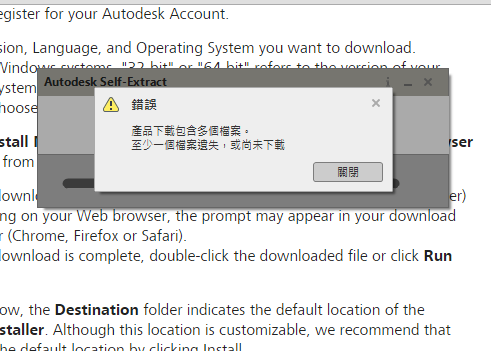
hello,I've used the browser download and the file did be downloaded.

But when I double click the downloaded file ,it told me that there are several files in the downloaded file and I didn't get them.

I don't know how to solve this problem..


like this

擷取.PNG

0 Likes
Message 20 of 25

camilo.lemos
Alumni
Alumni

Hi @Anonymous and welcome to the Autodesk Community!


Please, disable your firewall and anti-virus programs and download the software (all parts) from our Virtual Agent linked here (click on Download Links, choose product and version).


I hope this helps!


Camilo Lemos

0 Likes