Community
- Forums Home
- >
- Subscription, Installation and Licensing Community
- >
- Autodesk Technology Managers
- >
- Re: Anyone try Windows 8 Developer preview?
Autodesk Technology Managers Forum
Share your knowledge, ask questions, and engage with fellow CAD/BIM Managers.
Turn on suggestions
Auto-suggest helps you quickly narrow down your search results by suggesting possible matches as you type.
 This page has been translated for your convenience with an automatic translation service. This is not an official translation and may contain errors and inaccurate translations. Autodesk does not warrant, either expressly or implied, the accuracy, reliability or completeness of the information translated by the machine translation service and will not be liable for damages or losses caused by the trust placed in the translation service.
Translate
This page has been translated for your convenience with an automatic translation service. This is not an official translation and may contain errors and inaccurate translations. Autodesk does not warrant, either expressly or implied, the accuracy, reliability or completeness of the information translated by the machine translation service and will not be liable for damages or losses caused by the trust placed in the translation service.
Translate
Anyone try Windows 8 Developer preview?
67 REPLIES 67
Reply
Topic Options
- Subscribe to RSS Feed
- Mark Topic as New
- Mark Topic as Read
- Float this Topic for Current User
- Bookmark
- Subscribe
- Printer Friendly Page
Message 1 of 68


02-28-2012
05:59 AM
- Mark as New
- Bookmark
- Subscribe
- Mute
- Subscribe to RSS Feed
- Permalink
- Report
02-28-2012
05:59 AM
Anyone try Windows 8 Developer preview?
Or have plans to try the public Beta of Windows 8 to be released soon?
I had greate success with the Win7 beta and wondering if Windows8 will be the same experience.
67 REPLIES 67
Message 2 of 68


02-28-2012
08:19 AM
- Mark as New
- Bookmark
- Subscribe
- Mute
- Subscribe to RSS Feed
- Permalink
- Report
02-28-2012
08:19 AM
i tried to install autocad 2012 on win 8 dev preview
it won't get past the setup screen i can't even click on install products without it crashing
DarrenP
Did you find this post helpful? Feel free to Like this post.
Did your question get successfully answered? Then click on the ACCEPT SOLUTION button.
Message 3 of 68


02-29-2012
02:35 PM
- Mark as New
- Bookmark
- Subscribe
- Mute
- Subscribe to RSS Feed
- Permalink
- Report
02-29-2012
02:35 PM
Gentlemen,
I decided to give it a try today. At first I ran into a lot of the usual suspects. But eventually, I was able to get AutoCAD 2012 up and running on the latest Windows 8 build 8250.
I copied the contents of the AutoCAD disc to the HDD. Then I modified the setup.ini file and removed all instances of DOTNET from the prerequisites. Windows 8 already has .NET 4 preloaded into the OS, so the installer will fail if this step is not done. Once I saved the setup.ini file, I changed the properties of setup.exe to run in Windows 7 Compatibility mode and to Run as Administrator. The installer went on without a hitch.
I launched the product (also Win7 compatibility) and was able to pull a network license from my license manager after my trusty IPv6 technique.
Edit: On a side note, I installed LMTOOLS 11.10 but the licensing for adskflex.exe did not work. I went back down to adskflex.exe 11.7 and it fired off. Seems that the latest 11.9 adskflex.exe has the same connectivity issues on Windows 8 as Server 2008 R2. Stands to reason...
Travis Nave
 Need help in your post? Mention me with @TravisNave
HOT: Named User FAQ | 2025 Download Links | Invalid Serial Number | LiteHTML.DLL error | Reset Autodesk 2020-25 Licensing
My Expert Contributions to the
FLEXnet License Admin | MSI Cleanup Utility | .NET Framework Cleanup Tool | IPv6 NLM Fix | adskflex.opt Options File | Combine .LIC Files
Disk Space | Quickstart Guide for LMTOOLS | Edit setup.ini for 1603 Installation Failure | 1603 Error installing /w Updates | Disable Optimus
Understanding Failures in the Installation .log File | Server Status from Client | Autodesk 2024 System Requirements Fix | Reuse USB Stick
⤽ If my post was helpful, please give Likes and/or mark the Accept as Solution button(s) below. Thank you! ⤵
Message 4 of 68
03-01-2012
05:55 AM
- Mark as New
- Bookmark
- Subscribe
- Mute
- Subscribe to RSS Feed
- Permalink
- Report
03-01-2012
05:55 AM
Thanks for the tips: I will download Win8 CP this evening, install it on my Slate and give it all a good try out.
If anyone else is wondering about Win8, these help a lot:
http://www.theverge.com/2012/2/29/2833006/how-to-install-windows-8-consumer-preview
http://www.computerworld.com/s/article/9224785/Windows_8_What_you_need_to_get_started?taxonomyId=89
Message 5 of 68
03-01-2012
06:10 AM
- Mark as New
- Bookmark
- Subscribe
- Mute
- Subscribe to RSS Feed
- Permalink
- Report
03-01-2012
06:10 AM
the OS is pretty cool
i only wish i had tablet to test this on
DarrenP
Did you find this post helpful? Feel free to Like this post.
Did your question get successfully answered? Then click on the ACCEPT SOLUTION button.
Message 6 of 68
03-01-2012
06:40 AM
- Mark as New
- Bookmark
- Subscribe
- Mute
- Subscribe to RSS Feed
- Permalink
- Report
03-01-2012
06:40 AM
I'm counting on Win8 being a big improvement on a tablet: my Samsung Slate is seriously handicapped by Win7 when it comes to touch-screen use in many areas, all it offers are work-arounds that are not smooth at all.
Message 7 of 68
03-01-2012
10:55 AM
- Mark as New
- Bookmark
- Subscribe
- Mute
- Subscribe to RSS Feed
- Permalink
- Report
03-01-2012
10:55 AM
Agreed. I've only found a few minor complaints so far with this preview release. The missing Start menu had me worried at first until I realized that I never use the Start menu now anyway. Might be an adjustment for my users though. Doesn't seem to be a way to enable it either like in previous beta releases. The other thing I don't like is the missing setting for managing wifi connections. They've even changed it enough that the export wifi to USB no longer works to import previous settings. There's also some difference in how it is resolving DNS because I was having problems with the hosts file and making it recognize changes to the file.
Clearly this OS was designed to be on a tablet or a device that at least has touch screen or pen input. I see no reason to upgrade to Win8 over Win7 unless this functionality is important to you. Also doesn't seem that the app store (currently free) has Angry Birds yet. 
From an IT stand-point, there doesn't seem to be a lot of change on commands, MMC, the run box, and all the other shortcuts and tricks. It's not ready for prime time yet. But AutoCAD works on it. Ha!
Travis Nave
Need help in your post? Mention me with @TravisNave HOT: Named User FAQ | 2025 Download Links | Invalid Serial Number | LiteHTML.DLL error | Reset Autodesk 2020-25 Licensing
My Expert Contributions to the
FLEXnet License Admin | MSI Cleanup Utility | .NET Framework Cleanup Tool | IPv6 NLM Fix | adskflex.opt Options File | Combine .LIC Files
Disk Space | Quickstart Guide for LMTOOLS | Edit setup.ini for 1603 Installation Failure | 1603 Error installing /w Updates | Disable Optimus
Understanding Failures in the Installation .log File | Server Status from Client | Autodesk 2024 System Requirements Fix | Reuse USB Stick
⤽ If my post was helpful, please give Likes and/or mark the Accept as Solution button(s) below. Thank you! ⤵
Message 8 of 68
03-01-2012
10:59 AM
- Mark as New
- Bookmark
- Subscribe
- Mute
- Subscribe to RSS Feed
- Permalink
- Report
03-01-2012
10:59 AM
microsoft also released server 8 consumer preview
that seems to geared towards cloud enviroments
DarrenP
Did you find this post helpful? Feel free to Like this post.
Did your question get successfully answered? Then click on the ACCEPT SOLUTION button.
Message 9 of 68
03-01-2012
11:01 AM
- Mark as New
- Bookmark
- Subscribe
- Mute
- Subscribe to RSS Feed
- Permalink
- Report
03-01-2012
11:01 AM
I am not brave enough to put a beta server on my enterprise. hahaha! It might turn my infrastructure into clouds!
Travis Nave
Need help in your post? Mention me with @TravisNave HOT: Named User FAQ | 2025 Download Links | Invalid Serial Number | LiteHTML.DLL error | Reset Autodesk 2020-25 Licensing
My Expert Contributions to the
FLEXnet License Admin | MSI Cleanup Utility | .NET Framework Cleanup Tool | IPv6 NLM Fix | adskflex.opt Options File | Combine .LIC Files
Disk Space | Quickstart Guide for LMTOOLS | Edit setup.ini for 1603 Installation Failure | 1603 Error installing /w Updates | Disable Optimus
Understanding Failures in the Installation .log File | Server Status from Client | Autodesk 2024 System Requirements Fix | Reuse USB Stick
⤽ If my post was helpful, please give Likes and/or mark the Accept as Solution button(s) below. Thank you! ⤵
Message 10 of 68
03-02-2012
01:07 PM
- Mark as New
- Bookmark
- Subscribe
- Mute
- Subscribe to RSS Feed
- Permalink
- Report
03-02-2012
01:07 PM
Can you send me your file setup.ini of AutoCad 2012 ? I can't install AutoCad because framework .
Message 11 of 68
03-02-2012
01:14 PM
- Mark as New
- Bookmark
- Subscribe
- Mute
- Subscribe to RSS Feed
- Permalink
- Report
03-02-2012
01:14 PM
Open up your setup.ini file and do a search for DOTNET. That will allow you to remove all the prerequisite checks for all the .NET versions. Remove every single one. Then at the bottom section where the DOTNET section begins, delete everything in between the beginning and ending comments. Save the file. Run setup as W7 compatibility mode as Administrator.
Travis Nave
Need help in your post? Mention me with @TravisNave HOT: Named User FAQ | 2025 Download Links | Invalid Serial Number | LiteHTML.DLL error | Reset Autodesk 2020-25 Licensing
My Expert Contributions to the
FLEXnet License Admin | MSI Cleanup Utility | .NET Framework Cleanup Tool | IPv6 NLM Fix | adskflex.opt Options File | Combine .LIC Files
Disk Space | Quickstart Guide for LMTOOLS | Edit setup.ini for 1603 Installation Failure | 1603 Error installing /w Updates | Disable Optimus
Understanding Failures in the Installation .log File | Server Status from Client | Autodesk 2024 System Requirements Fix | Reuse USB Stick
⤽ If my post was helpful, please give Likes and/or mark the Accept as Solution button(s) below. Thank you! ⤵
Message 12 of 68
03-02-2012
01:30 PM
- Mark as New
- Bookmark
- Subscribe
- Mute
- Subscribe to RSS Feed
- Permalink
- Report
03-02-2012
01:30 PM
I was installed without Framework . Thank you so much .
I'm not sure it will erro but now it's work . Will file install be fix in future ? 
Message 13 of 68
03-02-2012
01:39 PM
- Mark as New
- Bookmark
- Subscribe
- Mute
- Subscribe to RSS Feed
- Permalink
- Report

Message 14 of 68
03-02-2012
01:41 PM
- Mark as New
- Bookmark
- Subscribe
- Mute
- Subscribe to RSS Feed
- Permalink
- Report
03-02-2012
01:41 PM
I didn't get that error. Are you running the program now in Windows 7 compatibility mode as Administrator? Try that.
It's unlikely for there to be a compatibility fix for this release in the future. Perhaps AutoCAD 2013 if we're lucky.
Travis Nave
Need help in your post? Mention me with @TravisNave HOT: Named User FAQ | 2025 Download Links | Invalid Serial Number | LiteHTML.DLL error | Reset Autodesk 2020-25 Licensing
My Expert Contributions to the
FLEXnet License Admin | MSI Cleanup Utility | .NET Framework Cleanup Tool | IPv6 NLM Fix | adskflex.opt Options File | Combine .LIC Files
Disk Space | Quickstart Guide for LMTOOLS | Edit setup.ini for 1603 Installation Failure | 1603 Error installing /w Updates | Disable Optimus
Understanding Failures in the Installation .log File | Server Status from Client | Autodesk 2024 System Requirements Fix | Reuse USB Stick
⤽ If my post was helpful, please give Likes and/or mark the Accept as Solution button(s) below. Thank you! ⤵
Message 15 of 68

03-05-2012
08:34 AM
- Mark as New
- Bookmark
- Subscribe
- Mute
- Subscribe to RSS Feed
- Permalink
- Report
03-05-2012
08:34 AM
Travis, what portion of the file am I to erease? Just the GREEN in my screen shot? Thanks, Mark
Everything in existence was first an Idea
Autodesk Plant 3D Premium 2019
Autodesk MEP 2019
HP 3.2 Ghz CPU 16 ram
1TB 7200 rpm SATA 6Gb/s hard drive
2GB DDR3 NVIDIA GeForce GTX 680ti
HP 2311x 23" LED Monitor
Autodesk Plant 3D Premium 2019
Autodesk MEP 2019
HP 3.2 Ghz CPU 16 ram
1TB 7200 rpm SATA 6Gb/s hard drive
2GB DDR3 NVIDIA GeForce GTX 680ti
HP 2311x 23" LED Monitor
Message 16 of 68
03-05-2012
10:17 AM
- Mark as New
- Bookmark
- Subscribe
- Mute
- Subscribe to RSS Feed
- Permalink
- Report
03-05-2012
10:17 AM
Correct. Just F3 it all the way down and remove all the DOTNET references for all products. You will also have to remove the program section for DOTNET at the end of the file too.
Travis Nave
Need help in your post? Mention me with @TravisNave HOT: Named User FAQ | 2025 Download Links | Invalid Serial Number | LiteHTML.DLL error | Reset Autodesk 2020-25 Licensing
My Expert Contributions to the
FLEXnet License Admin | MSI Cleanup Utility | .NET Framework Cleanup Tool | IPv6 NLM Fix | adskflex.opt Options File | Combine .LIC Files
Disk Space | Quickstart Guide for LMTOOLS | Edit setup.ini for 1603 Installation Failure | 1603 Error installing /w Updates | Disable Optimus
Understanding Failures in the Installation .log File | Server Status from Client | Autodesk 2024 System Requirements Fix | Reuse USB Stick
⤽ If my post was helpful, please give Likes and/or mark the Accept as Solution button(s) below. Thank you! ⤵
Message 17 of 68
03-05-2012
10:19 AM
- Mark as New
- Bookmark
- Subscribe
- Mute
- Subscribe to RSS Feed
- Permalink
- Report
03-05-2012
10:19 AM
Here is my modified setup.ini file for vanilla (x64) AutoCAD 2012. You should be able to unzip it and use it on AutoCAD or use it as a reference to modify other Autodesk products.
Travis Nave
Need help in your post? Mention me with @TravisNave HOT: Named User FAQ | 2025 Download Links | Invalid Serial Number | LiteHTML.DLL error | Reset Autodesk 2020-25 Licensing
My Expert Contributions to the
FLEXnet License Admin | MSI Cleanup Utility | .NET Framework Cleanup Tool | IPv6 NLM Fix | adskflex.opt Options File | Combine .LIC Files
Disk Space | Quickstart Guide for LMTOOLS | Edit setup.ini for 1603 Installation Failure | 1603 Error installing /w Updates | Disable Optimus
Understanding Failures in the Installation .log File | Server Status from Client | Autodesk 2024 System Requirements Fix | Reuse USB Stick
⤽ If my post was helpful, please give Likes and/or mark the Accept as Solution button(s) below. Thank you! ⤵
Message 18 of 68
03-05-2012
10:56 AM
- Mark as New
- Bookmark
- Subscribe
- Mute
- Subscribe to RSS Feed
- Permalink
- Report
03-05-2012
10:56 AM
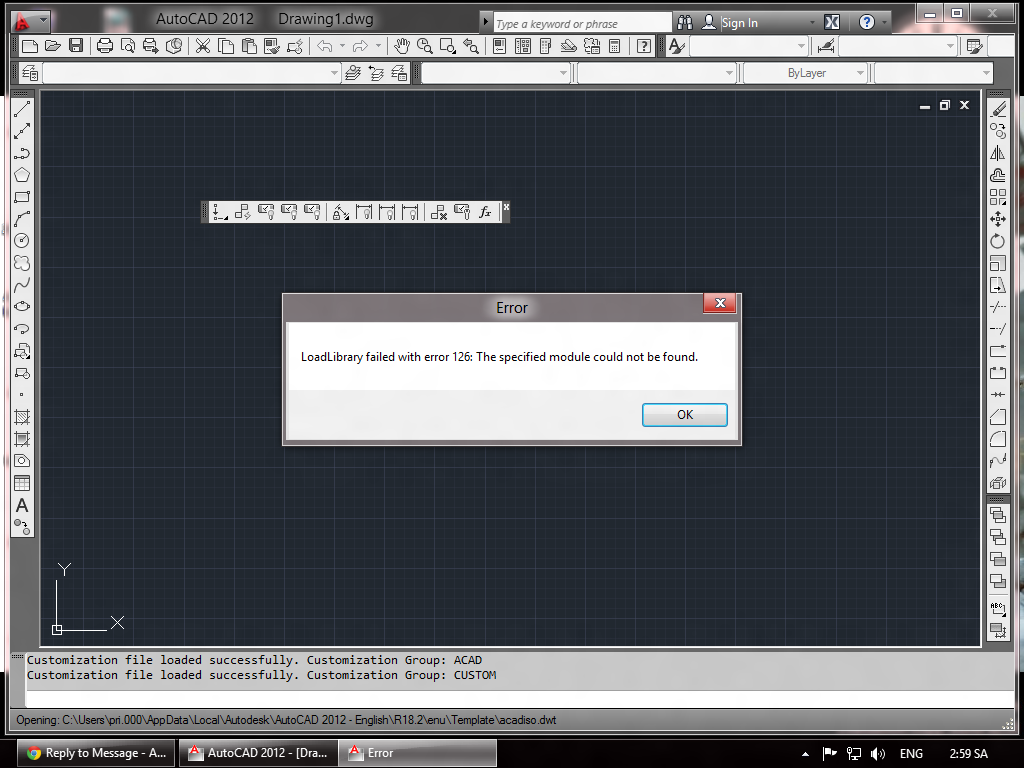
It was intalled but it don't work . "load library failed error 126" . Wait 2013 version ... 
Message 19 of 68
03-05-2012
11:41 AM
- Mark as New
- Bookmark
- Subscribe
- Mute
- Subscribe to RSS Feed
- Permalink
- Report
03-05-2012
11:41 AM
After modifying the .ini file and overwriting the one that is copied to the hard drive, here is my process:
1. Login as a local administrator
2. UAC and antivirus (if installed) is disabled
3. Right-click setup.exe and go to Properties
4. Set Compatibility mode to Windows 7
5. Check to run as Administrator and click OK
Run setup.exe and install as expected (not adding any service packs to the install.) This went on without a hitch for me once it was completed. I used vanilla AutoCAD 2012 from DVD media copied to the hard drive with the modified setup.ini that I provided.
Once installed, I set the file properties of acad.exe to Windows 7 compatibility mode as well. It launched without error. I am using a network licensed copy. I did not test this with stand-alone.
Your Load Library Failed Error 126 error could be due to your graphics card, especially if using an AMD/ATI Radeon card. I am using an nVidia card. You might consider updating your driver if that is an option for you on W8.

Travis Nave
Need help in your post? Mention me with @TravisNave HOT: Named User FAQ | 2025 Download Links | Invalid Serial Number | LiteHTML.DLL error | Reset Autodesk 2020-25 Licensing
My Expert Contributions to the
FLEXnet License Admin | MSI Cleanup Utility | .NET Framework Cleanup Tool | IPv6 NLM Fix | adskflex.opt Options File | Combine .LIC Files
Disk Space | Quickstart Guide for LMTOOLS | Edit setup.ini for 1603 Installation Failure | 1603 Error installing /w Updates | Disable Optimus
Understanding Failures in the Installation .log File | Server Status from Client | Autodesk 2024 System Requirements Fix | Reuse USB Stick
⤽ If my post was helpful, please give Likes and/or mark the Accept as Solution button(s) below. Thank you! ⤵
Message 20 of 68
03-05-2012
12:02 PM
- Mark as New
- Bookmark
- Subscribe
- Mute
- Subscribe to RSS Feed
- Permalink
- Report


Reply
Topic Options
- Subscribe to RSS Feed
- Mark Topic as New
- Mark Topic as Read
- Float this Topic for Current User
- Bookmark
- Subscribe
- Printer Friendly Page
Forums Links
Can't find what you're looking for? Ask the community or share your knowledge.
Post to forums

