Auto-suggest helps you quickly narrow down your search results by suggesting possible matches as you type.
Showing results for
Show only
|
Search instead for
Did you mean:
This page has been translated for your convenience with an automatic translation service. This is not an official translation and may contain errors and inaccurate translations. Autodesk does not warrant, either expressly or implied, the accuracy, reliability or completeness of the information translated by the machine translation service and will not be liable for damages or losses caused by the trust placed in the translation service.Translate
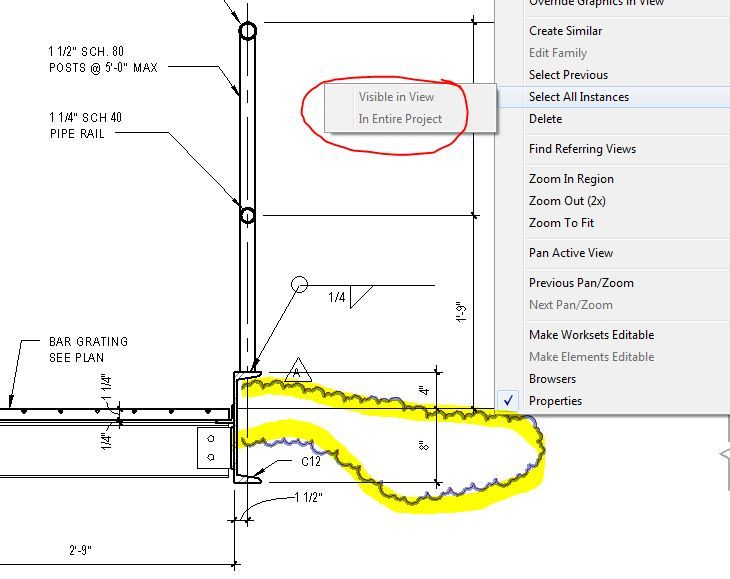
Hard to believe you still can't select all instances of revision clouds. What's up Autodesk? Why, after 4.5 years, still no movement on requests like this? For the amount of money folks pay every year to use this software, it doesn't seem like a lot to ask to address requests like this.
I'm guessing this option is intentionally grayed out because they don't know if you intend to select every revision cloud from every revision, or every revision cloud from the selected revision. This could lead to someone selecting and accidentally deleting all instances of all revision clouds in the entire model. I would think a simple solution would be to just prompt you with a question if you run the command on revision clouds.
Well that shouldn't matter. If I intend to select every revision cloud, either in the view or entire model, I should be able to. I can do it with Add-Ons, which means the functionality is definitely reachable and working as expected. It is just stupid that it cannot be done in standard Revit.
I mean, you can "accidentally" select all Walls and delete them so this is no difference really.
Autodesk is a complete joke how users STILL cannot easily move revision clouds of multiple sheets or in the entire project cannot be moved to another sequence. The entire structure needs to be more fluid and is inexcusable for an issue that is going on seven (7) years [as of 2023, circa 2016] of being recognized as a major hindrance. STOP PAYING FOR POORLY SUPPORTED AUTODESK PRODUCTS.
@samanthad58CLM, it definitely does work that way. It's just that you'd have to activate each individual view is all. Just time consuming is all. Your workaround is the best we have so far, it would just be great to have this idea implemented is all.