- Home
- /
- Architecture, Engineering & Construction
- /
- Revit Products Forums
- /
- Revit Ideas
- /
- be able to reset parameter to NULL
Announcements
Welcome to the Revit Ideas Board! Before posting, please read the helpful tips here. Thank you for your Ideas!
Turn on suggestions
Auto-suggest helps you quickly narrow down your search results by suggesting possible matches as you type.
 This page has been translated for your convenience with an automatic translation service. This is not an official translation and may contain errors and inaccurate translations. Autodesk does not warrant, either expressly or implied, the accuracy, reliability or completeness of the information translated by the machine translation service and will not be liable for damages or losses caused by the trust placed in the translation service.
Translate
This page has been translated for your convenience with an automatic translation service. This is not an official translation and may contain errors and inaccurate translations. Autodesk does not warrant, either expressly or implied, the accuracy, reliability or completeness of the information translated by the machine translation service and will not be liable for damages or losses caused by the trust placed in the translation service.
Translate
Options
- Subscribe to RSS Feed
- Mark as New
- Mark as Read
- Bookmark
- Subscribe
- Printer Friendly Page
- Report
be able to reset parameter to NULL


be able to reset parameter to NULL
If you set a value to a parameter (even Text), there's no way to get it back to "blank", and will therefore not group with other (new) elements properly. This example schedule is being sorted by Level, Type, z Offset, & Comments:
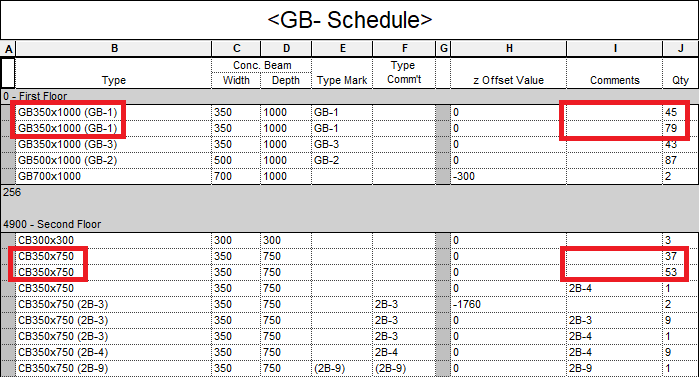
WORKAROUND: In order to get the highlighted elements to display (group) correctly, you need to set the "empty" one to a value, then delete it (since Revit treats an empty string as different than a null value) so that it groups with existing elements that had their Comments field used & cleared. The problem is that you need to MANUALLY do this for ALL new elements from then on...
FYI, the schedule above is being used to do some QC correction (a user had incorrectly used both Type and Element comments instead of the Type Mark parameter).
Related idea & discussion:
Null value needed for dimensional parameters with scheduling capability - to display the null in a schedule as a "-", "---", "n/a", etc. [should make separate idea for casting dimension to a string]
Reset Numeric parameter value back to 'empty' - for an Integer parameter to be blank instead of showing "0" (zero), with steps to reset to null if it's not a built-in parameter?
41 Comments
Forums Links
Can't find what you're looking for? Ask the community or share your knowledge.