cancel
Showing results for 
Show  only  | Search instead for 
Did you mean: 

Editable C3D Tables

Editable C3D Tables

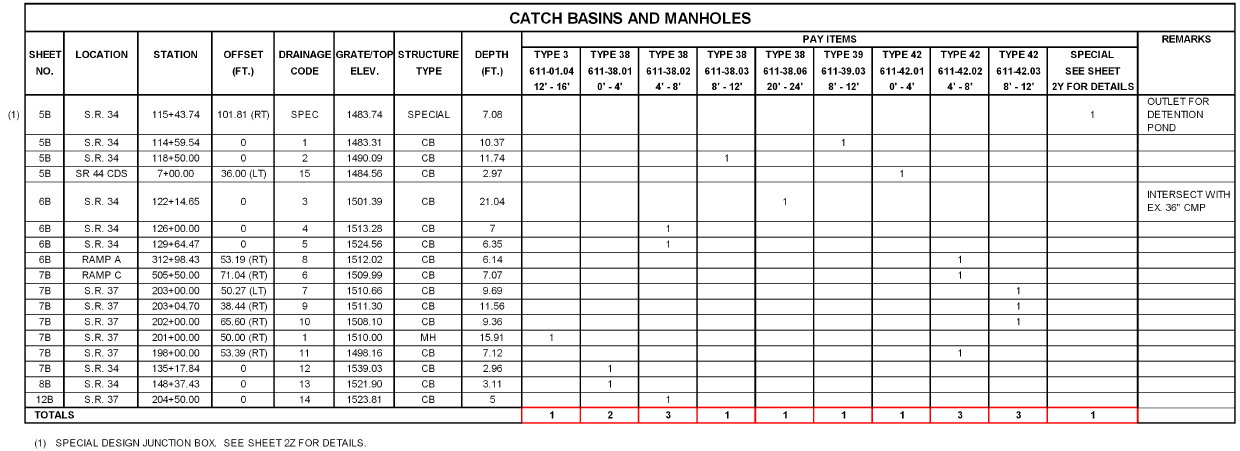
We need the ability to edit a C3D table like an AutoCAD table. For instance, a pipe table cannot be edited to add a user defined column, or create rows for headers that can contain merged cells. Below is what the Tennessee DOT requires for storm pipe and storm structure tables.
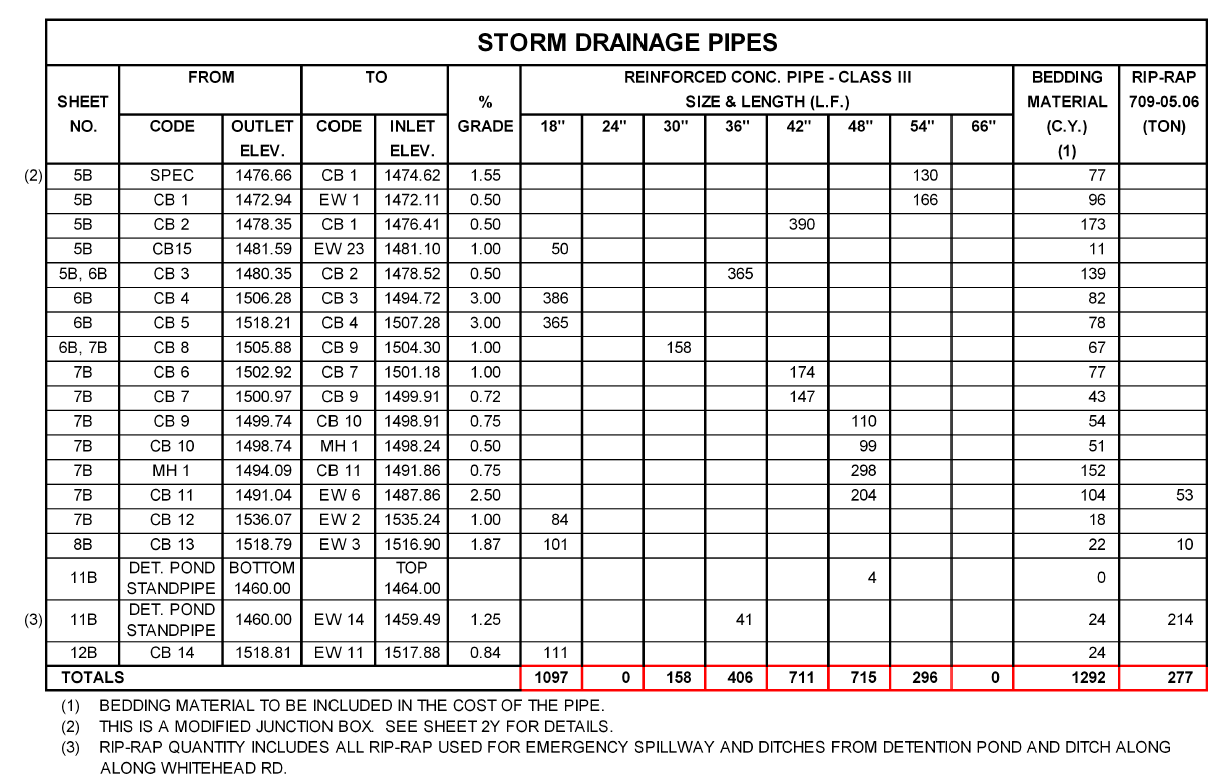
 

Example TDOT Storm Pipe Table


storm_structure_table_example.png


It is impossible to make tables like this currently in C3D that are dynamic and actually read the pipe network data. 


It's also impossible to make a dynamic control point table in C3D that looks like the example below because point objects cannot reference alignments.

control_point_table_example.png


The C3D tables need to be AutoCAD tables that can read the model data. 

111 Comments
Anonymous
Not applicable

Dude. I think you just nailed it on the head there. That makes so much sense to me. I like that idea. That way, if we need to print out calcs; we can export them to excel and print. Same data, no copying pasting and no one re-entering data. Saves time and error!

jmayo-EE
Mentor

I like the workflow Fred.

Anonymous
Not applicable

I just switched from 2007 LDC to 2016 C3D and the table row height is just EATING up my paperspace.  They must fix this issue.  My tables are now HUGE!!  I really hope they fix this very soon.

C_William_Lee
Advocate

I agree.  I would like to add that the padding should be as close as possible from the border of the cell to the edge of the text.  For instance, if you use  a minimum cell height and center justify the text the text ends up with a slight offset from top to bottom.  If the cell contains only a single line of text it is very noticeable.  I think AutoCAD is trying to calculate the text height plus some sort of line spacing.  Cell padding needs to be accurate in order for tables to look right.

Anonymous
Not applicable

There needs to be a setting to fix the row height absolutely, so all the lines lines up no matter what.  This reminds me of the old Carlson way to make a table and then explode it and then completely rearrange everything so that it looks the way I like.  I shouldn't have to do this.  What is the purpose of autmoatic tables that updates if I have to have a second page just to show the huge line table?  I can't believe that, in the wizardwy of C3D, with all the automatic stuff, than row height cannot be set.  This is very disappointing and adds to my list of disappointments.  By the way, I should be able to turn off the title line as well.  I don't need a title that says "Line Table".  It is pretty self explanatory what it is.  Why don't they automatically put a little label next to my bearing and distance labels that says, "line bearing and distance" so that those reading the map know that the bearing and distance is a bearing and distance?  [shaking my head]

hencoop
Advisor

I'm sure Autodesk is working diligently on fixing this problem... It shouldn't take more than another 5-10 years to solve.


I have been able to make the title have unique text for each table... but only because I have a unique Style for each table.


While you are at it, Autodesk, could you include an option to have split tables align automatically with a single title spanning all of the splits? Having to take another step to align them is... well... another step.  And, having a single title on the first of the splits or on all of the splits is not what most designers/drafters would choose to do if they could choose.


Sure, it may not be appropriate for some layouts to automatically realign, but if that is the intent of the designer or drafter it would be nice for them to set it so it happens along with the rest of the dynamic updating.

SkipBurns
Advocate

Up Voted! Ten years ago on my old account I was asking for this 🙂 http://forums.autodesk.com/t5/autocad-civil-3d-general/parcel-tables/m-p/1787997

jmayo-EE
Mentor

I am helping another firm setup some of this and I just to add some notes to this.


They want one dynamic table per sheet in the dwg file for road rehab quantities. They would lke to do it all in acad not in word or excel. The maps are simple plan profile sheets. No soil numbers required, no contours required, all EG & FG grades for CL, left & right flowline are shown in one profile view with layout profiles and bands for the elv's and CL grades. They need one table per sheet with block counts, area calcs from parcels and hatches, cogo point counts, total pipe len, total number of structures.


This cannot be done with C3D tables nor with AutoCAD tables.


They can't have different objects in same C3D table. They can't put C3D objects in an AutCAD table. 


They can't perform math on values in C3D tables.


They can't have points in a C3D table without a unique identifier column which requires masking and maybe a manually drawn border.


Their solution, which I am doing my best to change is to bring all the C3D data into a dwg and explode it so they can use tables, attributes, fields and data extraction...


jmayo-EE
Mentor

...and in case people are wondering why payitems aren't used it's because they just don't want to change, don't want to set up it up (even if it's once), don't want to learn new things.


Autodesk needs an app that makes people change to save $ and not maintain habits to save fustration.


Even if they don't want to change, at least they pay. 🙂

jgarcia121
Enthusiast

It would also be nice to be able to add sums of values on tables.  A lot of times we have tables of points, parcels, etc. and need to tabulate areas, counts, etc on the table for documentation purposes, and we do not have that availability.

Hammer.john.j
Advocate

PLEASE

fix this.

alexey.kurenkov
Advisor

The idea scored more than 200 votes, but there is no answer

durasovartyom
Advisor
AllenJessup
Mentor

@alexey.kurenkov At the top of each page it say Accepted. That means there are plans to add it in a future release. How far in the future can't be said.

alexey.kurenkov
Advisor

You just need to believeSmiley Happy

AllenJessup
Mentor

I do believe that they mean to do it. Now we just have to get past can and will.

Anonymous
Not applicable

The tables, as they exist today (Civil3D 2018), lack a lot of very fundamental options to change/modify the way the tables appear and portray data.


I also find it hard to believe that the line and curve tables cannot carry over expressions.  Most of the labels I use on day to day basis contain expressions, which, then becomes useless or way extra work to get the same data into tables.


Please fix this. 

JOKO_
Enthusiast

I wholeheartedly agree.  I was hoping 2018 would include this capability but was disappointed that it does not.  Much error and time would be saved if this functionality was added.  Please create a solution to this, Autodesk.

htls69
Advocate

How long do we have to wait for this to be completed once it has been accepted???

Cadguru42
Advisor

@htls69


It's been 3 years since I first made this Idea. Nothing has been done that I know of regarding this idea. It's been the #1 Civil 3D Idea for years, yet hasn't happened. 


AutoCAD Architecture has the ability to have schedules that reference their data (even through XREFs!) and edit the tables. Since C3D and Architecture are supposed to be on the same base, AEC, why can't C3D tables act more like a real table? It shouldn't take three years to implement something that another vertical, using the same base, has had for years. 

Can't find what you're looking for? Ask the community or share your knowledge.

Submit Idea