cancel
Showing results for 
Show  only  | Search instead for 
Did you mean: 

Editable C3D Tables

Editable C3D Tables

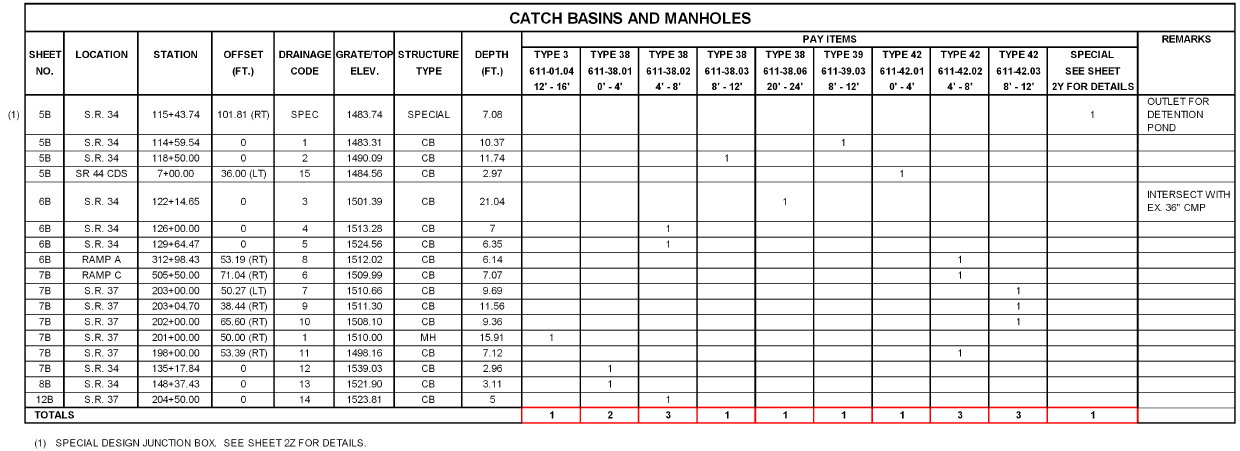
We need the ability to edit a C3D table like an AutoCAD table. For instance, a pipe table cannot be edited to add a user defined column, or create rows for headers that can contain merged cells. Below is what the Tennessee DOT requires for storm pipe and storm structure tables.
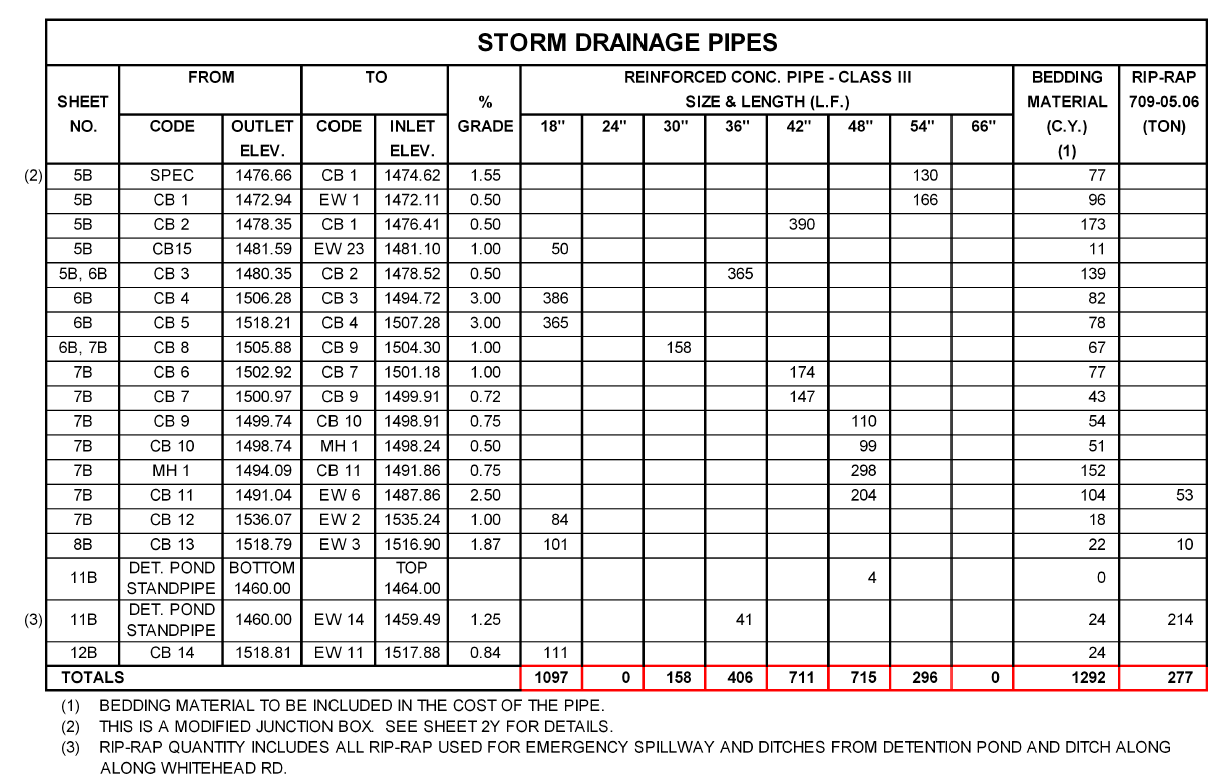
 

Example TDOT Storm Pipe Table


storm_structure_table_example.png


It is impossible to make tables like this currently in C3D that are dynamic and actually read the pipe network data. 


It's also impossible to make a dynamic control point table in C3D that looks like the example below because point objects cannot reference alignments.

control_point_table_example.png


The C3D tables need to be AutoCAD tables that can read the model data. 

111 Comments
Status changed to: Gathering Support

There are a number of ideas already in the system about using Civil 3D objects with AutoCAD tables. If this were to happen, what Excel features would you still be looking for?


Regards,


Peter Funk
Sr Product Manager
Civil 3D
Autodesk, Inc.

Anonymous
Not applicable

Peter how about this, again we use alot of spreadsheets for different calculations and we usually submit those calcs to the reviewing agencies.  Sometimes we pull up a spreadsheet and accidentally grab information out of the wrong dwg.


I am kinda looking at it if there were away to keep the excel data intact with the dwg. It would be nice if it can act like excel and where the user can print out to a PDF. That kinda of thing. Does this make some sense i hope?

AllenJessup
Mentor

I'd like to see the ability to add and subtract Bearings and Distances extracted from linework and Parcels. I'd want them to be Dynamic but also have the ability to freeze the cells or whole tabel at a certain point.

troma
Mentor

I'd like a table that can pull in all pipe data (length, inverts etc.) and perform functions like multiply, divide, sum, subtract.

We need to be easily able to format the result as a percentage or as a number, with control of the display of decimal places.

Also need to arbitrarily set some text to a different style within the table.


Thanks.

fcernst
Mentor

I think a powerful implementation would be as an Add-In for Excel created by Autodesk that can link directly to a selected drawing and brings in all the requested Civil 3D objects' properties for manipulation directly within the Excel GUI.


This would be a two-way communication link for sending the newly calculated property values in Excel back to the Civil 3D objects in the drawing for instantaneous dynamic model updating in Civil 3D.


Excel does best what Excel does.... Then we would have access to ALL of Excel's features, functions and formatting: Solver, Goal Seek, Subtotals, Pivot Table, etc.


We would be able to use all of Excel's table formatting features...and be able to create Graphs in Excel easily from the data.

Anonymous
Not applicable

So am i hearing something similar to a "Data Reference" into Excel from our Civil3D Objects / parts / etc? The user would still need to know what drawing it is tied to, I can see how surfaces / pipe networks / parcels / would greatly be benefical to that setup.

fcernst
Mentor

Right, the Data Reference analogy is good. 


The User would see a tree in Excel of all the Civil 3D objects in the referenced/attached Civil 3D drawing with little toggle check boxes next to each one, and be able to select the items to be brought into Excel.

Anonymous
Not applicable

Just wanna make sure we dont get the users confused with Hydraflow storm sewers, how we can change and update pipe network parts. This would strickly be for getting information out of the drawing into excel. Not excel back into a drawing. Do we need to give other examples on how this could work?


A Surface was initially linked "data referenced" into excel for some basic earthwork stuff. The User closes the drawing. Prints out the excel calc for a submittal. Days later the user goes to revised the surface, then goes to open the previously saved excel document and a box appears ask if it whould update "syncronize" the data. User clicks ok. then checks calcs and prints again to re-submitt.


Something like that possibly.

fcernst
Mentor

..This would strickly be for getting information out of the drawing into excel.


For just getting the data to Excel we just need to have the Civil 3D objects fully exposed to Data Extraction, like only AutoCAD objects really are now.


..make sure we dont get the users confused with Hydraflow storm sewers


If a tech is laying out a pipe network for an engineer to analyze in Storm Sewers, then the first run is no problem. The engineer imports and analyzes in Storm Sewers then exports the changes. After that, if the designer changes the pipe network, the engineer in Storm Sewers would get a message that the nework has changed, "do you accept the changes?"...and so on and so forth..


I have another post requesting we get rid of the cumbersome Import/Export paradigm for Storm Sewers, and just create a direct invisible two-way link between Storm Sewers and the Civil 3D pipe networks. Then we can operate in the Storm Sewers GUI and just press the Save button.

Anonymous
Not applicable

I rememeber seeing that. You did get THUMBS up from me. That was a great idea. Do you think they could do it that or is it to much of a hassel, i wonder.

ceethreedee.com
Collaborator

Using Point Groups

  • Autofill (renumbering points,raw descriptions,user defined fields)
  • User-Defined Fields (Expressions Like (Depth to Subgrade=<Selected Surface Level> - <Point Elevation>)
  • IF statements IFf(Raw Description=BLAH,"This",This"
  • VLOOKUP statements VLOOKUP(<raw description>,"some table",3,false) (amazing!)

Using Volume Surfaces (analysis's)

  • Autofill again (<Elevation> +/- 0.5) for ranges
  • Cumulative Calcs in Volume Tables. Stage Storage etc..
  • Conditional Formatting and IF statements (IF(<Cell>,>100,Red,Blue) etc..

Using Pipe Networks

  • Autofill again!! (renumbering pipe/structure names)!
  • User Defined Fields (Expression Like (Trench Depth = <cover depth> + <Pipe dia> + <bedding_depth>)
  • Assigning Size to Pipes/structures based on standard tables (IF(<flow rate>=XX,600 dia,IF <flow rate>=XX,300 dia,150dia))

I don't know there is so much more you could go on forever..

Anonymous
Not applicable

I hate to ask this. but would you mind showing me a printscreen of a table that has a pipe network to it with some of the above formulas, that you have metioned please? I am having a hard time trying to imagine how to do it. lol. Thanks!

Status changed to: Gathering Support
 
jmayo-EE
Mentor

I think it's better to release the c3d data to autocad fields so we can create a table right in C3D without having to open another program and move data back and forth until the final design is found. Perhaps even get C3D data into Mleaders, dimensions and mtext as well.


ceethreedee.com
Collaborator

Giggity!!! Smiley Happy

Status changed to: Gathering Support

I've changed this to "Duplicate". I think: http://forums.autodesk.com/t5/autocad-civil-3d-ideastation/editable-c3d-tables/idi-p/5573857 should cover this one.


Regards,

Peter Funk
Sr Product Manager
Civil 3D
Autodesk, Inc.

Anonymous
Not applicable

What if we wanted to be able to "sync" / data reference civil 3d objects into external spreadsheets? Would that be something else?

AllenJessup
Mentor

As others have mentioned. If this were accomplished by making C3D object data available in AutoCAD Fields. Then it could be used any where we are used to using fields. If this can be accomplished this way I think it would be optimal.

If you used an AutoCAD Polyline and pretended it was a Civil 3D Alignment, could you do what you wanted using the AutoCAD Table, Data Extraction Wizard and all the linking tools that are in place right now?


Regards,

Peter Funk
Sr Product Manager
Civil 3D
Autodesk, Inc.

fcernst
Mentor

It makes sense to categorize these as duplicate to me.


ExceL:


-Each Table could have a drop down arrow in the upper left corner that would have the option to Export directly to Excel.

     --(This could also be implemented as a context sensitive right-click shortcut menu option when clicking on the Table.)


-Then a dialog box would pop up for Export, and a toggle option to create a dynamic link to Excel would be avaialble to the User.


So the User can choose whether to link the Exported table or not.


Data Extraction is a little cumbersome. A simple direct link option for Tables would be much easier to use.


It would be nice to have the Civil 3D objects exposed to Data Extraction for other needs.

Can't find what you're looking for? Ask the community or share your knowledge.

Submit Idea