cancel
Showing results for 
Show  only  | Search instead for 
Did you mean: 

Editable C3D Tables

Editable C3D Tables

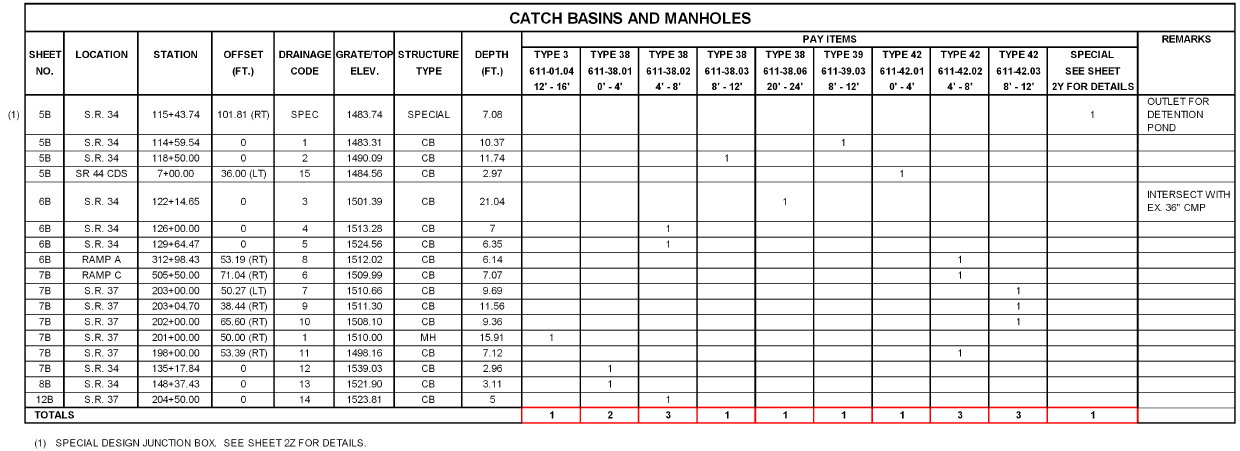
We need the ability to edit a C3D table like an AutoCAD table. For instance, a pipe table cannot be edited to add a user defined column, or create rows for headers that can contain merged cells. Below is what the Tennessee DOT requires for storm pipe and storm structure tables.
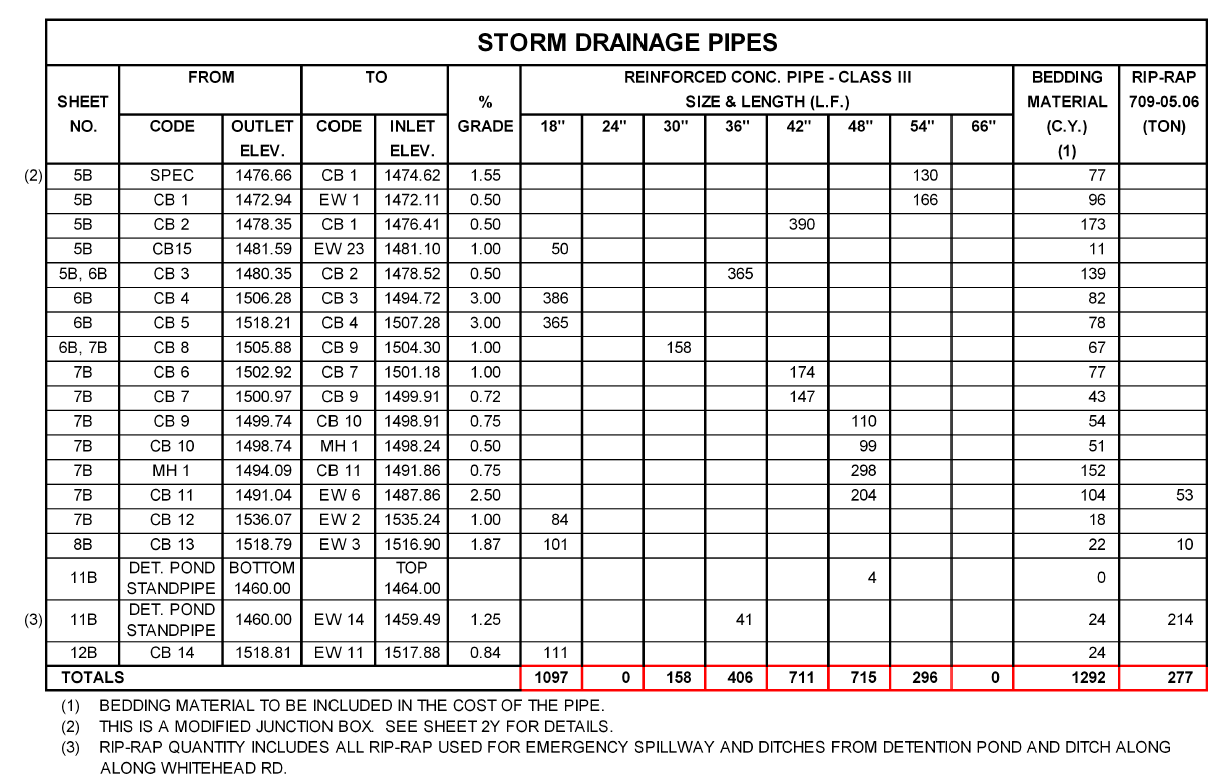
 

Example TDOT Storm Pipe Table


storm_structure_table_example.png


It is impossible to make tables like this currently in C3D that are dynamic and actually read the pipe network data. 


It's also impossible to make a dynamic control point table in C3D that looks like the example below because point objects cannot reference alignments.

control_point_table_example.png


The C3D tables need to be AutoCAD tables that can read the model data. 

111 Comments
troma
Mentor

@TimYarris as I said previously,

"This functionality should be available to all C3D users, built into the program. Not as an extra feature for certain collections."


Making people buy an extra piece of software to fix the first piece of software does not count as "implementing" this idea in my book.

Hammer.john.j
Advocate

by your own definition the implementation is the purchase of a program by others that you modified externally to interact with civil 3d as an "add-in".  In fairness, express tools is the same concept and it is loaded by default as a partial customization file and so project explorer should be the same.  As a deployment manager, why would I deploy civil 3d without this add-in and then therefore why are you putting us in a situation to do that?


I suspect most people agree this isn't implementation, it's a work-around.  "well it's not loaded by default, but as a work-around you can load this 3rd party app we acquired, tweaked, and renamed".

JOKO_
Enthusiast

I installed 2023 and still no sign of the ability to adjsut row height or insert custom information into cells of a dynamic table.  Please "unmark" this as implemented since Project Explorer is not a suitable substitution for the dynamic tables we use on a regular basis.  

hencoop
Advisor

@TimYarris

Sorry, I apparently investigated "Project Navigator" instead of "Project Explorer".  If Autodesk could be consistent in its efforts to be all things to all users perhaps they would have a single focus on "Projects" that encompasses everyone's needs rather than providing completely disparate features with very nearly the same names.


We have 15 licenses for the Architecture Engineering & Construction Collection software and nothing within them is named "Project Explorer".

No Project Explorer.jpg

JOKO_
Enthusiast

I just installed Civil3D 2024.  I still see no ability to adjust row height or edit individual cells on dynamic tables.  Am I missing it?

htls69
Advocate
JOKO_
Enthusiast

Thanks, @htls69, but the video you posted is for autocad tables, not c3d dynamic tables (e.g. alignment segment table or parcel segment table).  Autocad tables can be useful but we are looking for the ability to edit dynamic tables in a similar manner to the standard tables.  

Cadguru42
Advisor

@JOKO_ Autodesk's response to my Idea is to use Project Explorer. PE can make an AutoCAD Table object with C3D data in it, so adjusting some of the basics like row height is possible. However, the table created by PE is not truly dynamic. It's more of a static view and has to be manually refreshed when C3D object data is changed. This also causes any manual adjustments to the table object to be overridden, which defeats the purpose of my Idea in the first place.

Cadguru42
Advisor

So I've run into yet another issue with this same request that Project Explorer doesn't seem to have a way to implement. It looks like PE cannot make a table with Property Set data as columns to another type of table. In my case, I need a COGO point table with Raw Description, Northing, Easting, and a Property Set definition of Depth for the last column. Doesn't seem possible. So, I thought I'd just edit the ACAD table after the initial creation from PE, but then realized the point table has the points sorted by point number. Except, I don't even have Point Number as a column to show. There apparently is no way to sort the point table created by PE by anything other than the Point Number. 

Another useless "feature" added to C3D marked as "Implemented" to an idea when it doesn't really do what the Idea asked for in the first place.

mattCLQ3D
Explorer

2023....A bunch of new half baked features added.... still no way of changing C3D table heights or widths.  

JOKO_
Enthusiast

Downloaded C3D 2026.  Still no joy.

Can't find what you're looking for? Ask the community or share your knowledge.

Submit Idea