- Home
- /
- Architecture, Engineering & Construction
- /
- AutoCAD Electrical Forums
- /
- AutoCAD Electrical Ideas : Latest Ideas
Turn on suggestions
Auto-suggest helps you quickly narrow down your search results by suggesting possible matches as you type.
AutoCAD Electrical Ideas
Share ideas for future product features directly with the AutoCAD Electrical team and collaborate on existing suggestions with your peers.
Options
- Mark all as New
- Mark all as Read
- Float this item to the top
- Subscribe
- Bookmark
- Subscribe to RSS Feed
Idea Statuses
- Gathering Support 785
- Under Review 8
- Future Consideration 204
- Accepted 0
- Implemented 20
- Archived 0
- Future Consideration 12

 manis-h_kumar
on
09-24-2026
10:26 PM
Submitted on
09-24-2026
10:26 PM
Status:
Gathering Support
manis-h_kumar
on
09-24-2026
10:26 PM
Submitted on
09-24-2026
10:26 PM
Status:
Gathering Support
Hi , we have wonderful feature for comparing DWG sheet in our AutoCAD electrical 2024 version .But the problem is we can compare only one sheet at a time , is there any updates or features where we can compare more than one sheet at a time or project file.
Show More
0
Votes
 jajeon9Z3HQ
on
09-01-2026
07:12 PM
Submitted on
09-01-2026
07:12 PM
Status:
Gathering Support
jajeon9Z3HQ
on
09-01-2026
07:12 PM
Submitted on
09-01-2026
07:12 PM
Status:
Gathering Support
Currently, the Special Break feature in AutoCAD Electrical reports provides a very limited set of selectable attributes for each report type. It would be extremely helpful to expand the available field list for Special Breaks so that users can break down and generate report tables in their preferred formats. For example, in a BOM report, users should be able to separate tables using custom fields such as the User1 (USER1) field from default_cat.mdb via Special Break. Additionally, once a Special Break is applied, the "Sort" option becomes disabled. Please enable the "Sort" functionality even when using Special Breaks, so users can arrange the categorized report data in their exact desired sequence (e.g., sorting the categorized BOM report seamlessly after breaking it down).
Show More
0
Votes

 pmccutcheon
on
08-10-2026
12:16 PM
Submitted on
08-10-2026
12:16 PM
Status:
Gathering Support
pmccutcheon
on
08-10-2026
12:16 PM
Submitted on
08-10-2026
12:16 PM
Status:
Gathering Support
I often run the same report over and over again. Typically I spot some error, have to fix the error, then rerun. Prime example is BOM, always some small mistake that needs correcting. I'd like to make the report settings "sticky" where it remembers the last report setup I ran. Example to run Panel BOM, I have to set: Full; Display in Tallied; Named Installation; pick the name; then run it's a bit trite, but after 10 cycles is wearing ?Unless Automatic reports can automate this?
Show More
pmccutcheon
on
07-14-2026
09:18 AM
Submitted on
07-14-2026
09:18 AM
Status:
Gathering Support
#1 We use a lot of multiconductor cables that have numbered conductors - say all conductors are blue for 24V, but are numbered. Our shop guys like to have the conductor numbers in sequential order with the terminals TB12345 - cond 1 TB12346 - cond2 TB22888 - cond3 TB23000 - cond4 etc the problem is the wire numbers don't always come out sequentially on the drawing, you need a way to sort them out. (the "result" attachment shows this) So the terminal block editor will currently display terminal strip in order, and will show the cable conductor - but you cannot edit the cond# in the editor. Would be nice if you could. #2 When editing cable children - there is a "generic" color picker, but might be nice if there was a "next" function. Suppose I am using cables with numbered conductors, and I have just edited cond#2. When I edit the next one, the "next" button would stick in "3". If you are using colored conductors, I suppose you could also step through the colors with "next"
Show More


 egadeeshp
on
07-01-2026
02:49 AM
Submitted on
07-01-2026
02:49 AM
Status:
Gathering Support
egadeeshp
on
07-01-2026
02:49 AM
Submitted on
07-01-2026
02:49 AM
Status:
Gathering Support
Description of the Issue: I have been using AutoCAD Electrical for the past five years. Currently, when publishing a PDF, the software waits until the very end of the plot cycle to check if the destination file is open or locked by another program (like Adobe Acrobat). If a file is accidentally left open, the user has to wait for the entire plot process to finish, only for the export to fail or hang at the last second. Suggested Improvement: Please move this file-availability check to the very beginning of the publishing process. Checking if the target file is open/locked upfront would prevent unnecessary processing and save users a significant amount of time.
Show More

 controlsgirl
on
06-25-2026
10:32 AM
Submitted on
06-25-2026
10:32 AM
Status:
Gathering Support
controlsgirl
on
06-25-2026
10:32 AM
Submitted on
06-25-2026
10:32 AM
Status:
Gathering Support
I love the add rung function. It makes things so fast. However, that only works when you have a ladder defined. I'd love for the wire feature to have a simple click and point function where when you click between two components and it searches both left and right and top and bottom of the point for matching terminals (wire right and wire left or wire bottom and wire top).
Show More
controlsgirl
on
06-19-2026
10:03 PM
Submitted on
06-19-2026
10:03 PM
Status:
Gathering Support
It would be so much faster to start typing the wire type name instead of dealing with the menu.
Show More
controlsgirl
on
06-19-2026
07:23 AM
Submitted on
06-19-2026
07:23 AM
Status:
Gathering Support
Utilize shift+right click similarly to object snap node selection. After initiating the change wire type command, shift+right click provides scrolling list of wire types with most recent at the top. Assign numbers 1-5 to the most recent so they can be selected with the keyboardor quick selection with the keyboard. Process initiate change wire type command (I do with an alias CWT + spacebar). Shift+right-click either scroll to desired wire type or enter 1-5 for one of the most recently used type. Changing wiretypes currently takes way way way too long.
Show More
robert.rossiTXK
It sure would be nice to have the choice to overwrite or append an attout file. Also would be nice to write to excel format. An even better idea would be to be able to simply edit all block attributes in a drawing in an excel type dialog without having to brows to an external file.
Show More
0
Votes
pmccutcheon
on
05-26-2026
11:22 AM
Submitted on
05-26-2026
11:22 AM
Status:
Gathering Support
Would be nice if the "LAST" wire selected was available as an option, or somehow quicker to get at. eg suppose I selected BLUE 18 AWG, but missed a wire and have to come back. Would be nice if that recent choice was readily available. BTW: I never realized before clicking LAYER NAME sorts the list!
Show More
pmccutcheon
on
05-21-2026
06:55 AM
Submitted on
05-21-2026
06:55 AM
Status:
Gathering Support
Would be nice if the signal code table had a few more options for Finding or Filtering signal codes. Suppose I am working in a given cabinet, and all signals within that cabinet start with CAB1 or have CAB1 in the SIGCODE. So if I could filter for CAB1 would be a timesaver. Or have a FIND for CAB1, and be able to search thru the list. (Example2: or if I am looking for 24VDC sources, then be able to filter/sort for "24V") Or limit to a certain sheet. If I am working on sheet 529, perhaps I'd to see only SIGCODEs that originate on 529 (either SRC or DST), so I don't have to pick through the entire list. A bit like the way the parts catalog filter works
Show More
pmccutcheon
on
05-21-2026
06:49 AM
Submitted on
05-21-2026
06:49 AM
Status:
Gathering Support
Would be nice to have a bulk editor for Signal Codes. Suppose you want to change OP1_24V, OP1_0V, OP1_GND etc to OP2_xxx. Yes you can use the export/import from excel currently Would be an extension of the Find/Edit/Replace Component Data command. Currently this command doesn't support SIGCODE
Show More
shart9ADL6
on
05-14-2026
11:12 AM
Submitted on
05-14-2026
11:12 AM
Status:
Gathering Support
It would be nice to have alternating colored rows (Zebra Stripping) on reports. Currently the easiest way of accomplishing this is by exporting and importing it through Excel.
Show More
KRajendranRD4M8
on
05-08-2026
12:54 PM
Submitted on
05-08-2026
12:54 PM
Status:
Gathering Support
Please add a customizable ribbon feature that allows users to select frequently used tools and place the ribbon anywhere on the screen. During critical drawing edits, users often rely on only two or three tools means, so having a user-defined ribbon would reduce the need to repeatedly access the full tool palette, drop down menu etc..” If this feature already exists, please guide us on where to locate it in the application
Show More

0
Votes
pmccutcheon
on
04-10-2026
09:23 AM
Submitted on
04-10-2026
09:23 AM
Status:
Gathering Support
incredible that there is 51 pages of ideas submitted...
Show More
0
Votes
robert.rossiTXK
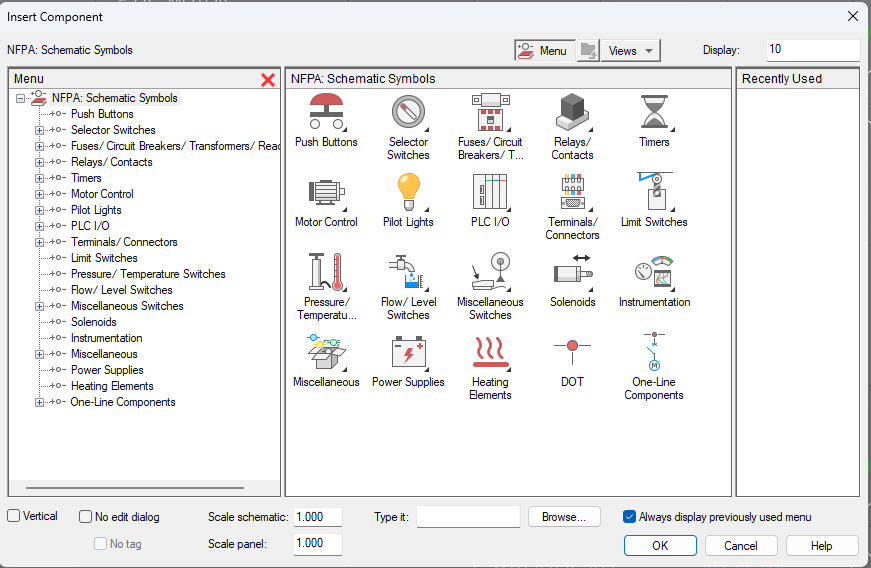
A simple yet very useful feature would be to add a persistent "favorites" pane to the standard Icon component menu. In the course of a day I may insert 5 or 6 unique items from the menu. I know that they get added to the "recent" pane, but it is not persistent, the recent pane is cleared when closing Autocad.
Show More
 rshuja
on
03-05-2026
01:33 AM
Submitted on
03-05-2026
01:33 AM
Status:
Gathering Support
rshuja
on
03-05-2026
01:33 AM
Submitted on
03-05-2026
01:33 AM
Status:
Gathering Support
When I insert a relay contact and try to link it to its parent relay coil, there is no search option available in the selection window. For example, if I want to link the contact to relay number KF980, I must manually scroll through the entire list to find the correct relay. This process is very time-consuming, especially since the relays are not listed in sequential order even after Sort option check. I am facing two main issues, as shown in the attached image: The drawing sheet numbers are not arranged in sequential order. There is no search option in the parent selection window to quickly locate and select the desired relay number, which results in unnecessary delays.
Show More
 amaillardS7EJT
on
01-30-2026
12:36 AM
Submitted on
01-30-2026
12:36 AM
Status:
Gathering Support
amaillardS7EJT
on
01-30-2026
12:36 AM
Submitted on
01-30-2026
12:36 AM
Status:
Gathering Support
Option to specify a quantity in the "API" (main component) edit Unlike in the component edit, where a quantity can be specified, this option is not available in the API edit. Why? When I generate the parts list for my schematic, I am always forced to manually enter the quantity of the main API component. However, this works fine for references in multiple bills of materials.
Show More
robert.rossiTXK
It sure would be nice, (and very 21st century) if we could assign catalog data to components while viewing the missing catalog data report.
Show More
robert.rossiTXK
Love to have the ability to run a command or two on all drawings in a project via the "Project-Wide Utilities". Maybe select from a list of commands like "Zoom All" or enter a command with parameters like "GRIDDISPLAY=2, LIMITS=0,0:36,24"
Show More
Categories
-
API
29 -
Architecture
21 -
Circuit Automation
99 -
Content
75 -
Feature Idea
349 -
Innovation
121 -
Interoperability
45 -
Mobile or Field
4 -
New Standard
29 -
Performance
185 -
Product Updates
1 -
productivity
494 -
Programming
55 -
Project Builder
60 -
Regional Content
13 -
Workflow Improvement
469
- « Previous
- Next »