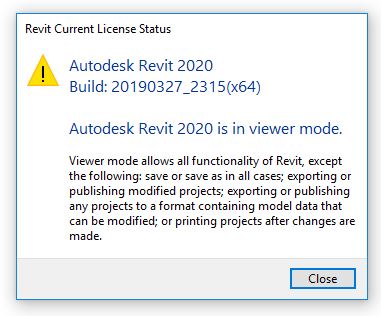
I was asked by the Twitter support team to post it here, so here goes.
I downloaded and installed Revit 2020 today and as every year I am excited to see the new stuff. But the first ting I noticed is that I can not save a project or a family and Revit pops up with a message telling me I'm in Viewer Mode (see attached image). I already tried logging out and back in again and of course rebooted my workstation as well.
Any idea what going on?
Gelöst! Gehe zur Lösung
Gelöst von Viveka_CD. Gehe zur Lösung
Gelöst von huotger. Gehe zur Lösung
Gelöst von Tony_Michniewicz. Gehe zur Lösung
Yep Alfredo was another one that has the issue
It is not immediately clear how your Revit session entered viewer mode. If you can provide log files from the sessions in which this problem occurred, we may be able to narrow down the cause.
Another piece of helpful information would be if you launch a new session of Revit, access the About dialog and click the Manage License button. Do these actions result in the same viewer mode dialog or do you see the traditional License Manager dialog at this point?

The log tells me there is a licence failure (see attached log file) and when trying to get to the licence manager it indeed also gives me the Viewer Mode warning.
So far I get the Viewer Mode every time, but unlike when I intentionally start Revit 2020 in Viewer Mode (with the shortcut automatically created after install) there is no VIEWER MODE text visible in the title bar and I get the same VIEWER MODE message when I try to save anything with both ways of starting Revit.
I'm having the same issue on Revit LT 2020. When I try to manage the license via "About Revit LT 2020", I get the same warning that I'm in viewer mode. The title bar does not show any indication and my license is a subscription one.
I'm having the same issue. Stand alone sign-in type activation with AEC subscription.
good to know that at least I'm not the only one with this issue. Now lets hope we can find a solution.
Someone probably forgot to flip the switch on the main subscription license server...
For those of you that have encountered this issue, do you have a subscription to Revit, AEC Collection, or a design suite?
Also, if others can share their journals from sessions that end up in viewer mode, it will help determine if the underlying problem is the same for everyone.

I have a subscription to Revit LT 2020 and I've attached my latest journal file.
After receiving the Viewer Mode error, I did a clean install of Windows 10, updated it, installed Nvidia drivers and then Revit 2020, with the same results. I am attaching my Info.Center.log which contains many failures and communication errors and this ICommunicationCenterConnector.SubAwareServiceUrl does not contain valid URL.
not sure if this is relevant, but might it be a licensing communication problem.
I have just installed Revit LT on 4/10/19 at 11:15pm MST and it worked correctly upgrading and saving files.
I am attaching the last Journal file I have from the Full Revit 2020. still locked to viewer mode.
Same problem here. Revit 2020 on Subscription and only opens in viewer mode.
Any resolution to this??
I am also having this same issue. I purchased the AEC collection subscription yesterday and have tried saving projects but it is stuck in viewer only mode. Nothing on revit indicates that I am in viewer mode. When installed I was prompted to enter my Autodesk ID and Password. I have tried signing out and back in with my Autodesk ID but that is not working.
Tony, are you still looking for more Journals?
Seriously, we spend thousands of dollars on this software and we can't even use it......? It would be nice if Autodesk could resolve this ASAP!!
Let me know if you need additional journals. I have a subscription to Revit 2020 only.
Honestly not surprised there are licensing issues and given the fact that Autodesk has already issued a license hotfix for 2020 products only goes to prove the point. Has anyone tried to install this license hotfix to see if the viewer mode issue gets resolved? Not sure if the issues are related, just thinking out loud at the moment...
Hybrid Sleep or Hibernate power settings impact on Autodesk 2020 product licensing
Matt Wunch
Revit Subject Matter Expert/sUAS Pilot
Twitter | LinkedIn
AU2017 - Code Blue Dr Revit - How to Resuscitate Corrupt Revit Models
Was this answer helpful? If so, please click the ACCEPT AS SOLUTION or the KUDO button.
Thanks for the advice...... Just tried installing it (although it just runs through a screen that says it is unpacking/installing and never asks for or confirms that it was actually installed).
No change here. Still in Viewer Mode
I installed the hot-fix and still had the viewer issue. I also have sleep mode disabled on my machine.
Sie finden nicht, was Sie suchen? Fragen Sie die Community oder teilen Sie Ihr Wissen mit anderen.