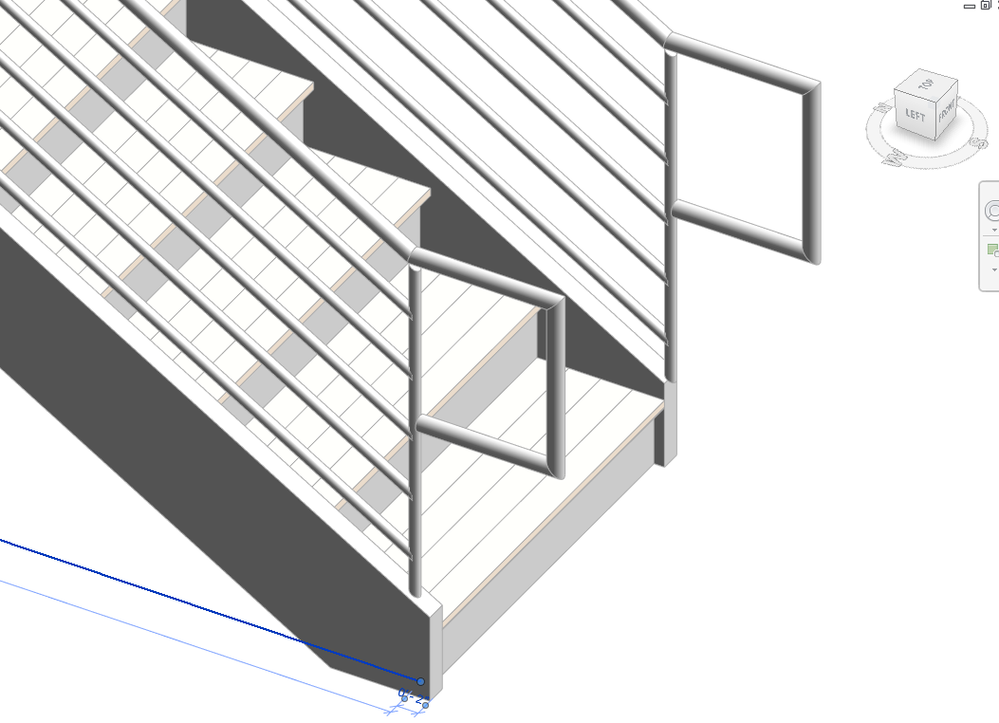
Rail extends past Post

Rail extends past Post

PhilvK
Advisor Advisor
3,686 Views
9 Replies
Message 1 of 10

Rail extends past Post

PhilvK
Advisor
Advisor

As shown below, when I ‘space’ the end post of my rail system back 2” to sit on the stringer, the bottom rail sticks out. Is there a setting that corrects this?

Rail Extends.jpg

0 Likes
Accepted solutions (2)
3,687 Views
9 Replies
Replies (9)
Message 2 of 10

ToanDN
Consultant
Consultant
Accepted solution

Why don't you shorten the railing sketch line instead of moving the baluster?


Capture.PNG

Message 3 of 10

PhilvK
Advisor
Advisor

Thank you. Sometimes the most obvious answer is not apparent to me!


While I have your attention, when I re-sketch the railing, the rail is drawn flat on the ground. When I select ‘Pick New Host’, the stair doesn’t highlight to be selected.. Do you know why not?

0 Likes
Message 4 of 10

Alfredo_Medina
Mentor
Mentor
Accepted solution

Maybe the sketch has moved slightly out of the stair in plan view. Try to move it inwards, and set the host again.


Alfredo Medina _________________________________________________________________ ______
Licensed Architect (Florida) | Freelance Instructor | Profile on Linkedin
Message 5 of 10

PhilvK
Advisor
Advisor

Thank you . I am not sure if that was it, but it seems to be working now. I think there was a little operator error going on here.

0 Likes
Message 6 of 10

srooney
Explorer
Explorer

This solution does not work, as it shortens the calculation point for the upper rail extension, so the the extension is no longer the code distance from the nosing.  Checking the "post" property on the baluster type is supposed to trim the rail to the post, but this does not seem to work either.

Message 7 of 10

ToanDN
Consultant
Consultant

The solution addressed OP query specifically.   If you are not satisfied then create  a new thread to ask for your condition.  By the way, the rrail extension can be lengthen to any dimension you want to meet code.

0 Likes
Message 8 of 10

srooney
Explorer
Explorer
The question was directly pertinent to my problem, so no need to start another thread.

If you shorten the sketch line, and make the rail extension longer to account for this - the extension starts horizontally

at the end of the sketch line, so you will have too much horizontal.

The OP should at least be aware of this.


If this is the only "solution" on the forum, then the actual

solution as usual is for Autodesk to improve the railing tool, instead of us all having to make a work-around,

which is certainly not your problem.


Message 9 of 10

ToanDN
Consultant
Consultant

ToanDN_0-1628625498888.png


0 Likes
Message 10 of 10

TheMattatonAP
Advocate
Advocate

@ToanDN what were your settings to achieve this image? I share @srooney 's concern that pulling the sketch line back introduces inaccuracy in the extension.

dims-wrong.png

0 Likes