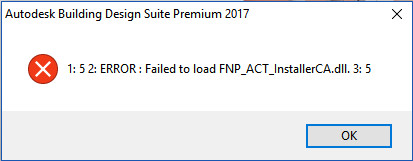
Installation Error: "1: 5 2: Failed to load FNP_ACT_InstallerCA.dll. 3: 5"

Installation Error: "1: 5 2: Failed to load FNP_ACT_InstallerCA.dll. 3: 5"

Anonymous
Not applicable
16,358 Views
15 Replies
Message 1 of 16

Installation Error: "1: 5 2: Failed to load FNP_ACT_InstallerCA.dll. 3: 5"

Anonymous
Not applicable

I have been unable to install any Autodesk products on two different Win 8.1 x64 systems due to the dll-error referenced in the subject. Is this a known issue/is there a fix?


Thanks!

0 Likes
Accepted solutions (1)
16,359 Views
15 Replies
Replies (15)
Message 2 of 16

TravisNave
Mentor
Mentor

Are you disabling anti-virus, UAC, and installing with local admin rights?


Travis Nave Send TravisNave a Private Message                                             Need help in your post? Mention me with @TravisNave


My Expert Contributions to the
Autodesk Forums:
FLEXnet License Admin | MSI Cleanup Utility | .NET Framework Cleanup Tool | IPv6 NLM Fix | adskflex.opt Options File | Combine .LIC Files
0 Likes
Message 3 of 16

Anonymous
Not applicable

Yes on all fronts. I've tried the web-installer and also the full browser download methods.

Thanks!

-Eric

0 Likes
Message 4 of 16

david.lau
Community Manager
Community Manager
Accepted solution

Can you try this:


http://upandready.typepad.com/up_and_ready/2014/01/error-1-5-2-adlmpitsetproductinformation-failed-3...


Can you attach a screen capture?


David Lau
Message 5 of 16

Anonymous
Not applicable

Enabling full permissions to "Everyone" in "C:\ProgramData\Autodesk\Adlm" fixed the issue. Many thanks!!

-Eric

0 Likes
Message 6 of 16

Flexcut
Contributor
Contributor

I have the same problem with Building Suite 2017
Enabling full permissions to "Everyone" in "C:\ProgramData\Autodesk\Adlm" does not work.
What can I do for this problem?
See the screen capture
TKS
Angelo

0 Likes
Message 7 of 16

Flexcut
Contributor
Contributor

this is the log file


Angelo

0 Likes
Message 8 of 16

vv_t
Community Visitor
Community Visitor

Have you finde solution for the problem? The same problem and no solution.

Only pirate portable copy 🙂

0 Likes
Message 9 of 16

Anonymous
Not applicable

Adding full permissions did not work for me either. Any other solutions?


Error message from log file is MSI (s) (9C!FC) [13:50:00:462]: Product: ACAD Private -- 1: 5 2: ERROR : Failed to load FNP_ACT_InstallerCA.dll. 3: 5

0 Likes
Message 10 of 16

Mark.Lancaster
Consultant
Consultant

@Anonymous


Welcome to the Autodesk User's Community..


How are you installing your product?  Can you provide the setup.log file instead?  Make sure to remove any sensitive info like your serial # from the log before you post.

Mark Lancaster


  &  Autodesk Services MarketPlace Provider


Autodesk Inventor Certified Professional & not an Autodesk Employee


Likes is much appreciated if the information I have shared is helpful to you and/or others


Did this resolve your issue? Please accept it "As a Solution" so others may benefit from it.

0 Likes
Message 11 of 16

Anonymous
Not applicable

I'm installing from a web browser download. Although I've tried the online installer as well with the same error message.

  • UAC is disabled
  • Antivirus (Windows Defender) disabled
  • Added full permissions and ownership to C:\ProgramData\Autodesk

log attached.

0 Likes
Message 12 of 16

Mark.Lancaster
Consultant
Consultant

That's not the log I need.  It should have setup in the name


Update:  Also did you review this article and the solution it provides?

Mark Lancaster


  &  Autodesk Services MarketPlace Provider


Autodesk Inventor Certified Professional & not an Autodesk Employee


Likes is much appreciated if the information I have shared is helpful to you and/or others


Did this resolve your issue? Please accept it "As a Solution" so others may benefit from it.

0 Likes
Message 13 of 16

Anonymous
Not applicable

attached setup log

0 Likes
Message 14 of 16

Anonymous
Not applicable

I did review that article. It did not work either.

  1. The only file of that name was in the appdata\local\temp directory which gets overwritten; I did replace it though.
  2. No other location contains that file.

You did receive the correct log file yes?

0 Likes
Message 15 of 16

Anonymous
Not applicable

Any updates or suggestions?

0 Likes
Message 16 of 16

Anonymous
Not applicable

I was able to successfully install. I had to replace the Intel SSD with a Western Digital SSD then reinstall Windows 10 fresh. The first thing I did before any updates or drivers was install Autocad 2017 and it installed successfully.


Bad SSD? not sure, but it certainly suggests that.

0 Likes