Eagle 8.0 first launch fail

Eagle 8.0 first launch fail

Anonymous
Not applicable
14,991 Views
59 Replies
Message 1 of 60

Eagle 8.0 first launch fail

Anonymous
Not applicable

Hi


I download and install Eagle without problems. However, I can not run for the first time the software
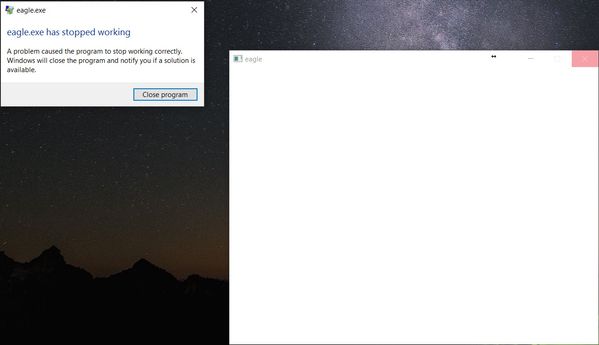
eagle.jpg


Reply
Reply
0 Likes
Accepted solutions (3)
14,992 Views
59 Replies
Replies (59)
Message 41 of 60

Anonymous
Not applicable

Always the same thing even with version 8.0.1Smiley Mad

Reply
Reply
0 Likes
Message 42 of 60

jorge_garcia
Autodesk
Autodesk
Hello Guys,

We have a lead, does anyone have Lavasoft Ad-Aware installed on your machine? If you do can you disable it and try running EAGLE?

Please let me know if this works for anyone.

Best Regards,


Jorge Garcia
​Product Support Specialist for Fusion 360 and EAGLE

Kudos are much appreciated if the information I have shared is helpful to you and/or others.

Did this resolve your issue? Please accept it "As a Solution" so others may benefit from it.
Reply
Reply
0 Likes
Message 43 of 60

jorge_garcia
Autodesk
Autodesk
Accepted solution
Hi Wilmer,

I hope you're doing well. Your crash report indicates that you have Lavasoft Ad-aware on your machine and that it ran into an error when EAGLE started up. Could you disable this software and see if that allows EAGLE to start.

To everyone else, please post crash reports that will help us narrow down the issue.

Best Regards,


Jorge Garcia
​Product Support Specialist for Fusion 360 and EAGLE

Kudos are much appreciated if the information I have shared is helpful to you and/or others.

Did this resolve your issue? Please accept it "As a Solution" so others may benefit from it.
Reply
Reply
0 Likes
Message 44 of 60

Anonymous
Not applicable

Yes, that works.


The program is ad ware web companion, software preinstalled from lenovo that was not working.


Reply
Reply
0 Likes
Message 45 of 60

jorge_garcia
Autodesk
Autodesk
Awesome Wilmer,

Can others on this thread confirm that or deny that this works for them as well. If it doesn't work please post Windows crash reports and we'll look into it.

Best Regards,


Jorge Garcia
​Product Support Specialist for Fusion 360 and EAGLE

Kudos are much appreciated if the information I have shared is helpful to you and/or others.

Did this resolve your issue? Please accept it "As a Solution" so others may benefit from it.
Reply
Reply
0 Likes
Message 46 of 60

jpmandala
Observer
Observer

Hi,


I still have the same issue with 8.0.1. I do not have Lavasoft Ad-aware. My issue seems to be graphics related, but I cannot update the graphics drivers since I am on a laptop running a custom driver for switchable graphics. No previous issues with EAGLE 7.7


Here is my debug.log file output:

[0212/204337:ERROR:gles2_cmd_decoder.cc(12613)] [GroupMarkerNotSet(crbug.com/242999)!:581E7F0700000000]GL ERROR :GL_INVALID_ENUM : glTexStorage2DEXT: <- error from previous GL command


[0214/161341:ERROR:gles2_cmd_decoder.cc(12613)] [GroupMarkerNotSet(crbug.com/242999)!:1867D50700000000]GL ERROR :GL_INVALID_ENUM : glTexStorage2DEXT: <- error from previous GL command


Win7 64-bit Laptop

Switchable Radeon Graphics

Reply
Reply
0 Likes
Message 47 of 60

Anonymous
Not applicable
Accepted solution

I apparently had AdAware web companion installed at some point.  The uninstall left the LavaSoftTcpService64.dll behind.  After following the Option#2 in the first post I was able to open Eagle 8


http://www.lavasoftsupport.com/index.php?/topic/34376-solution-for-lavasofttcpservice-problem-after-...

Reply
Reply
0 Likes
Message 48 of 60

Anonymous
Not applicable

I don't have LavaSoft Adware...

This is my crash log:


Log Name: Application
Source: Application Error
Date: 15/02/2017 10:25:49
Event ID: 1000
Task Category: (100)
Level: Error
Keywords: Classic
User: N/A
Computer: ISSAM-WORK.ont.com.tn
Description:
Faulting application name: eagle.exe, version: 0.0.0.0, time stamp: 0x589b753f
Faulting module name: ig4icd64.dll, version: 8.14.10.1930, time stamp: 0x4aba7134
Exception code: 0xc0000005
Fault offset: 0x00000000002a3cb5
Faulting process ID: 0x332c
Faulting application start time: 0x01d2876d7cf81bc2
Faulting application path: C:\EAGLE 8.0.1\eagle.exe
Faulting module path: C:\WINDOWS\SYSTEM32\ig4icd64.dll
Report ID: 7420d5ad-1e43-4767-b016-05a1b6fedc13
Faulting package full name:
Faulting package-relative application ID:
Event Xml:
<Event xmlns="http://schemas.microsoft.com/win/2004/08/events/event">
<System>
<Provider Name="Application Error" />
<EventID Qualifiers="0">1000</EventID>
<Level>2</Level>
<Task>100</Task>
<Keywords>0x80000000000000</Keywords>
<TimeCreated SystemTime="2017-02-15T09:25:49.163238200Z" />
<EventRecordID>98385</EventRecordID>
<Channel>Application</Channel>
<Computer>ISSAM-WORK.ont.com.tn</Computer>
<Security />
</System>
<EventData>
<Data>eagle.exe</Data>
<Data>0.0.0.0</Data>
<Data>589b753f</Data>
<Data>ig4icd64.dll</Data>
<Data>8.14.10.1930</Data>
<Data>4aba7134</Data>
<Data>c0000005</Data>
<Data>00000000002a3cb5</Data>
<Data>332c</Data>
<Data>01d2876d7cf81bc2</Data>
<Data>C:\EAGLE 8.0.1\eagle.exe</Data>
<Data>C:\WINDOWS\SYSTEM32\ig4icd64.dll</Data>
<Data>7420d5ad-1e43-4767-b016-05a1b6fedc13</Data>
<Data>
</Data>
<Data>
</Data>
</EventData>
</Event>

Reply
Reply
0 Likes
Message 49 of 60

jorge_garcia
Autodesk
Autodesk
Hi jpmandala,

I hope you're doing well. I'm afraid we can't officially support custom graphics driver. With that said we are going to try something to avoid the crash when there is a graphics issue. So hang tight, we are working on it. It's likely that the new modification will work for you as well.


Jorge Garcia
​Product Support Specialist for Fusion 360 and EAGLE

Kudos are much appreciated if the information I have shared is helpful to you and/or others.

Did this resolve your issue? Please accept it "As a Solution" so others may benefit from it.
Reply
Reply
0 Likes
Message 50 of 60

jorge_garcia
Autodesk
Autodesk
Hello issam_isl,

I hope you're doing well. For your issue we need some additional information. Could you please provide the Make and Model of your machine as well as hardware profile (Processor, Graphics Card, RAM etc.)? Your issue also seems to be graphics related but different from those with Radeon cards.

Please reply at your earliest convenience.

Best Regards,


Jorge Garcia
​Product Support Specialist for Fusion 360 and EAGLE

Kudos are much appreciated if the information I have shared is helpful to you and/or others.

Did this resolve your issue? Please accept it "As a Solution" so others may benefit from it.
Reply
Reply
0 Likes
Message 51 of 60

Anonymous
Not applicable
Accepted solution

I was convinced I did not have any Ad-Aware type software on my PC, but after double checking I found out I *did* have Ad-Aware web companion installed! Uninstalling that made Eagle 8 launch properly.

Reply
Reply
0 Likes
Message 52 of 60

jorge_garcia
Autodesk
Autodesk

@Anonymous


Excellent! I'm glad it working for you. Please feel free to post again if there's anything I can do for you.


Best Regards,


Jorge Garcia
​Product Support Specialist for Fusion 360 and EAGLE

Kudos are much appreciated if the information I have shared is helpful to you and/or others.

Did this resolve your issue? Please accept it "As a Solution" so others may benefit from it.
Reply
Reply
0 Likes
Message 53 of 60

alexandru.g
Observer
Observer

Hello guys,

Thank you for the suggestion.

My problem was that at launch, Eagle gave a "can't create directory" error and because of that I could not create a new project.

I found that my antivirus, BitDefender in my case, blocked Eagle in Ransomware Module.

After I added Eagle to safe programs, everything ran smooth.

Reply
Reply
0 Likes
Message 54 of 60

Anonymous
Not applicable

With version 8.0.2 everything is working fine...Smiley Happy

Reply
Reply
0 Likes
Message 55 of 60

jorge_garcia
Autodesk
Autodesk
Hello Issam,

Excellent! Thank you for reporting back. I'm glad everything is working for you.

Let me know if there's anything else I can do for you.

Best Regards,


Jorge Garcia
​Product Support Specialist for Fusion 360 and EAGLE

Kudos are much appreciated if the information I have shared is helpful to you and/or others.

Did this resolve your issue? Please accept it "As a Solution" so others may benefit from it.
Reply
Reply
0 Likes
Message 56 of 60

jpmandala
Observer
Observer

My issue related to graphics appears to be fixed now also with 8.0.2.


Thanks a lot Autodesk for solving this quickly.


Reply
Reply
0 Likes
Message 57 of 60

Anonymous
Not applicable

The same problem is back with version 8.4


system log:


Faulting application name: eagle.exe, version: 0.0.0.0, time stamp: 0x59e4fc69
Faulting module name: unknown, version: 0.0.0.0, time stamp: 0x00000000
Exception code: 0xc0000005
Fault offset: 0x0000000000000000
Faulting process ID: 0x166e8
Faulting application start time: 0x01d34f09828904d6
Faulting application path: C:\EAGLE 8.4.0\eagle.exe
Faulting module path: unknown
Report ID: 26bc1a57-e219-4b1d-a6d0-e0ce29224f45
Faulting package full name:
Faulting package-relative application ID:

Reply
Reply
0 Likes
Message 58 of 60

Anonymous
Not applicable

On my laptop it works fine...the above problem is only on my desktop HP dc7800p.

Reply
Reply
0 Likes
Message 59 of 60

jorge_garcia
Autodesk
Autodesk
Hello @Anonymous,

Please try starting EAGLE using the eagle_SW_OpentGL.bat file that is inside EAGLE's installation directory. The other thing I would encourage you to do is to make sure you have the latest drivers from the manufacturer for your video card.

Please let me know if there's anything else I can do for you.

Best Regards,


Jorge Garcia
​Product Support Specialist for Fusion 360 and EAGLE

Kudos are much appreciated if the information I have shared is helpful to you and/or others.

Did this resolve your issue? Please accept it "As a Solution" so others may benefit from it.
Reply
Reply
0 Likes
Message 60 of 60

Anonymous
Not applicable
Version 8.4 solves this problem !
Reply
Reply
0 Likes

