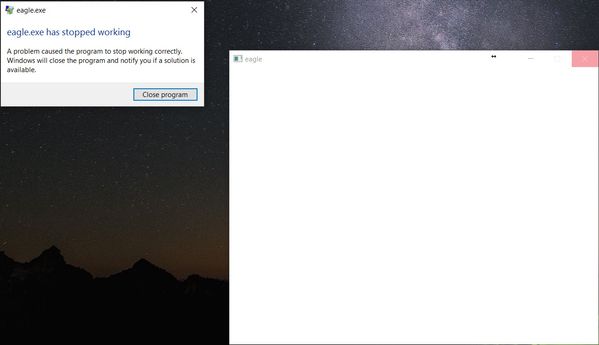
Eagle 8.0 first launch fail

Eagle 8.0 first launch fail

Anonymous
Not applicable
15,014 Views
59 Replies
Message 1 of 60

Eagle 8.0 first launch fail

Anonymous
Not applicable

Hi


I download and install Eagle without problems. However, I can not run for the first time the software

eagle.jpg


Reply
Reply
0 Likes
Accepted solutions (3)
15,015 Views
59 Replies
Replies (59)
Message 2 of 60

Anonymous
Not applicable

note: Windows 10 with other Autodesk software installed....v7.7 is working

Reply
Reply
0 Likes
Message 3 of 60

Anonymous
Not applicable

Me too -- exactly the same problem.  Blank window frame, "Not Responding", have to kill it.

7.7 works fine for me also.

Win10.


Reply
Reply
0 Likes
Message 4 of 60

jorge_garcia
Autodesk
Autodesk
Hi ericwertz and wargo123,

This is unusual, can you guys provide more details about your systems? EAGLE was tested under Win 10 and we didn't have this issue.

I'll have one of our devs check this out.

Best Regards,
Jorge Garcia


Jorge Garcia
​Product Support Specialist for Fusion 360 and EAGLE

Kudos are much appreciated if the information I have shared is helpful to you and/or others.

Did this resolve your issue? Please accept it "As a Solution" so others may benefit from it.
Reply
Reply
0 Likes
Message 5 of 60

Anonymous
Not applicable

my system is:

Lenovo y50 

Intel I7 16gb ram Nvidia 960m

win 10

McAfee antivirus

Autodesk Inventor 2017

Autodesk Recap Pro

Office 2016


if you need any log please let me know.


Reply
Reply
0 Likes
Message 6 of 60

innovatenate
Autodesk Support
Autodesk Support

I just wanted to offer some generic advice in this thread in case it helps. 


Anyone who is experiencing this issue:


Have you tried temporarily disabling anti-virus software?

Another option may be to add a specific exception in the settings for your anti-virus software for eagle.exe.


Instructions would looks something roughly like

1. Type “VirusScan Console” at the Start screen and press “Enter.”

2. Right-click “On-Access Scanner” listed in the left window pane and select “Properties.”

3. Click “All Processes, Detection, Exclusions” and select the “Exclusions” tab.

4. Click the “Add” button, click “Browse” and select the folder or file you want to add as an exception. (%program files%\autodesk\autodesk Eagle X.X\Eagle.exe  - this is a bit of a guess sorry if it is not exact)

5. Click “OK” in the “Add Exclusions Item” dialog box and click “OK” in the “Set Exclusions” prompt.

6. Click “Apply” in the “On-Demand Scan Properties” window and click “OK” to save your settings.


If you are running on Windows another tip may be to right click on the launch icon for Eagle and select Run As Administrator.


I hope this helps! 



Nathan Chandler
Principal Specialist
Reply
Reply
Message 7 of 60

Anonymous
Not applicable

I am having the same issue


Intel i7 4790K

2 x Nvidia GTX 770 

Windows 10
Office 2016

Fusion 360

Avast Antivirus


I have tried the following:

Run Eagle 8 as administrator

Disable antivirus

Disable windows firewall

Running GPU with and without SLI enabled


None of the above steps worked.  The application starts to open, checks internet connection and gives the Stopped Working error when attempting to open the login window


Reply
Reply
0 Likes
Message 8 of 60

Anonymous
Not applicable

no, no working

I remove completely the antivirus

Reinstall

and run as administrator.


Another detail is that my default explorer is not IE or edge. This looks similar to a bug of inventor year ago where it crashes before opening the license menu and it was something with net framework. If you don't find a solution I am willing to give you monitored access to debug this on my laptop.


Reply
Reply
0 Likes
Message 9 of 60

jorge_garcia
Autodesk
Autodesk
Hi wargo123 and others,

Is anyone here behind a corporate firewall that might require the use of a proxy?

Please reply if this is anyone's situation.

Best Regards,


Jorge Garcia
​Product Support Specialist for Fusion 360 and EAGLE

Kudos are much appreciated if the information I have shared is helpful to you and/or others.

Did this resolve your issue? Please accept it "As a Solution" so others may benefit from it.
Reply
Reply
0 Likes
Message 10 of 60

Anonymous
Not applicable
I'm at home and using a standard DSL router. And I don't have any "fancy" letters in my username, so it's not that either.


-e
Reply
Reply
0 Likes
Message 11 of 60

jorge_garcia
Autodesk
Autodesk
Hi Eric,

Did you install EAGLE to it's default location or modify it to program files ( x86)? If you installed it to program files (x86) uninstall and then let EAGLE install to it's default location.

Let me know if there's anything else I can do for you.

Best Regards,


Jorge Garcia
​Product Support Specialist for Fusion 360 and EAGLE

Kudos are much appreciated if the information I have shared is helpful to you and/or others.

Did this resolve your issue? Please accept it "As a Solution" so others may benefit from it.
Reply
Reply
0 Likes
Message 12 of 60

Anonymous
Not applicable

That's the problem.  Apparently not only can it not handle non-ASCII characters, but perhaps not spaces in filenames either.

Ah, I miss the old MS-DOS days...!


thanks,

-eric


Reply
Reply
0 Likes
Message 13 of 60

Anonymous
Not applicable

I'm still having this trouble. Eagle is installed to default 'C:\Eagle 8.0'


I have tried uninstalling and reinstalling it.  Re-downloaded and installed to default.  Uninstalled and installed to 'C:\Eagle8.0' to remove the space.  

Reply
Reply
0 Likes
Message 14 of 60

Anonymous
Not applicable

Me too I installed in C:/Eagle/ and not solution. How do you launch a product that can not be setup in a specific folder?


I am attaching the crash report....

Reply
Reply
0 Likes
Message 15 of 60

Anonymous
Not applicable

I have de same problem in Win10. Message : "Eagle a cessé de fonctionner ....".
Eagle version 7.7 work correctly !


Reply
Reply
0 Likes
Message 16 of 60

jorge_garcia
Autodesk
Autodesk

Hi Wargo, denis and others,


Let's explore a few other possibilities. Is anyone under any IT restrictions? Corporate Firewall or in any other way limited. If you have special characters in your name (accents, apostrophes, etc.) please adjust your account to not have them.


If you are behind a corporate firewall, then you will likely need a proxy in order to use EAGLE. Our next release will have the proxy functionality enabled to solve the issues for those with IT restrictions.


If neither of these scenarios apply please post again and we'll continue to work through them.


Please accept as solution if my post fully resolves or you issue, or reply with additional details if the problem persists.


Best Regards,


Jorge Garcia
​Product Support Specialist for Fusion 360 and EAGLE

Kudos are much appreciated if the information I have shared is helpful to you and/or others.

Did this resolve your issue? Please accept it "As a Solution" so others may benefit from it.
Reply
Reply
Message 17 of 60

Anonymous
Not applicable

I am behind institute proxy. Port 80 and 443 are open.

Waiting for the next build to come.

thanks a lot Jorge

Reply
Reply
0 Likes
Message 18 of 60

Anonymous
Not applicable

I am on a home network.  I can try putting my system in a DMZ later tonight and see if that resolves the issue.

Reply
Reply
0 Likes
Message 19 of 60

Anonymous
Not applicable

MY user is "xxx xxx" with a space between as is a Microsoft account. I am in home network without a corporate firewall. is the space affecting the launch?

Reply
Reply
0 Likes
Message 20 of 60

jorge_garcia
Autodesk
Autodesk
Hi wargo123,

It shouldn't. When you login to EAGLE you are usually entering an e-mail which by definition(correct me if I'm wrong) doesn't have a space in it. If you are entering a user name try entering the e-mail you setup your Autodesk account with.

Does that work?

Best Regards,


Jorge Garcia
​Product Support Specialist for Fusion 360 and EAGLE

Kudos are much appreciated if the information I have shared is helpful to you and/or others.

Did this resolve your issue? Please accept it "As a Solution" so others may benefit from it.
Reply
Reply
0 Likes