Correcting Surface Triangulation

Correcting Surface Triangulation

Anonymous
Not applicable
4,793 Views
2 Replies
Message 1 of 3

Correcting Surface Triangulation

Anonymous
Not applicable

Hello,


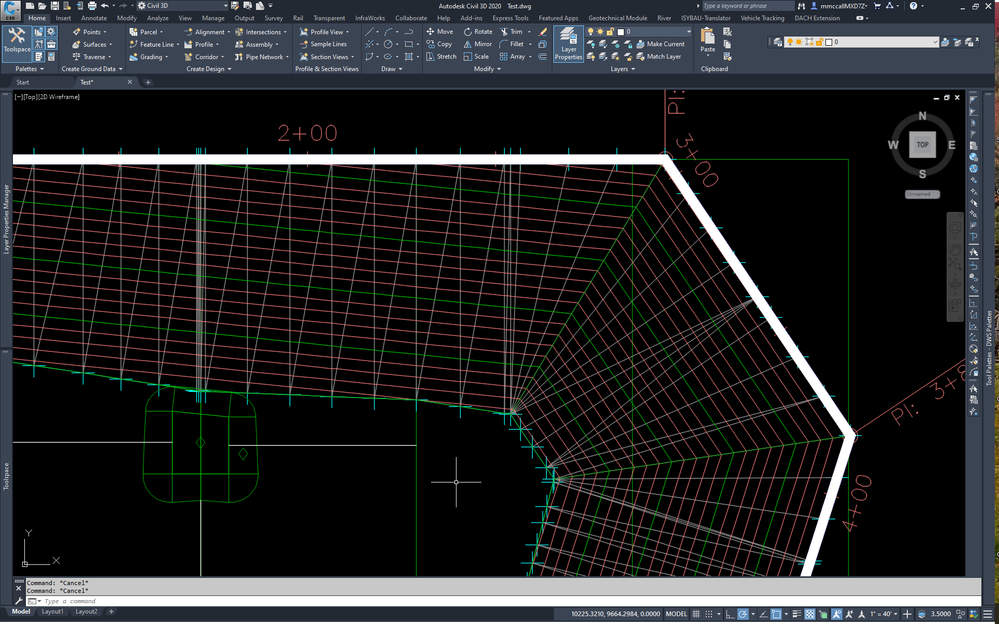
Attached is a DWG file with a couple images showing areas in my surface model that I need to correct the surface triangulation. It appears that there is not very good triangulation in these areas, and it is causing incorrect contours. I understand the concepts of swap edge and add line, but I cannot find a combination of these commands that will fix the triangulation in these areas. Any tips or tricks that I could use to fix the triangulation in this area will be very helpful.


The surface was created using grading objects.


Thanks in advance.

0 Likes
Accepted solutions (1)
4,794 Views
2 Replies
Replies (2)
Message 2 of 3

jeff_rivers
Advisor
Advisor

I get an error when I attempt to view your images, and I'm leery of downloading outside dwgs.  But if you're having trouble editing the triangles, perhaps adding a few more points to your surface will allow you better control of the triangulation in your area of interest.  


Prospector > Surface > Edit > Add Points, and select some points along your tin lines, or triangle faces.  


Jeffrey Rivers
Win 10 Pro 64-bit, Intel i9 3.7GHz, 64 GB
NVIDIA RTX A4000
C3D 2020 V13.2.89.0
0 Likes
Message 3 of 3

MMcCall402
Mentor
Mentor
Accepted solution

I think its a matter of too much data on the Grading Group 1 surface.  Edit that surface to remove the intermediate surface points mid-way up the corner locations.  Then add a line linking the top corners to the bottom.


image.png

Mark Mccall 
CAD Mangler


EESignature


VHB - Engineering, Inc.

0 Likes