- Home
- /
- Architecture, Engineering & Construction
- /
- AutoCAD Forums
- /
- AutoCAD Forum
- /
- Re: cant see objects selcted on autocad while copy
Announcements
Announcement: We’re aware of an issue affecting starting a new topic from category pages and creating new blog posts. New topics can still be started directly from the relevant board. Learn more here.
cant see objects selcted on autocad while copy
Options
- Subscribe to RSS Feed
- Mark Topic as New
- Mark Topic as Read
- Float this Topic for Current User
- Bookmark
- Subscribe
- Mute
- Printer Friendly Page
cant see objects selcted on autocad while copy

Not applicable
4,255 Views
20 Replies


4,256 Views
20 Replies
Replies (20)


Message 3 of 21
- Mark as New
- Bookmark
- Subscribe
- Mute
- Subscribe to RSS Feed
- Permalink
- Report
didn't work

Message 5 of 21
- Mark as New
- Bookmark
- Subscribe
- Mute
- Subscribe to RSS Feed
- Permalink
- Report
i cant write 2


Message 7 of 21
- Mark as New
- Bookmark
- Subscribe
- Mute
- Subscribe to RSS Feed
- Permalink
- Report
when i select the objects on copy its doesnt show the highlight
Message 8 of 21
- Mark as New
- Bookmark
- Subscribe
- Mute
- Subscribe to RSS Feed
- Permalink
- Report
But what I can't believe 🤔
Plrase show Scrrenshot of whole program window after type in
Command: DRAGMODE
Sebastian
Message 9 of 21
- Mark as New
- Bookmark
- Subscribe
- Mute
- Subscribe to RSS Feed
- Permalink
- Report
so what is the right commned?
Message 10 of 21
- Mark as New
- Bookmark
- Subscribe
- Mute
- Subscribe to RSS Feed
- Permalink
- Report
here
Message 11 of 21
- Mark as New
- Bookmark
- Subscribe
- Mute
- Subscribe to RSS Feed
- Permalink
- Report
In you other post you were told to set HIGHLIGHT to 0. Set it back to 1 and set SELECTIONEFFECT to 1 also.
Message 12 of 21


- Mark as New
- Bookmark
- Subscribe
- Mute
- Subscribe to RSS Feed
- Permalink
- Report
Who messed with your Autocad?
Try all of these:
PICKDRAG
DRAGMODE
PICKFIRST
HIGHLIGHT
and see how they were made to work.
Message 13 of 21
- Mark as New
- Bookmark
- Subscribe
- Mute
- Subscribe to RSS Feed
- Permalink
- Report
didn't work 😞
Message 14 of 21
- Mark as New
- Bookmark
- Subscribe
- Mute
- Subscribe to RSS Feed
- Permalink
- Report
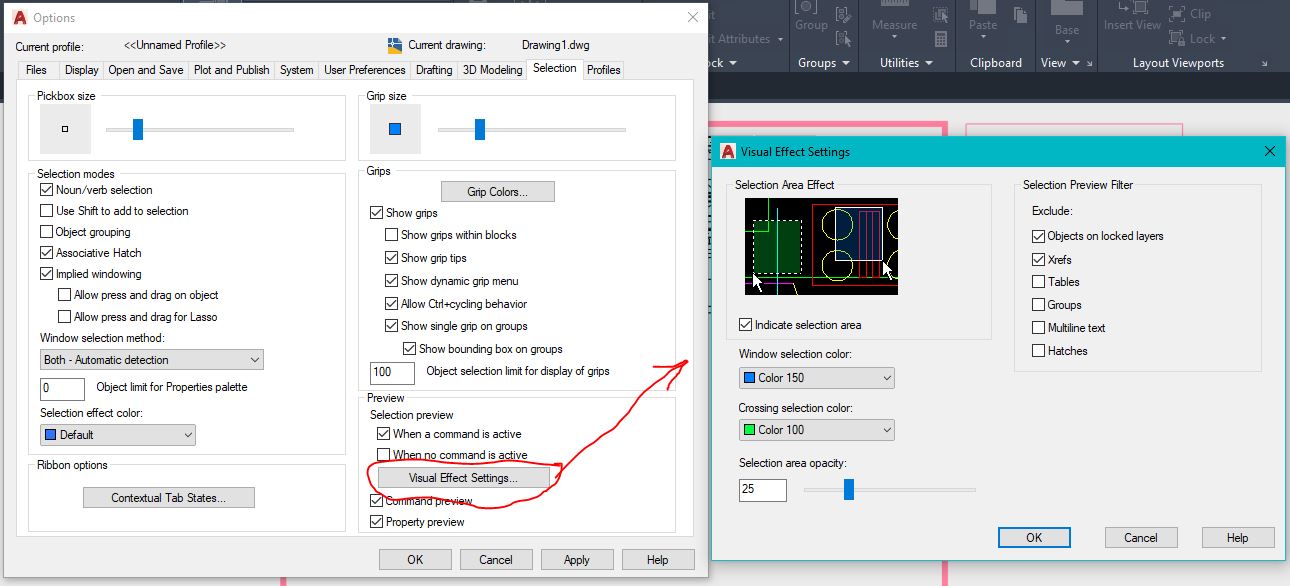
Are you saying you don't have the "selection preview"?
If that's the case, click the "Big Red A" and select options, then go to the "Selection" tab, and check all of the options you want to use. It may take some experimentation to get what you want and turn off what you don't.....see attached for example.
Hope this helps, if not, can you be more specific?
Message 16 of 21
- Mark as New
- Bookmark
- Subscribe
- Mute
- Subscribe to RSS Feed
- Permalink
- Report
well i tried every one of them and it didnt work
Message 17 of 21
- Mark as New
- Bookmark
- Subscribe
- Mute
- Subscribe to RSS Feed
- Permalink
- Report
AUTO means 2, so use AUTO
but it is set on AUTO.
So dragmode isn't the problem.
Important: Please run all test with simple objects only!
LINE or CIRCLE, nothing else.
Sebastian
Message 18 of 21
- Mark as New
- Bookmark
- Subscribe
- Mute
- Subscribe to RSS Feed
- Permalink
- Report
Command: GRAPHICSCONFIG
turn on hardware acceleration OFF
try it
turn on hardware acceleration OFF
try it
-
I see it is a student version, so you are a new user?
then i have one question: Start MOVE command,
acad ask for object selection, do it
confirm/end th eobject selection,
acad ask for 1. Point...
type in: _NONE<enter>
then click with your cursor near to the object you want to move.
Still a problem?
Sebastian
Message 19 of 21
- Mark as New
- Bookmark
- Subscribe
- Mute
- Subscribe to RSS Feed
- Permalink
- Report
this is a student virison and i have this progrem for about 8 months
i tried everything listed here
it stop to show the highlight when i fixed the dotted line problem
so its new
Message 20 of 21
- Mark as New
- Bookmark
- Subscribe
- Mute
- Subscribe to RSS Feed
- Permalink
- Report
@Anonymous wrote:
it stop to show the highlight when i fixed the dotted line problem
so its new
Well then the solution should be pretty easy, UNDO whatever you did when you "fixed the dotted line problem"
If you still can't get it, then PLEASE ...... download and install SCREENCAST and make a screencast so we can SEE the problem and what values all of the relevant SYSTEM VARIABLES are set to. Help us to help you.