Bluebeam plugin not working

Bluebeam plugin not working

Anonymous
Not applicable
29,730 Views
17 Replies
Message 1 of 18

Bluebeam plugin not working

Anonymous
Not applicable

Hello, 


I'm posting on behalf of a client. Our client uses bluebeam Revu 2019 and AutoCAD 2020. Bluebeam plugin to create pdfs is enabled in Bluebeam Administrator. It was being used to create 3d pdfs from AutoCAD. The user tries to use the plugin but gets an error in AutoCAD. I have tried disabling/enabling the bluebeam plugin following instructions here. 


https://support.bluebeam.com/articles/ive-installed-a-new-version-of-cad-software-how-do-i-get-the-l...


Please see screenshot for the error. Any suggestions on how to solve this are greatly appreciated. 


Thank you again.

0 Likes
Accepted solutions (1)
29,731 Views
17 Replies
Replies (17)
Message 2 of 18

Anonymous
Not applicable

did you contact bluebeam support?

not really an Autodesk issue

0 Likes
Message 3 of 18

Alfred.NESWADBA
Consultant
Consultant

Hi,


seems the menu is loaded, but not the plugin itself, otherwise it would not state "unknown command".

(or "BSIPDF" is not a valid command inside this plugin)


- alfred -

------------------------------------------------------------------------------------
Alfred NESWADBA
ISH-Solutions GmbH / Ingenieur Studio HOLLAUS
www.ish-solutions.at ... blog.ish-solutions.at ... LinkedIn ... CDay 2026
------------------------------------------------------------------------------------

(not an Autodesk consultant)
0 Likes
Message 4 of 18

pendean
Community Legend
Community Legend
0 Likes
Message 5 of 18

JeffryWEdwards
Explorer
Explorer
Accepted solution

I did not see a resolution to this and I just had a similar issue. This was caused, for me, due to some administrative setting restrictions of the BlueBeam plug-in install folder. I was able to get in touch with an administrator, of my company computer, to make sure that the folder the plug-in had the proper permissions. If you are the admin on your computer, then try to run BlueBeam in Administrator Mode and see if this helps. Maybe that can help you narrow down how to fix this for you. See my image of the prompt that led me to this discovery. 

0 Likes
Message 6 of 18

CptnCaveman
Contributor
Contributor

Any update on this. Tried latest release of ReVu 20 and MEP 2022.. still get same error. Already checked folder permissions. Still can't get the ReVu add-in to work!

0 Likes
Message 7 of 18

Ed__Jobe
Mentor
Mentor

What error are you getting? There are two mentioned in this thread. Did you try contacting Bluebeam support as mentioned? They respond fairly quickly.

Ed


Did you find this post helpful? Feel free to Like this post.
Did your question get successfully answered? Then click on the ACCEPT SOLUTION button.
How to post your code.

EESignature

0 Likes
Message 8 of 18

pendean
Community Legend
Community Legend
@Anonymous Contact BlueBeam Support https://support.bluebeam.com/

0 Likes
Message 9 of 18

CptnCaveman
Contributor
Contributor

The original ticket is for Bluebeam plugin not working in AutoCAD products. This still seems to be the same issue with ReVu 20 with Autodesk 2022 products. Yes, I have reached out to support on this. I was checking here if anyone had any updates. Thanks for the response though.

0 Likes
Message 10 of 18

Basam.Yousif
Advisor
Advisor

Was this ever resolved?

I just saw a client experiencing this, and escalated to BB support. I will post the solution when I get it.

0 Likes
Message 11 of 18

CptnCaveman
Contributor
Contributor

This was not resolved. Only suggestion was removing all software & reinstall then update to latest version. We have since moved onto other PDF solutions. If a fix does come out at some point, then we will revisit this. Good luck!

0 Likes
Message 12 of 18

Ed__Jobe
Mentor
Mentor

What error are  you getting? Is it that the menu can't find "BSIPDF"?

As @ mentioned, only the menu is loaded. The plugin itself is not. Go to Bluebeam Administrator>Plugins tab, and make sure that the app is registered with AutoCAD.

Ed


Did you find this post helpful? Feel free to Like this post.
Did your question get successfully answered? Then click on the ACCEPT SOLUTION button.
How to post your code.

EESignature

Message 13 of 18

drumroll3
Community Visitor
Community Visitor

I have found out that Bluebeam States this.

You must have a Core or Complete plan for Revu 21 (or a CAD or eXtreme edition license for Revu 20 and below) to use the AutoCAD, Navisworks, Revit, SketchUp and SolidWorks plugins.

0 Likes
Message 14 of 18

makourani
Participant
Participant

Just check the civil3d/CAD link in the administrator of the bluebeam (see screenshot)

makourani_0-1717588896249.png


Message 15 of 18

pendean
Community Legend
Community Legend

pendean_0-1717592133132.png


0 Likes
Message 16 of 18

lczuczuk
Community Visitor
Community Visitor
Reload plug-in thru Bluebeam administrator worked for me.
Message 17 of 18

servicedeskDG3F5
Explorer
Explorer
This also worked for me. Disable, Apply, restart AutoCAD, close, Re-enable plugin, Apply, then open AutoCAD again. Should be solved after that
0 Likes
Message 18 of 18

SI_Derrick_V
Observer
Observer

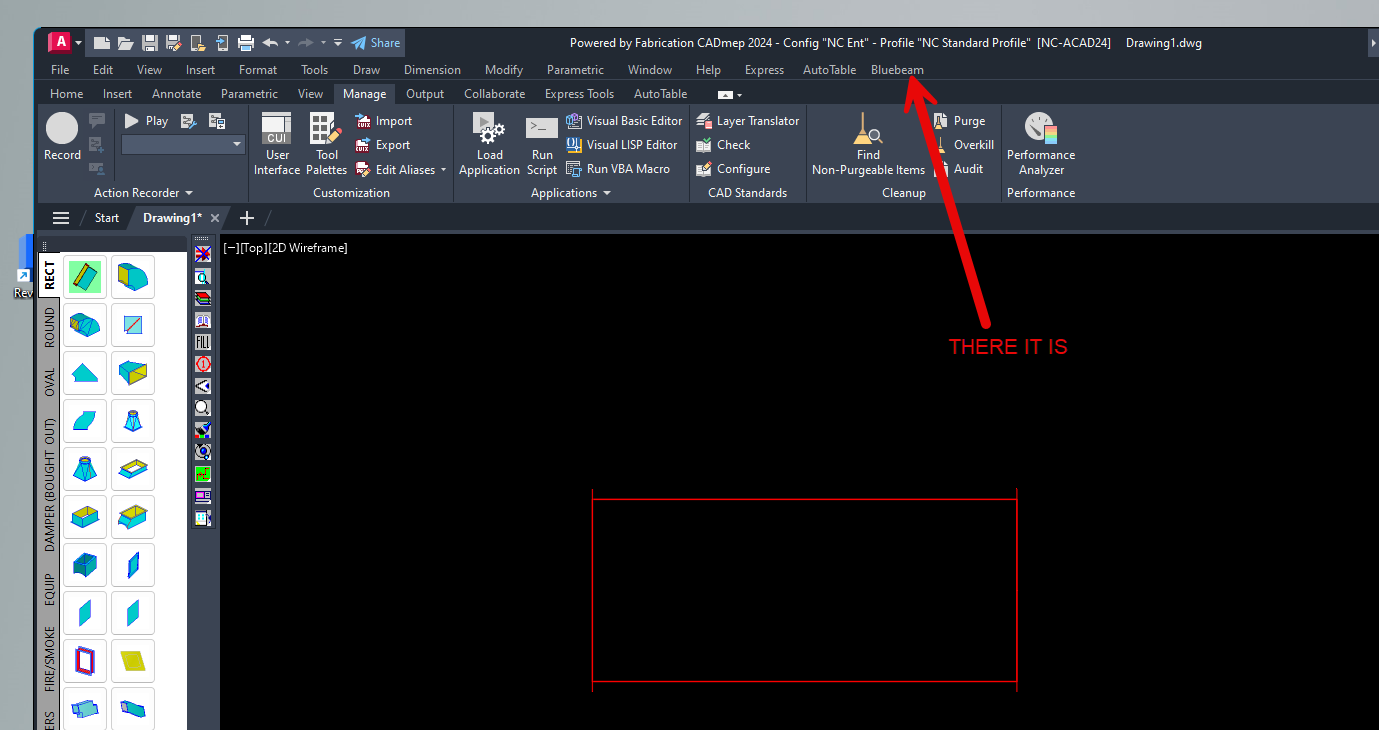
I also had to enable the "menu bar" on top of the screen "customize quick access toolbar" pull down. 

SI_Derrick_V_0-1750866046316.png

SI_Derrick_V_1-1750866066463.png


0 Likes