Base command in Autocad

Base command in Autocad

mariustipa
Advocate Advocate
1,600 Views
16 Replies
Message 1 of 17

Base command in Autocad

mariustipa
Advocate
Advocate

Hi

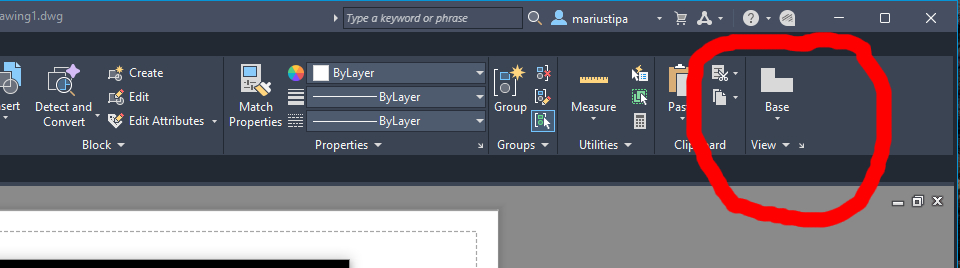
The base command in Autocad is not working since 2023 version. Base from Model Space or Base from Inventor ... is doying nothing.

Also there is a loop in installing something when launch Base command but I got no clue what.

Any ideea please?

0 Likes
Accepted solutions (1)
1,601 Views
16 Replies
Replies (16)
Message 2 of 17

j.palmeL29YX
Mentor
Mentor

What command are you talking about? Do you mean the command VIEWBASE? 

Jürgen Palme
Did you find this post helpful? Feel free to Like this post.
Did your question get successfully answered? Then click on the ACCEPT SOLUTION button.

EESignature

0 Likes
Message 3 of 17

imadHabash
Mentor
Mentor

Hi,

Just to remind that you should have a Solid object while using this command.

You may find some help HERE.


Imad Habash

EESignature

Message 4 of 17

mariustipa
Advocate
Advocate

This is the command - see attach

0 Likes
Message 5 of 17

mariustipa
Advocate
Advocate

The Inventor plugin INVINTEROP_2026.exe can't be installed. It takes me into a continuous loop. 

It is amazing how they make this software really a garbage.

See attach please.

0 Likes
Message 6 of 17

paullimapa
Mentor
Mentor

May want to post that inventor error in the inventor forum and get better feedback 


Paul Li
IT Specialist
@The Office
Apps & Publications | Video Demos
0 Likes
Message 7 of 17

paullimapa
Mentor
Mentor

Questions 

1) What AutoCAD version are you running now?

2) Do you have the latest updates installed?

Enter About command do a screenshot and share it here

3) Does the problem occur on all dwgs or a specific dwg?

Can you share a sample dwg file?


Paul Li
IT Specialist
@The Office
Apps & Publications | Video Demos
0 Likes
Message 8 of 17

pendean
Community Legend
Community Legend

@mariustipa Please share your actual DWG file (and Inventor file) here when you get a chance: it's not called BASE command so your title needs to be changed to BASE VIEWS if you want to attract the correct assistance. Which option did you select?

pendean_0-1756905364601.png


Did you restart your PC and ensure your login is at the local ADMIN level or higher? That's needed to resolve your installation issue.

Message 9 of 17

CGBenner
Community Manager
Community Manager

@mariustipa 

You image is showing that the software needs for your system to restart in order to complete the installation.  Have you allowed the restart to happen?  If so, does the error persist?

Did you find a post helpful? Then feel free to give likes to these posts!
Did your question get successfully answered? Then just click on the 'Accept solution' button.  Thanks and Enjoy!


Chris Benner

Community Manager - NAMER / D&M


Message 10 of 17

mariustipa
Advocate
Advocate

From Model Space.

0 Likes
Message 11 of 17

mariustipa
Advocate
Advocate
Accepted solution

Brief:

Thank you all!

Indeed the Inventor Plugin needed to be install. Then one need to change Registry by deleting the AutoUpdate Key here:

HKEY_LOCAL_MACHINE\SOFTWARE\Microsoft\Windows\CurrentVersion\WindowsUpdate\AutoUpdate

Step 2:

Install Inventor Interoperability from here:
https://manage.autodesk.com/products/updates
Step 3:

Mandatory Restart.


0 Likes
Message 12 of 17

mariustipa
Advocate
Advocate

Yes it takes me into a restart loop. I have explained all at the end - last post.

0 Likes
Message 13 of 17

mariustipa
Advocate
Advocate

Actually it is called BASE from the menu.

0 Likes
Message 14 of 17

mariustipa
Advocate
Advocate

The Inventor Interoperability 2026.exe is just a plugin inside Autocad and it allows to make projections and sections. This is not about Inventor itself.

0 Likes
Message 15 of 17

mariustipa
Advocate
Advocate

Of course! I did not said the contrary. But the plugin is needed for Base Command inside Autocad.

0 Likes
Message 16 of 17

mariustipa
Advocate
Advocate

The restart option leads you into a loop. To solve this the Registry needed to be edited by this path:
HKEY_LOCAL_MACHINE\SOFTWARE\Microsoft\Windows\CurrentVersion\WindowsUpdate\AutoUpdate

0 Likes
Message 17 of 17

j.palmeL29YX
Mentor
Mentor

For using the viewbase command properly AFAIK it is not necessary to install any plug in nor to change settings in the registry. After a standard installation of AutoCAD the command should work well (assuming there are 3DSolid objects i your current drawing).

 Perhaps you should reset all AutoCAD settings to default or perform a clean uninstall and new installation of AutoCAD. 


Jürgen Palme
Did you find this post helpful? Feel free to Like this post.
Did your question get successfully answered? Then click on the ACCEPT SOLUTION button.

EESignature

0 Likes