max 2016: Objects not visible in layer manager...

max 2016: Objects not visible in layer manager...

jens.diemer
Collaborator Collaborator
49,640 Views
93 Replies
Message 1 of 94

max 2016: Objects not visible in layer manager...

jens.diemer
Collaborator
Collaborator

I have some scene files, with objects that aren't visible in layer manager:


bug1.pngbug2.pngbug3.png

Jens

------------------------------------------------------------------------------------------------------------------
https://github.com/jedie/3dsmax_bugs | https://github.com/jedie/3dsmax_patches
Accepted solutions (1)
49,641 Views
93 Replies
Replies (93)
Message 81 of 94

Anonymous
Not applicable

I had this problem, but converting my object to an editable poly seemed to do the trick?

Message 82 of 94

jens.diemer
Collaborator
Collaborator

Wow... My first error report is from 2015 and the problem still exists and we have to use scripts to fix it, because AD hat no idea to a real bugfix since 2015?

The whole thing just confirms that it was right to cancel my subscription.

Jens

------------------------------------------------------------------------------------------------------------------
https://github.com/jedie/3dsmax_bugs | https://github.com/jedie/3dsmax_patches
0 Likes
Message 83 of 94

Anonymous
Not applicable

ignore.

0 Likes
Message 84 of 94

soluisgroup
Participant
Participant

I am using 2018 and have tried this script and it doesn't seem to be working, any updates to this bug?


--Select objects that arent showing up and run this script. It will create a new layer with 

layer = LayerManager.newLayer()
for n in (selection as array) do layer.addnode n
-- Unknown property: "addnode" in undefined
-- MAXScript callstack:
--	thread data: threadID:14676
--	------------------------------------------------------
--	[stack level: 0]
--	In n loop
--		Parameters:
--			n: $Editable_Poly:HDM_01_01_front_bumper @ [0.019892,0.723917,0.805844]
--		Locals:
--			n: $Editable_Poly:HDM_01_01_front_bumper @ [0.019892,0.723917,0.805844]
--			layer: undefined
--		Externals:
--			owner: undefined
--	------------------------------------------------------
--	[stack level: 1]
--	called from top-level


Message 85 of 94

Anonymous
Not applicable

here is another way automatic retrieve all your layers and objects


you can download my script from here:

Message 86 of 94

3DWAKSTER
Contributor
Contributor

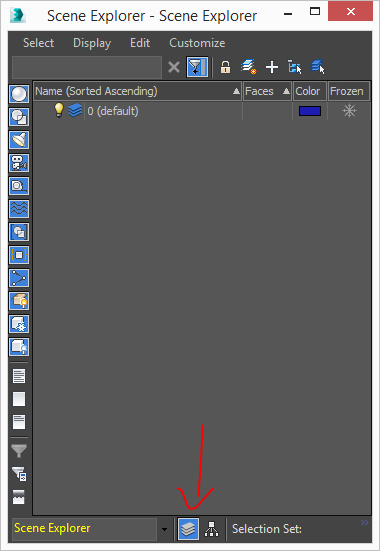
Here's a simple solution: In the Scene Explorer -Layer Explorer switch to Hierarchy view.

Image01.jpg

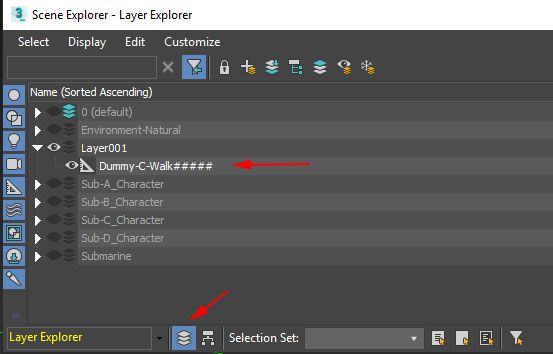
You should be able to see the object in this view. Right-click on the object and choose 'Add Selected To' from the drop-down menu and choose 'New Layer'.

Image02.jpg

Now go back to  'Sort By Layers' and you should now see the object in a new layer.


Image03.jpg


Message 87 of 94

echu_sen
Participant
Participant

2019, and the bug still exist. Just had it for my first time, and you suggest the issue to solve it with an external script? really? AUTODESK MUST SOLVE THIS

by the way, previous post doesn't fix anythig, just creates new layers so the old ones persist hidden

Message 88 of 94

ik3ds
Explorer
Explorer
(
	layerNames = #()

	for n in (objects as array) do
	(
		appendifunique layerNames n.layer.name
	)

	for i in layerNames do
	(
		if i != "0" do
		(
			LayerManager.newLayerFromName i
			print i
		)
	)

	for n in (objects as array) do
	(
		for i = 1 to layerNames.count do
		(
			if n.layer.name == layerNames[i] do
			(
				layer = LayerManager.getLayerFromName layerNames[i]
				layer.addnode n
			)
		)
	)
)

This should do the job for anyone who still is having issues with this. It will recreate new layers with the original layer names and reasign the objects to the appropriate layers.

Message 89 of 94

keithmcveen
Explorer
Explorer

Awesome script, I just ran into this problem a minute ago and your script worked perfectly, returned all my layer names with all of the objects in the right layers.  You are a life saver THANK YOU!

Message 90 of 94

markus
Advocate
Advocate

This bug keeps coming back. I'm using the latest 2020.2 and I just imported some objects from a step file. After import, the objects were not visible in the active layer or any other layers. It's really annoying when bugs go on, year after year without being fixed, and users have to waste time on *insert favorite swear* like this. The above script works as a workaround, but it's a really annoying bug. 


Message 91 of 94

Anonymous
Not applicable

Has anyone else tried resetting Max user preference settings back to default? After doing this, I reopened a file that was having the issue of objects not showing in my layers. All of my layers and objects were good to go. Just another thing to try.


knowledge.autodesk.com/support/3ds-max/learn-explore/caas/sfdcarticles/sfdcarticles/Resetting-3ds-Max-3ds-Max-Design.html

0 Likes
Message 92 of 94

b_apostol
Contributor
Contributor

Still helping people in 2020.


Thanks you so much!

0 Likes
Message 93 of 94

ViperAleks
Advocate
Advocate

I have reported this bug here https://forums.autodesk.com/t5/3ds-max-forum/bug-max2018-layer-explorer-list-is-empty-when-merged-ob... 

There are files and steps to reproduce this bug. 


0 Likes
Message 94 of 94

info
Community Visitor
Community Visitor

Hello,

I had the same problem in 3ds max 2022, but with newly created splines and after hours of trying to fix this, I found a rather simple solution that worked out for me:

In the layer manager under Customize/ Toolbars  I activated the item "Display".

On the left side there appeared the toolbar and I recognized that the button "Display Shapes" was not activated.

By activating it the splines appeared in the layer manager and they are selectable now.

Maybe this could be helpful for some of you.

Best regards.