Nodes management

Nodes management

jo2ny
Advocate Advocate
3,391 Views
8 Replies
Message 1 of 9

Nodes management

jo2ny
Advocate
Advocate

Hello,


I have a question regarding nodes.

1) Is there a way to select only nodes that are on bars, but not the start point or end point. I would like to get rid of them. Nodes that have only one adjoining member.

And what's the difference between adjoining members and adjoining elements


2) Can I generate nodes at intersections of bars without dividing the bars for the whole structure? As using the Intersection command but without bar division.


Thank you in advance!

0 Likes
Accepted solutions (1)
3,392 Views
8 Replies
Replies (8)
Message 2 of 9

Anonymous
Not applicable

1)Just drag the cursor box over the nodes you want to delete and press "delete".  As long as you dont actually select the bar, the bar won't be deleted.


2)See pic


divide.png


0 Likes
Message 3 of 9

jo2ny
Advocate
Advocate

Yes, what you're saying is correct. But there are two problems here:

1) Dividing bars it's not needed at equal distances. This is not such a big problem because I can use the Divide by Plane option.


2) The big problem is what will I do if I have a bigger structure.

Here's an example:

In TOP view:


I have 30 vertical bars (Y direction). And another 10 bars that should be horizontal but after importing I found some of them a bit rotated (about 3 degrees angle from horizontal X direction). Probably due to some poor snaps in AutoCAD.


I deleted the bad horizontal bars, but the nodes from intersections remain. I want to select all of them and delete them. Preferably with a selection filter. - This is problem 1.


Secondly I will draw the 10 horizontal bars (in the correct position) and would like Robot to generate nodes at the intersections with the vertical bars. - Problem 2.

0 Likes
Message 4 of 9

Rafal.Gaweda
Autodesk Support
Autodesk Support


I deleted the bad horizontal bars, but the nodes from intersections remain. I want to select all of them and delete them. Preferably with a selection filter. - This is problem 1.


If they are not on any bar (disjointed \ separated) just run calculations and they should be reported as Isolated Nodes, then  select them by group $NODISOL and remove. Or just only run Verification to detect some of them or add new bars and run Detailed Correction to line = bar or plane.

If it is not the case please make screen capture or send sample.


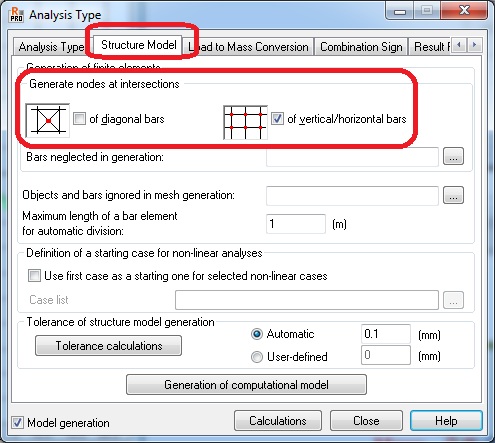
Secondly I will draw the 10 horizontal bars (in the correct position) and would like Robot to generate nodes at the intersections with the vertical bars. - Problem 2.

   - add nodes manually snaping to these points

   - calculation nodes can generated automatically at these points due to these settings


genmod.jpg


Rafal Gaweda
0 Likes
Message 5 of 9

Rafal.Gaweda
Autodesk Support
Autodesk Support

Maybe this:

nodesel.jpg


Rafal Gaweda
0 Likes
Message 6 of 9

jo2ny
Advocate
Advocate

I made a Jing video.

I'll try to identify some steps to make the video clearer.


1) See the model

2) Selecting the area of interest and opening it in a new window

3) Identifying the bars with problems. They should be horizontal and extended to the last vertical bar.

4) Showing that intermediary points do not have any adjoining members, or elements (I don't know the difference between those two)  => they are isolated nodes

At a previous attempt they had only one adjoining member - the horizontal bar => not isolated.

I mention that this model was created by directly opening a 3D .dxf file created in AutoCAD.

Modifying in AutoCAD and reimporting is not an option because of numerous section attribution and member types that I made and don't want to redo.

5) I fixed the horizontal bars. Brought them to the correct position.

6) Generating a computational model. But there were no nodes generated at intersections. Why is that?

7) I'm trying to create some claddings. Cannot snap at the intersection of bars. Why?

All points and bars in this substructure are at Z=0.00m  so they should be in the same plane.

(I checked and also in AutoCAD in the 3D .dxf model, they intersect there also.)


Here's the video link http://screencast.com/t/86PK582vuIxB


Thank you in advance.


0 Likes
Message 7 of 9

Rafal.Gaweda
Autodesk Support
Autodesk Support
Accepted solution


4) Showing that intermediary points do not have any adjoining members, or elements (I don't know the difference between those two)  => they are isolated nodes


Whether these nodes are reported as isolated or not depends on Model Generation. If verification is run before Model Generation they can be reported as isolated. To be sure - turn on display of calculation elements.

Link to movie below. This is my way of correcting model:


http://screencast.com/t/6rmv6zyl


6) Generating a computational model. But there were no nodes generated at intersections. Why is that?


 There were, but calculation nodes, not real ones. Movie below.


 http://screencast.com/t/2BLqaw5C


7) I'm trying to create some claddings. Cannot snap at the intersection of bars. Why?

All points and bars in this substructure are at Z=0.00m  so they should be in the same plane.


Something with snapping... I will check


Workaround:  http://screencast.com/t/5U3THL4A


Rafal Gaweda
Message 8 of 9

jo2ny
Advocate
Advocate

Thank you! This helped me a lot!

It works nicely, this video explanation method.

It's very clear, and I think also easier than to explain in words.


0 Likes
Message 9 of 9

Rafal.Gaweda
Autodesk Support
Autodesk Support


7) I'm trying to create some claddings. Cannot snap at the intersection of bars. Why?

All points and bars in this substructure are at Z=0.00m  so they should be in the same plane.


Something with snapping... I will check


I guess it is related to calculation nodes there.

Easier workaround: http://screencast.com/t/M8tV5NoP 


Rafal Gaweda
0 Likes