- Home
- /
- Architecture, Engineering & Construction
- /
- Revit Products Forums
- /
- Revit Ideas
- /
- Historic Revision Schedule
Announcements
Welcome to the Revit Ideas Board! Before posting, please read the helpful tips here. Thank you for your Ideas!
Turn on suggestions
Auto-suggest helps you quickly narrow down your search results by suggesting possible matches as you type.
 This page has been translated for your convenience with an automatic translation service. This is not an official translation and may contain errors and inaccurate translations. Autodesk does not warrant, either expressly or implied, the accuracy, reliability or completeness of the information translated by the machine translation service and will not be liable for damages or losses caused by the trust placed in the translation service.
Translate
This page has been translated for your convenience with an automatic translation service. This is not an official translation and may contain errors and inaccurate translations. Autodesk does not warrant, either expressly or implied, the accuracy, reliability or completeness of the information translated by the machine translation service and will not be liable for damages or losses caused by the trust placed in the translation service.
Translate
Options
- Subscribe to RSS Feed
- Mark as New
- Mark as Read
- Bookmark
- Subscribe
- Printer Friendly Page
- Report
Historic Revision Schedule

Historic Revision Schedule
Recently while working on a project with various consultants in Revit I came up with what I thought was a pretty intuitive method for creating/managing a sheet index that "automatically" (with minimal input) upodated over the course of a project. It worked really well, but as I sit back and watch the project shift from CD release to Addendum to Bulletin I find myself wondering why the underlying systems I used to drive this method weren't already interrelated within Revit to begin with. After all, when does an architecture firm formally release full drawings without a sheet index or without an associated revision?
Now that I’ve established the premise I’ll describe the process I created. It’s going to sound convoluted and complicated but that’s only because it’s not built in to the software to begin with. It functions very efficiently after its setup. The end result is a sheet index that includes sheets from linked sheets from every discipline’s model that populate the index automatically and correctly display the drawing release (the revision) each sheet is associated with by displaying a bullet in a particular revisions column. Some sheets were there from the very beginning, some sheets came in later in the production process. Image 1 below shows a clip of the end result of this system; a highly commonarrangement of the index of drawings that Revit is incapable of creating without the setup described below.
- Each bullet is essentially driven by two parameters; a YES/NO project parameter named for a revision and associated with “SHEETS” and a formulated parameter that actually creates the bullet. For example, for a revision called “BID/PERMIT” I’ve got a YES/NO parameter called “Submittal – Permit” and a formulated parameter called “Permit Set Date” named to be generic and to provide a prompt to the user to rename it with the actual release date. In this case “Permit Set Date” gets renamed to “08/24/2014 - BID/PERMIT” to show correctly on the cover sheet.
- When a sheet is deemed to be in a “revision” (in the Revit sense) release the checkbox is checked in that sheet’s properties. Each sheet to be shown on the index is also told to “Appear in sheet list” which is also a Y/N built in to each sheet in Revit, although I actually created an additional Y/N parameter to drive this called, “Appears in Schedule”. The sheet index is then filtered by “Appears in Schedule” equals “Yes.”
- Now, of course each release also has to appear on the titleblock of each sheet. This is where the actual revisions come in to play. Each release gets a formal Revit revision that is then added to the sheet either via the “Revisions on Sheet” edit window (or in this case via a great Xrev Freebies product Xrev UpRev) if the release happens before revision clouds are necessary, or directly driven by revision clouds if they exist.
Do you see my issue here? These two things, the Revisions and the sheet index/the parameters that drive it are all separate even though they are inherently interrelated. To do one release that automatically schedules in this common form of sheet index I have to create 2 parameters and a revision and then I have to go to a sheet and add the revision to it and check the box to include it in that revision.
I’m suggesting that these two systems be inherently linked inside Revit. When I create a revision in Revit the program should automatically create: a Yes/No parameter as a sheet instance property and a formulated schedule parameter driven by that Y/N that shows up as an addable field in any “Sheet List” schedule. Everything should be driven by the revisions window (Image 2 below).
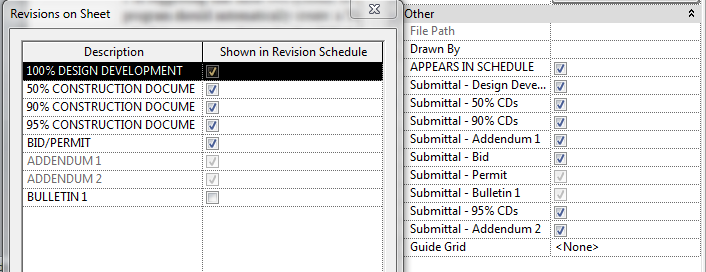
In writing this I found an even easier software tweak that would allow this to happen. The previously mentioned “Revisions on Sheet” button that each sheet has (under Identity Data on the properties pallet) is a way to add revisions to a sheet without having a revisions cloud on that sheet. These for some reason cannot be accessed as fields in the Sheet Index. Simply allowing these to be scheduled would be half of the change I’m suggesting. Image 3 below shows the “Revisions on Sheet” window next to the custom Y/N parameters I created for this project. After that the formulated parameter would still need to be created.
If the Sheet Issues/Revisions system currently in Revit could drive all of this (Image 2 below) it would also solve the issue I had of moving these custom parameters between files (I had to use an empty project with only these parameters in them to transfer project parameters to my consultant/engineers files). All you’d have to do is link a consultant’s file, or conversely all a consultant would have to do is link your file into theirs, and go to manage, transfer project standards, and select “Revision Settings” since you can transfer project standards of linked files without actually opening said linked files.
This feels very straight forward to me, but I’ve been dealing with it for a while. I’d love to see Sheet Issues/Revisions and Sheet Lists synchronized in Revit. Thoughts?
Image 1:
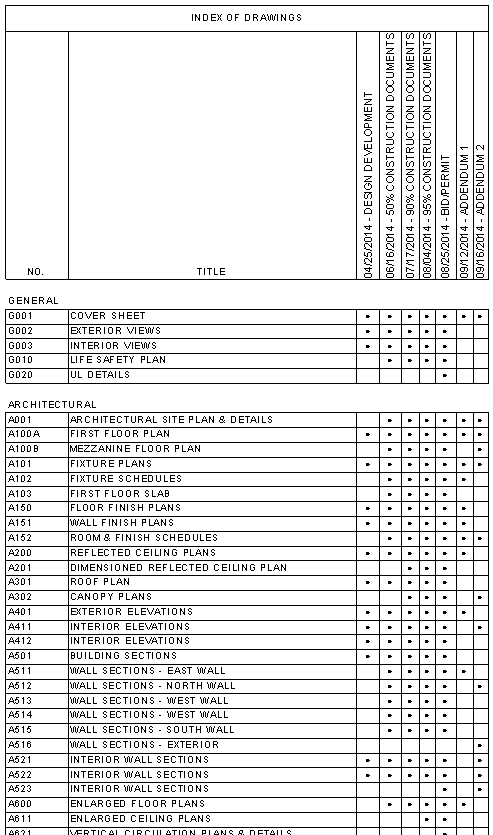
Image 2:
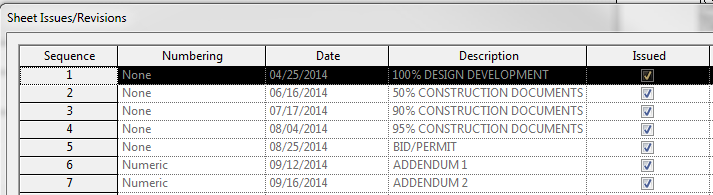
Image 3:
Footnote:
I posted this under the title, "Sheet Indexes and Revision Schedules - Why are they disconnected?," a few years here:
53 Comments
Forums Links
Can't find what you're looking for? Ask the community or share your knowledge.