Auto-suggest helps you quickly narrow down your search results by suggesting possible matches as you type.
Showing results for
Show only
|
Search instead for
Did you mean:
This page has been translated for your convenience with an automatic translation service. This is not an official translation and may contain errors and inaccurate translations. Autodesk does not warrant, either expressly or implied, the accuracy, reliability or completeness of the information translated by the machine translation service and will not be liable for damages or losses caused by the trust placed in the translation service.Translate
Submitted byAnonymouson10-18-201610:21 AM
Status:
Accepted
API for RVT Link Display Settings
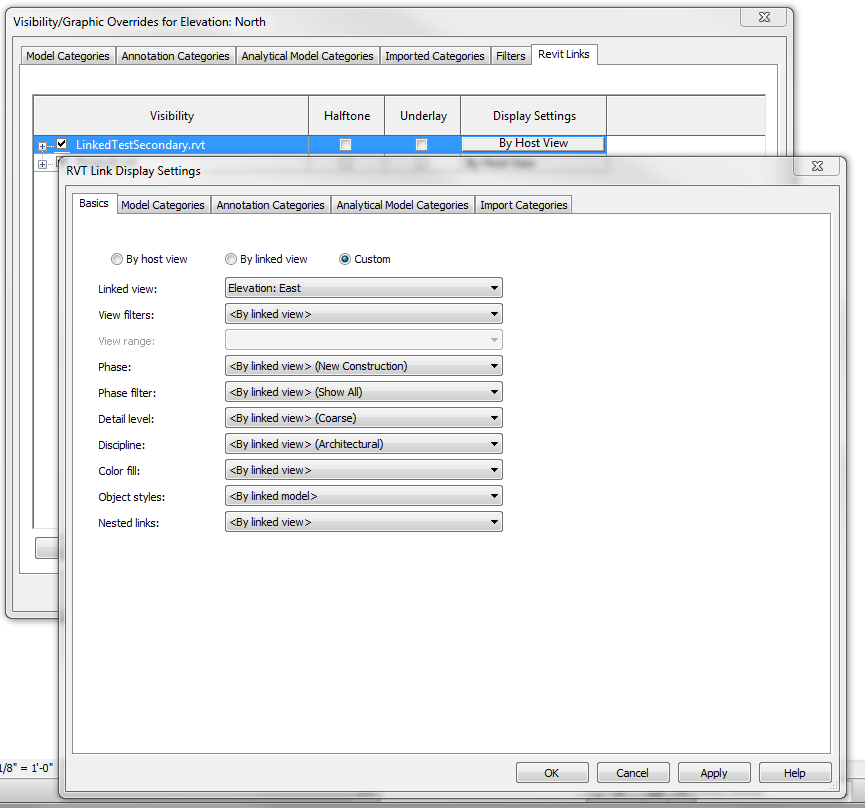
I would like to have access to at least read the Revit Link Display Settings through the API. I want to be able to see if a filter in the Link file is being applied and if the current view is using the link display settings or the main file's settings.
I don't understand why this idea was proposed in 2016 and nothing has changed until 2023. AE firms keep updating and changing design files. I have to change linked background files for every single view VG override Link Model session individually.
View templates can only capture setting for linked files AFTER they have been linked. Which is the reason these settings need to be accessed programmatically. MEP consultants can have a lot of subcategories that aren't defined until loaded. Additionally, if a file is unlinked and relinked - you start over on the settings. Being able to get at these settings programmatically, will let us push the desired settings to all of the view templates at once, rather than edit them one-by-one. It's such an issue, we're doing a lunch class next week to discuss the issue.
Note that this request has been accepted and should soon hit the streets.
Hey @aaron_rumple : ) The only way round that now is to have placeholders for each discipline. This covers ~98% of the settings. When they have custom subcategories that were overridden is where you start to run into issues, rare but it happens.
IF you try to cram entire revit sites and all the building of that site into one model - that falls apart; If you have each building (and sometimes each podium tower) as its own file, works like a charm! : ) Individual files also smaller and faster to work in... drawback of syncing content... avaial... blah blah blah blah... : )
There are other option depending the overrides with viewfilters:
A. Use worksets, if the links contain only a limited number of Worksets (and unique between linked models) add a workset to your model with that name. Now create a viewfilter for the categories + that workset and add it to view/templates to override the linked model
B. Use viewtemplates and use another common paramter to filter items to override. For MEP models I often use the system names (duct etc) to override, as they often can't be overridden by VG.
These can be programmed by API / Dynamo, inspect/check the linked models and create appropiate viewfilters and set their override settings.
Never use worksets to control visibility. Those are for maintaining large systems across very large sites like Airports, Cityscapes, etc. Using worksets for visibility are a blunt instrument that leads to nothing but sorrow in the long run.
View filters are a little better - especially for system families. Each of those subcomponents in a system family should be a subcategory. Ideally if we had "Trees" of visibility controls:
*Should coincide with a similar approach to subcategories of families I.e. Doors, Door.Panel, Door.Hardware, etc. These subsets come in really handy for key schedules, scheduling, visibility graphics, and soforth.
@TripleM-Dev.net Worksets are the worst way to control visibility. Might as well go back to AutoCAD layers. Worksets are from a bygone era when limited technology required you to have a workset per user on the team and you had to checkout your workset before working. They serve no purpose other than memory management for very large models in today's Revit. In fact, I would expect the feature to be removed as Revit heads to 100% cloud based.
As previously noted - This requested feature has been accepted and you should see it soon,
Yes, we do look at the forums (every day, in fact!). We are simply unable to respond to each and every comment that is made. In this instance, this Idea has been Accepted and our teams are working on this feature. Feel free to join our Revit Preview Release or follow our Revit Public Roadmap to provide additional feedback.