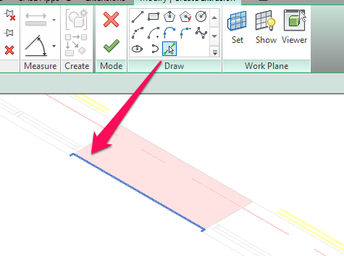
i want to make extrusion by sketchup mass

i want to make extrusion by sketchup mass

Anonymous
Not applicable
1,815 Views
10 Replies
Message 1 of 11

i want to make extrusion by sketchup mass

Anonymous
Not applicable

hi

I insert mass in place from sketchup

now I want to make extrusion mass parts

did I have to draw profile of each plane?

how to pick a profile of sketchup mass and make of him extrusion?

0 Likes
1,816 Views
10 Replies
Replies (10)
Message 2 of 11

L.Maas
Mentor
Mentor

You can create an elevation view perpendicular on the area you want to create the profile which will make it easier to trace.


You can try to use the pick tool to create the profile. Depends little bit on the file you try to trace if the lines can be picked. Not sure if Sketchup will expose the lines to allow this.

Line.png

Louis

EESignature

Please mention Revit version, especially when uploading Revit files.

Message 3 of 11

Anonymous
Not applicable
there is a difference between both softwares the revit and the sketshup each one works with a different system and this what makes the use of the model done inside sketshup difficult and not editable . the best thing is to draw them again as said @enllnt .
0 Likes
Message 4 of 11

Anonymous
Not applicable

INSERT SKETCHUP MASS

MASS A WALL BY PICK A PLANE FROM MASS

HIDE ALL ELEMENT . LEFT THE WALL JUST CREATED

MAKE EXTRUSION

PICK A PLANE FROM THIS WALL

THEN SHOW GRID(NEXT TO SET PLANE)

NOW ITS EASY TO DRAW PROFILE

0 Likes
Message 5 of 11

spkoulis
Explorer
Explorer

Just be careful when introducing angles from a non native geometry (SketchUp) to Revit elements like walls and profiles. It is very easy to run into "slightly off axis" problems further down the line. I would introduce reference planes in a manual way making sure angles do not have more than 3 decimal digits in the degrees.

0 Likes
Message 6 of 11

Anonymous
Not applicable
Hi
I still didnt get how to move extru. Inside plane
Say i want to move extru. At plane x to specific point at plane y
How to do this?
Also i cant move extrus. In same plan to specifoc point. No snaps at all...
Please help
Thanks a lot
0 Likes
Message 7 of 11

ToanDN
Consultant
Consultant

Capture.PNG

0 Likes
Message 8 of 11

Anonymous
Not applicable
Solved
Thanks alot
0 Likes
Message 9 of 11

Anonymous
Not applicable

you have to work with move tool and remove constraint or unlock plan constraints and try to work on the elevation or section and avoid working on the 3d so u dont lose the axis movement 

0 Likes
Message 10 of 11

Anonymous
Not applicable
Yes i know i have to avoid sketching in 3d... thanks
Another q. If i want to update sketchup mass and insert it exactylt at same place the former mass was
How to do that?
0 Likes
Message 11 of 11

Anonymous
Not applicable

@Anonymous  Working in 3D is one of the things I like best about Revit!  There is nothing wrong with working in it.


@Anonymous you can work in 3D all you want, just be sure to set your workplane before modifying/creating.

0 Likes