Announcements
Notice: Upload of PDF documents is currently unavailable across the Community due to an ongoing issue.

Maya 2017 Render Options blank

Maya 2017 Render Options blank

Anonymous
Not applicable
22,521 Views
10 Replies
Message 1 of 11

Maya 2017 Render Options blank

Anonymous
Not applicable


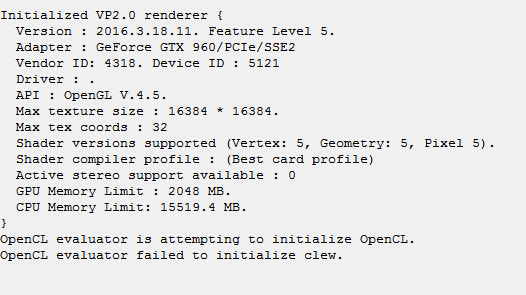
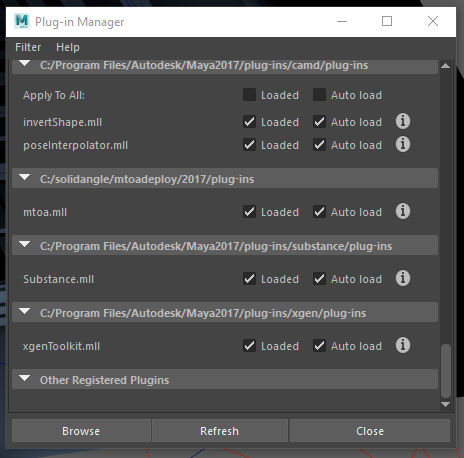
I used Arnold to render out something last night and it was working fine. I opened up a new scene, started modeling, added a spotlight, tried to render and nothing... I can't open up the Arnold Render View. I can only use Maya Software/Hardware/Hardware 2.0... But I can't even get the settings box to display any settings for any of the renderers. I deleted the prefs folder after my shelves started crashing, too. I reloaded the MTOA plugin for Arnold and nothing... I get these errors.


# Error: line 1: AttributeError: file C:\Program Files\Autodesk\Maya2017\Python\lib\site-packages\pymel\core\nodetypes.py line 409: nt.Unknown(u'defaultArnoldRenderOptions') has no attribute or method named 'drivers' #


# Error: line 1: MelError: file C:\Program Files\Autodesk\Maya2017\Python\lib\site-packages\pymel\core\language.py line 992: Error during execution of MEL script: line 1: AttributeError: file C:\Program Files\Autodesk\Maya2017\Python\lib\site-packages\pymel\core\nodetypes.py line 409: nt.Unknown(u'defaultArnoldRenderOptions') has no attribute or method named 'drivers'
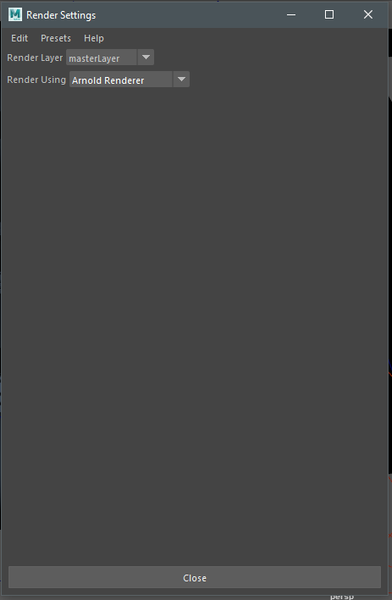


1.PNG2.PNG

3.PNG

Accepted solutions (1)
22,522 Views
10 Replies
Replies (10)
Message 2 of 11

Anonymous
Not applicable

:::EDIT:::


Turns out, I reinstalled Maya 2017, and opened up a new scene, modeled did everything as usual and everything was working fine. The render view worked, the render settings popped up. Everything was NORMAL...


I opened up the scene that was giving me trouble and all the issues I was having before return. The only thing that is different in this scene is that I have a spot light with Quadratic Decay, Penumbra Angle is changed, the Drop off is changed and it has a Fog added to it...


I'm assuming that this spotlight with the current settings is giving me trouble. I don't know if its the Fog, or the light itself. But I'll try and find out.

0 Likes
Message 3 of 11

Stephen.Blair
Community Manager
Community Manager
Accepted solution

Hi


Do you have these four nodes in the scene?

- defaultArnoldRenderOptions
- defaultArnoldDriver
- defaultArnoldFilter
- defaultArnoldDisplayDriver

You can check in the Outliner, just clear Display > DAG Objects Only

If so, then try this:

- close the Render Settings dialog
- delete those four nodes
- save the scene (with a new name)
- restart Maya
- load the scene you just saved


Thanks


Stephen

Solid Angle Support


// Stephen Blair
// Arnold Renderer Support
Message 4 of 11

Anonymous
Not applicable

I had the same issue, the render settings window was just blank and after following your easy steps it works absolutley fine! Thanks!

Message 5 of 11

Anonymous
Not applicable

Hi, I face this issues and try these easy step but failure. any suggestion to do other thing to solve these? Thank you

0 Likes
Message 6 of 11

Anonymous
Not applicable

I followed Stephen's instructions and opened the render settings windows only to get the same error.


However, when I executed these (after Stephen's steps) in mel the problem was resolved;


deleteUI unifiedRenderGlobalsWindow;
buildNewSceneUI;

0 Likes
Message 7 of 11

Anonymous
Not applicable

Thankyou


0 Likes
Message 8 of 11

Anonymous
Not applicable

What if the error still appears even if there is no extra nodes? nothing in the outline?

all the suggested steps where tried.

0 Likes
Message 9 of 11

mspeer
Consultant
Consultant

Hi!

You disabled "Display -> DAG Objects Only" in Outliner?

Message 10 of 11

Anonymous
Not applicable

Yes I did and it did not work.


However I have solved the problem - I have just exported geometry and textures and in this new maya scene, Arnold works.

0 Likes
Message 11 of 11

ozbirnryan
Explorer
Explorer

YES THIS WORKED, FINALLY SO APPRECIATE IT!

0 Likes