


- Mark as New
- Bookmark
- Subscribe
- Mute
- Subscribe to RSS Feed
- Permalink
- Report
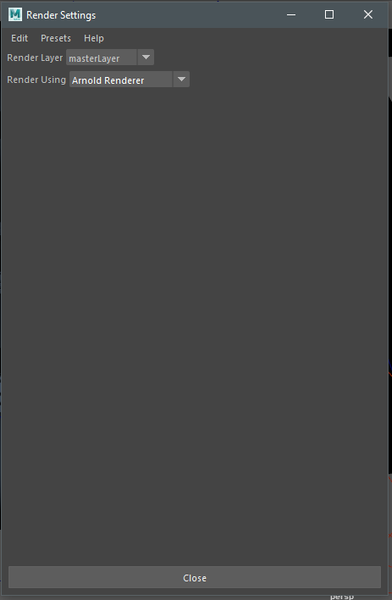
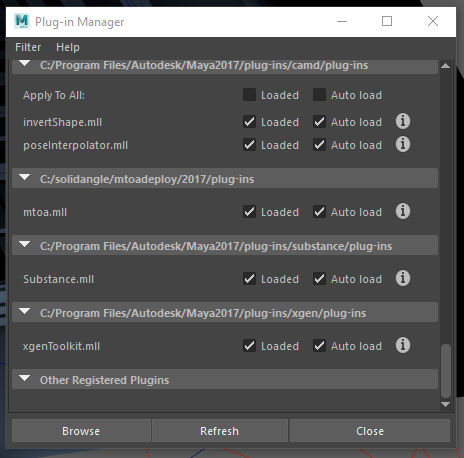
I used Arnold to render out something last night and it was working fine. I opened up a new scene, started modeling, added a spotlight, tried to render and nothing... I can't open up the Arnold Render View. I can only use Maya Software/Hardware/Hardware 2.0... But I can't even get the settings box to display any settings for any of the renderers. I deleted the prefs folder after my shelves started crashing, too. I reloaded the MTOA plugin for Arnold and nothing... I get these errors.
# Error: line 1: AttributeError: file C:\Program Files\Autodesk\Maya2017\Python\lib\site-packages\pymel\core\nodetypes.py line 409: nt.Unknown(u'defaultArnoldRenderOptions') has no attribute or method named 'drivers' #
# Error: line 1: MelError: file C:\Program Files\Autodesk\Maya2017\Python\lib\site-packages\pymel\core\language.py line 992: Error during execution of MEL script: line 1: AttributeError: file C:\Program Files\Autodesk\Maya2017\Python\lib\site-packages\pymel\core\nodetypes.py line 409: nt.Unknown(u'defaultArnoldRenderOptions') has no attribute or method named 'drivers'
Solved! Go to Solution.



