Understanding Inventor Hatch Angles

Understanding Inventor Hatch Angles

Anonymous
Not applicable
3,445 Views
8 Replies
Message 1 of 9

Understanding Inventor Hatch Angles

Anonymous
Not applicable

I'm having a hard time understanding and controlling Hatches in Inventor drawings.

I've read a few posts on it (there's not much I could find away) on how inventor adds angles to come up with it's own rotation.

I'm using a lot of wood in my assemblies, and I have a custom Plywood hatch pattern by material set to 0 deg in both styles library and in the .pat file as well. On top of that I've made another plywood hatch pattern set at 90deg (inventor style set at 0 deg plus .pat file rotated to 90deg.)


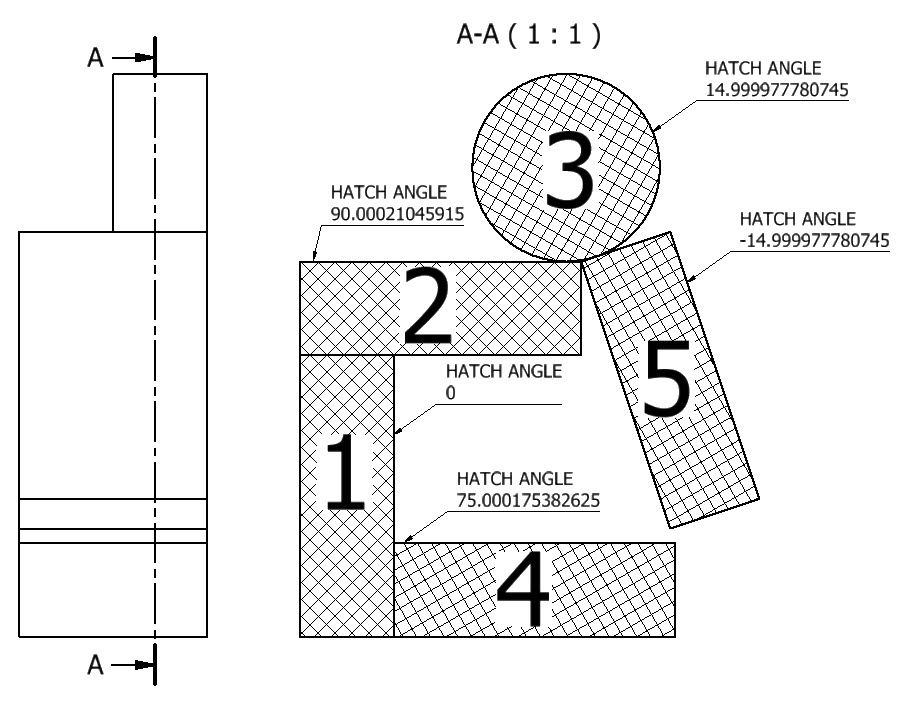
What I don't understand is why inventor keeps on rotating the hatches into some weird angles all the time. Plus, once I manually fix them to either 0 or 90 deg. any minor revision to the view or any associated detail, it reverts back to it's crazy strange rotation. Most of the plywood/wood parts I model are horizontally or vertically - 0 or 90 deg - so why all those unusual angles?


All I really want is to have all my wood hatches (by material) come out at 0 deg., manually change ones I need to be at 90 and NOT have inventor change them on me each time I make a minor tweak.


Is there a way to make this work? I'm wasting too much time fixing each hatch, every time, all the time.


Thanks

0 Likes
Accepted solutions (1)
3,446 Views
8 Replies
Replies (8)
Message 2 of 9

Anonymous
Not applicable
I haven't looked into this for a while, but I don't remember finding a solution 😕

In the end I just chose a different hatch that wasnt directional and have up worrying about it...

I'm interested to hear if anyone has a better solution @Jonsonshuie ?
0 Likes
Message 3 of 9

johnsonshiue
Community Manager
Community Manager

Hi! Here is some documentation about the custom hatch behavior. The added angle in Inventor is to support AutoCAD Hatch Pattern.


https://knowledge.autodesk.com/support/inventor-products/getting-started/caas/CloudHelp/cloudhelp/20...


Many thanks!


Johnson Shiue ([email protected])
Software Test Engineer
0 Likes
Message 4 of 9

edward.woodstream
Contributor
Contributor

I have this same problem!  This needs to be fixed.  I want all my hatch angles to come in at 0 degrees (or 90).  Then I have to modify one or two.  As it is, I spend a good portion of my time changing the hatch angle so my plywood doesn't look goofy.  I was hoping there was some way to globally change the hatch angles withing a drawing using ilogic, but haven't found anything...

0 Likes
Message 5 of 9

Xun.Zhang
Alumni
Alumni

Hi,


Here is a way to do so. 


Firstly, please go to edit hatch pattern dialog and select others in the dropdown list, export any of wood you'd like to use, and then open it, modify the value for the angle and re-import back as customized one. Try to define the customized one as your material default and you will get what you want.


I will upload a video for you. 

http://autode.sk/2C1sLUc

Hope it helps!


Xun
Message 6 of 9

PaulMunford
Autodesk
Autodesk

Hi @Xun.Zhang,


Thanks very much for your hard work - but i'm afraid that your proposed solution doesn't quite address the problem!


I believe that the issue isn't the default hatch angle. I believe that the issue is Inventor's ability to automatically rotate hatches on separate parts so that they are always at a unique angle to the parts around them. 


This feature is a great bit of automation that helps us comply with drawing standards. This is a specific case where we don't need the help 😉


I tested your proposes technique with an assembly, here is a screen shot:


(I numbered the order in which I inserted the parts into the assembly).


Autodesk Inventor Automated hatch anglesAutodesk Inventor Automated hatch angles


I believe that the request is to be able to turn off the Automatic rotation behaviour, either hatch style by hatch style, or failing that View by view, or failing that style by style.


Here is an illustration of the result.

Illustration showing what it might look like with automated hatch angles turned offIllustration showing what it might look like with automated hatch angles turned off


Is that helpful?


Paul


Paul Munford
Technical Onboarding Architect
Linkedin 

0 Likes
Message 7 of 9

PaulMunford
Autodesk
Autodesk
Accepted solution

Hmmm,


I may have fixed it with suggestions from this post:

http://beinginventive.typepad.com/being-inventive/2011/07/fix-hatch-angle-in-section-view.html


and this one:

https://forums.autodesk.com/t5/inventor-forum/hatch-patterns-explained/td-p/6243656


I set the allowable hatch angles to 0 and it seemed to work:


Styles and standards > Current standard > General > Preset values > Section Hatch Angles > Delete all values apart from 0.00


Autodesk Inventor hatch styles - rotation set to 0Autodesk Inventor hatch styles - rotation set to 0


Paul Munford
Technical Onboarding Architect
Linkedin 

Message 8 of 9

nick.tait2HB4B
Explorer
Explorer

I posted on this a while back.


In the UK we need adjacent parts to be 45degs but can be different scales etc.


Inventor randomly changes the angles!


So we - myself and school kids I teach - have to manually edit each hatch pattern !


https://forums.autodesk.com/t5/inventor-forum/hatch-pattern-in-an-assembly-not-45-degs/td-p/5501427


0 Likes
Message 9 of 9

PaulMunford
Autodesk
Autodesk

I left you a reply on your thread:
https://forums.autodesk.com/t5/inventor-forum/hatch-pattern-in-an-assembly-not-45-degs/m-p/5501427/h...


Paul Munford
Technical Onboarding Architect
Linkedin