@Anonymous
In addition to @dgorsman request for additional information here are some other things to consider
Disable your anti-virus application on 1 machine and see if that changes the performance. If it does, apply the necessary exceptions
Clean out your C:\Temp, C:\Windows\temp, and your C:\Users\[username]\Appdata\Local\Temp folder. Appdata is a hidden folder and you may need to adjust your viewing settings.
Perform a disk defrag (unless you have a SSD drive). It may be necessary for you to clean up your hard drive and repair registry. Use a tool like CCLEANER (but at your own risk).
Turn off Windows Bells & Whistles, use classic theme, and disable desktop gadgets and unused (Windows) services.. Also configure Inventor and Windows per the recommended performance options (Review this and that)
If possible keep Inventor Design Data locally. Having it on the network can lead to performance issues.
Work locally on your models if possible. If you have to store your models on the network. Leave the common files on the network and move your models back and forth using a file management tool. May want to consider implement Vault basic..
Keep your sketches simple and only project the necessary geometry.
Resolve issue via the Design Dr. Don't ignore them. Every so often on your model, perform a rebuild all. Other things to consider, limit adaptivity and use modeling functions over sketching commands. If you need to use the adaptive method.. Use it and then turn it off when done.
I know this is common sense, but keep your workspace, hard drive, or share network location organized and clean.
Properly configure a project file. Define the workspace and etc.
Don't put your eggs all in one basket when it comes to assemblies. Demote, simplify or break your model up into smaller chucks, Use the BOM structure to your advantage.
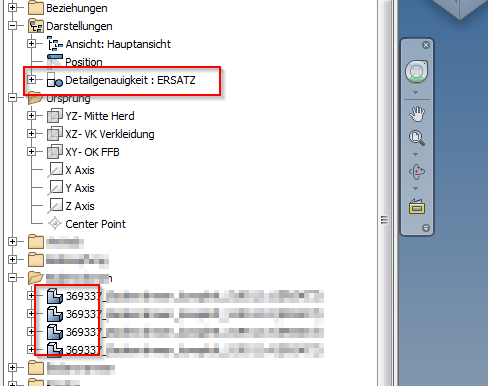
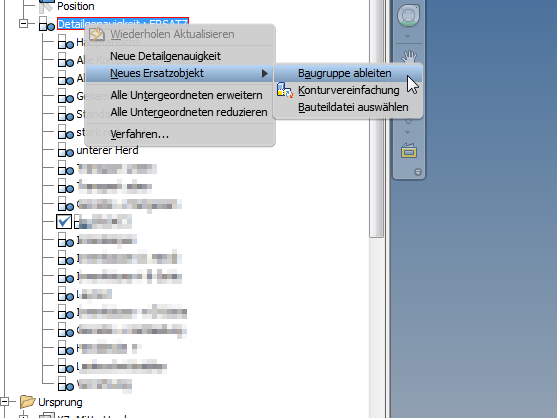
Simplify, Simplify, Simplify. Determine if the exact details are really necessary. If it is, create a simplified version (iPart, derived, shrinkwrap and etc) of the part. Think about using appearance over detail
Review the Autodesk Inventor 2014 working with large assembly performance guide
Unload unnecessary Inventor add-ins
Invoke defer update and manually update when you're ready.
Look at creating View Reps, Level of Details (LODs), or working with Express Mode with your models.
Thinking about using the drawing open options to defer updates/fast open
Switch drawing view preview to partial or boundary box (Tools/Application Options/Drawing tab)
Think about the parent to child relationship. Do you have these options turned on in Application Options (Relationship redundancy analysis and features are initially adaptive) ?
Are you putting too much details in your drawing.. Like trying to jam 20lb worth of stuff in a 5 lb bag.. Break up your drawings into smaller chunks.
Constraints consume memory. Simplify them as much as possible. Maybe you want to ground your components or consider using skeleton modeling techniques. Or suppress constraints to limit them if you have numerous ones.
IF you're using bolted connections, this can impact performance. Create LODS and turn them off when not needed.
Set your Windows Virtual Memory to the recommend settings.
Make sure your graphics card driver is up to date. Don't rely on Windows telling you it is. Go directly to the Vendor web-site.
If you're using the 3D Connexion device.. Make sure its driver is up to date and you have calibrated it.
Limit the number of other Windows application that are currently running.
Use the "Disable Refinement" option if you're using Inventor 2016 or newer. (This option is located under Tools/Application Options/Display tab)
If you are using shaded views in your drawing, try to limit them because they too will impact performance. In Document Settings/Drawing tab, make sure the Shaded View/Use Bitmap option is set to Always.
In Tools/Application Options/Display tab, you may want to consider setting Min Frame rate (Hz) to zero. Thus allowing faster rotation/spinning/orbit of your model.
Yes there's a lot of info here and not everything I pointed out will work for you or for others who may review this information. But its another way of looking at boosting performance in your model
Mark Lancaster
 & Autodesk Services MarketPlace Provider
Autodesk Inventor Certified Professional & not an Autodesk Employee
Likes is much appreciated if the information I have shared is helpful to you and/or others
Did this resolve your issue? Please accept it "As a Solution" so others may benefit from it.







 That's why I always finish with "Yes there's a lot of info here and not everything I pointed out will work for you"