Cant Create Thread in Inventor 2017 while 2012 is Ok

Cant Create Thread in Inventor 2017 while 2012 is Ok

Anonymous
Not applicable
1,594 Views
7 Replies
Message 1 of 8

Cant Create Thread in Inventor 2017 while 2012 is Ok

Anonymous
Not applicable

Dear All

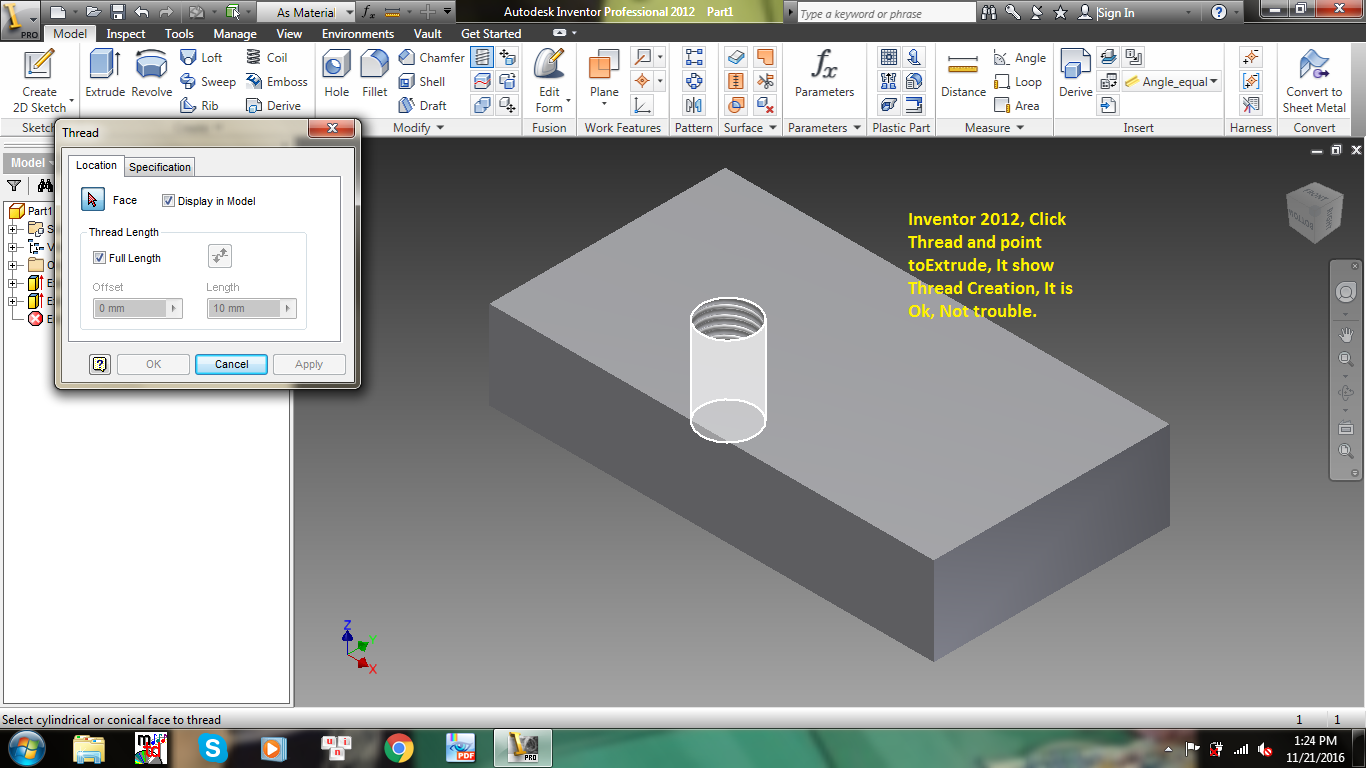
Im familiar Inventor 2012 then creation Thread is Ok

But I in 2017, by that way i cant creat thread.

Anyone get this trouble, I hope get your solution. Help me to check attach files.

Thank you!

0 Likes
Accepted solutions (1)
1,595 Views
7 Replies
Replies (7)
Message 2 of 8

blair
Mentor
Mentor

It works fine here, make sure that you have the latest SP's and Updates installed for your version. Possibly check your extrusion diameter, I think the latest version checks the diameter to match the thread to the major diameter. Mine will through up an error stating an invalid thread.


Do you have both versions opened at the same time?


Inventor 2020, In-Cad, Simulation Mechanical

Just insert the picture rather than attaching it as a file
Did you find this reply helpful ? If so please use the Accept as Solution or Kudos button below.
Delta Tau Chi ΔΤΧ

0 Likes
Message 3 of 8

Anonymous
Not applicable
Hi Blair
Thank you so much for your support
Could you help me more detail.
I dont know how to solve now.
Good luck!

--
Tuyên​, Nguyễn Ngọc​ | Phụ trách Kỹ thuật

*CTCP GIẢI PHÁP CÔNG NGHIỆP | INDUSTRY SOLUTION Co.*

*Nhà máy chế tạo thiết b*ị : Km25 Quốc lộ 3, Nguyên khê, Đông Anh, Hà nội

+84 904 883 061​ | Skype : solution061 | tuyen.nguyen@thietbicongnghiep.vn
| www.chetaothietbi.vn
-------------------------------------------------------------------------------------------------------------------------------------
GIẢI PHÁP LÀ TIÊN PHONG
0 Likes
Message 4 of 8

Anonymous
Not applicable
Hi Blair
Thank you so much for your support
Could you help me more detail.
I dont know how to solve now.
Good luck!

--
Tuyên​, Nguyễn Ngọc​ | Phụ trách Kỹ thuật

*CTCP GIẢI PHÁP CÔNG NGHIỆP | INDUSTRY SOLUTION Co.*

*Nhà máy chế tạo thiết b*ị : Km25 Quốc lộ 3, Nguyên khê, Đông Anh, Hà nội

+84 904 883 061​ | Skype : solution061 | tuyen.nguyen@thietbicongnghiep.vn
| www.chetaothietbi.vn
-------------------------------------------------------------------------------------------------------------------------------------
GIẢI PHÁP LÀ TIÊN PHONG
0 Likes
Message 5 of 8

Anonymous
Not applicable

Dear Mr Blair

I can view your Ipt file but trying and still cant make new Thread for my part.

Hope have other solution.

Goodluck!

0 Likes
Message 6 of 8

Roelof.Feijen
Advisor
Advisor

Hello @Anonymous,


Can you check if the visibility of Textures is on?

Go to the Ribbon > View Tab > Appearance Panel > Textures On


Otherwise check your Textures folder.

Go to Tools > Application Options > Files tab

Check the setting of the Texture folder. Is it specified?

Does it contain Textures?

The default location should be C:\Users\Public\Documents\Autodesk\Inventor 2017\Textures

Roelof Feijen

If my post answers your question, please click the "Accept Solution" button. This helps everyone find answers more quickly!
Message 7 of 8

SašoPrijatelj
Advocate
Advocate
Accepted solution

Inventor 2015 and earlier versions used an MS component named ADO for reading thread-related spreadsheets. This was changed in Inventor 2016. Now Inventor uses an Excel COM API call instead. Excel Starters and other low-end versions of Excel do not provide an API. Also Open Office or Office 365 are not supported as replacements for a full, locally installed Excel.
Solution:
As a temporary workaround, you can create the following Environmental variable:

Go to Control Panel > System> Advanced System Settings> System Properties, Advanced Tab.
Create a new Environmental variable called "UseLibXL" with a variable value of 1
Retry your clearance/threaded hole creation in Inventor.

This will attempt to use the 3rd party component in Windows instead of Excel. It doesn't support all aspects of what Excel provides but it should work for holes.

-----------------------------------------------------------------------
AutoDXF - automatic flat pattern creation and batch export to DXF for Inventor

Please use "Accept as Solution" & give "Kudos" if this response helped you.
Message 8 of 8

Anonymous
Not applicable

Wao !!!!!!!

Thank you so much, Mr saso

It is solved and run well for both Thread and Hole

You are so professional !

Thank you 2 again!

Good luck!

0 Likes