Auto CAD error: Unhandled exception e06d7363 (e06d7363h) at address ab9fa388h

Auto CAD error: Unhandled exception e06d7363 (e06d7363h) at address ab9fa388h

Anonymous
Not applicable
48,163 Views
29 Replies
Message 1 of 30

Auto CAD error: Unhandled exception e06d7363 (e06d7363h) at address ab9fa388h

Anonymous
Not applicable

Hi!

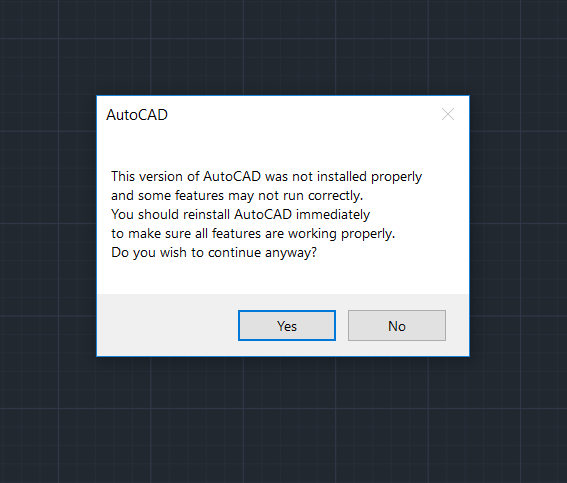
I have installed AutoCAD 2019 on my laptop and when I first started the program a pop up window showed the message that the AutoCAD was not installed correctly, and after that it showed me this errors:
      -  Unhandled exception e06d7363 (e06d7363h) at address ab9fa388h
      -  Unhandled exception c000005 access violation reading 0x0060 at address 5249b22fh 

I can run AutoCAD and open DWG files on it, but every time I start te AutoCAD this error messages show up, and after few minutes the AutoCAD crashes.

I have tried reinstalling the AutoCAD, but it didn't helped. The same errors showed up again after the reinstallation. 
Then I uninstalled the AutoCAD and installed Autodesk TrueView. 
TrueView was working fine with most DWG files. But sometimes it crashes when opening some DWG files, and then showed me this error: FATAL ERROR: Unhandled access violation reading 0X0031 exception at 665aee95h

I have Dell 5570 laptop with Windows 10 64bit, Core i7, 16GB RAM, AMD Radeon graphic card
I couldn't find any solution on internet for my problem. Can you please help me.


Accepted solutions (2)
48,164 Views
29 Replies
Replies (29)
Message 2 of 30

Alfred.NESWADBA
Consultant
Consultant

Hi,


>> when I first started the program a pop up window showed the

>> message that the AutoCAD was not installed correctly

Then please run a repair installation, make sure you are admin and your antivirus software is disabled during that process.


Next please install updates, AutoCAD 2019 has already Update 0.1


At least try to run AutoCAD without hardware acceleration ... start AutoCAD, empty drawing, start command _GRAPHICSCONIFG and turn off hardware acceleration (also please send us a screenshot from that dialog), restart AutoCAD ... better now?


Important too: does AutoCAD crash only with some specific drawings (or also with drawings created from scratch)?


- alfred -


------------------------------------------------------------------------------------
Alfred NESWADBA
ISH-Solutions GmbH / Ingenieur Studio HOLLAUS
www.ish-solutions.at ... blog.ish-solutions.at ... LinkedIn ... CDay 2026
------------------------------------------------------------------------------------

(not an Autodesk consultant)
0 Likes
Message 3 of 30

Anonymous
Not applicable

Thank you Alfred 

0 Likes
Message 4 of 30

Anonymous
Not applicable

I tried this methods that you mentioned, but it didn't helped.
I installed AutoCAD 2019 again, but I got the same error messages, even after turning off hardware acceleration. 

On Autodesk Desktop App I can't see any available updated for AutoCAD so I assume I have the latest version.
And AutoCAD crashes when I open other people drawings, not when I draw from the scratch.

0 Likes
Message 5 of 30

Anonymous
Not applicable

When AutoCAD crashed, it showed me this error: FATAL ERROR: Unhandled e06d7363h Exception at AB9FA388h

0 Likes
Message 6 of 30

Alfred.NESWADBA
Consultant
Consultant

Hi,


>> On Autodesk Desktop App I can't see any available

>> updated for AutoCAD so I assume I have the latest version.

Please start command _ABOUT and show us a screenshot from that dialog.


>> And AutoCAD crashes when I open other people drawings,

>> not when I draw from the scratch.

This might be an important info, can you upload one of these "other people" drawings?

Maybe there are some objects inside which your AutoCAD does not support (e.g. Proxy objects from vertical applications).


- alfred -

------------------------------------------------------------------------------------
Alfred NESWADBA
ISH-Solutions GmbH / Ingenieur Studio HOLLAUS
www.ish-solutions.at ... blog.ish-solutions.at ... LinkedIn ... CDay 2026
------------------------------------------------------------------------------------

(not an Autodesk consultant)
0 Likes
Message 7 of 30

Anonymous
Not applicable

Yes, I have uploaded one of those drawings
But the problem that bothers me is that after the installation there was a message that the autoCAD was not installed correctly, and it showed those errors that I mentioned, before I even opened any drawing.
Yes, AutoCAD crashed when I open other DWG drawings, but I think the installation of AutoCAD didn't go as it should and I believe now as a result of that AutoCAD crashed everytime I open DWG file.

0 Likes
Message 8 of 30

Alfred.NESWADBA
Consultant
Consultant

Hi,


>> But the problem that bothers me is that after the installation

>> there was a message that the autoCAD was not installed correctly,

Please follow these steps:

  • Do you have a registry cleaner running, or something like "make my pc faster" tool?
  • Uninstall them or at least disable them
  • Disconnect from network
  • Disable antivirus software
  • Run a repair installation for your AutoCAD
  • Run tests again


Does that message appear only in these specific drawings?


- alfred -

------------------------------------------------------------------------------------
Alfred NESWADBA
ISH-Solutions GmbH / Ingenieur Studio HOLLAUS
www.ish-solutions.at ... blog.ish-solutions.at ... LinkedIn ... CDay 2026
------------------------------------------------------------------------------------

(not an Autodesk consultant)
0 Likes
Message 9 of 30

Alfred.NESWADBA
Consultant
Consultant

Hi,


your drawing contains a lot of JPG-files, and these are stored within a user specific folder.

Please don't use references from user folders (if working with other people together), because on one side others can't access your user-folder by default, on the other side - if they can - there are conflicts with permissions.


- alfred -

------------------------------------------------------------------------------------
Alfred NESWADBA
ISH-Solutions GmbH / Ingenieur Studio HOLLAUS
www.ish-solutions.at ... blog.ish-solutions.at ... LinkedIn ... CDay 2026
------------------------------------------------------------------------------------

(not an Autodesk consultant)
0 Likes
Message 10 of 30

john.vellek
Alumni
Alumni

Hi @Anonymous,


I suggest you do a clean uninstall and reinstall using the Fixit from Microsoft.


When you go to your account page to download your software use the Browser Download method.


Please also let me know if you have an anti-malware utility running. The latest update from Microsoft for Windows 10 has seen some issues with ByteFence and MalwareBytes.  If you have either of these running, you might try disabling them temporarily to see if that helps.


I suggest also checking for the most current graphics drivers.


Please select the Accept as Solution button if my post solves your issue or answers your question.


John Vellek


Join the Autodesk Customer Council - Interact with developers, provide feedback on current and future software releases, and beta test the latest software!

Autodesk Knowledge Network | Autodesk Account | Product Feedback
0 Likes
Message 11 of 30

john.vellek
Alumni
Alumni

Hi @Anonymous,


I am coming back to your thread to see if the issue or question you posed has been resolved.  If so, please mark the post or posts as Solution(s) to help others find the answer quickly. If your issue persists, please give me a bit more detail on this issue so we can continue to work towards getting this solved.


John Vellek


Join the Autodesk Customer Council - Interact with developers, provide feedback on current and future software releases, and beta test the latest software!

Autodesk Knowledge Network | Autodesk Account | Product Feedback
0 Likes
Message 12 of 30

Anonymous
Not applicable

Hi John
Sorry for late reply

I tried the methods you mentioned above, but it didn't help.
I did the clean reinstallation of my graphic card driver, I downloaded standalone installation file for AutoCAD and installed it again, but unfortunately I had the same problem again.

0 Likes
Message 13 of 30

john.vellek
Alumni
Alumni

Hi @Anonymous,


I am sorry that the install did not complete properly.  If you go to your user Temp folder (%temp%) you should find the install logs. Can you attach to a post along  with an NFO for me to examine.


John Vellek


Join the Autodesk Customer Council - Interact with developers, provide feedback on current and future software releases, and beta test the latest software!

Autodesk Knowledge Network | Autodesk Account | Product Feedback
0 Likes
Message 14 of 30

Anonymous
Not applicable
Accepted solution
John, i found the “solution”, sort off.
I have instaled Trueviewer 2018, and it worked just fine (Trueviewer 2019 was crashing).
Then I delited Autocad 2019, and installed AutoCAD LT 2018. And Autocad LT 2018 is working good.
So I guess there was some problem with my pc and new 2019 versions of softwares.
Message 15 of 30

Anonymous
Not applicable

And of course, thank you John and Alfred for your help and time.
I really appreciate it 🙂 

Message 16 of 30

Anonymous
Not applicable
Accepted solution

hi i had the same error and i found the solution you must change the region setting to your language and unmarked the beta :-use Unicode utf-8  

Message 17 of 30

Anonymous
Not applicable

Thnx mate! That is the solution. It worked for me too!

Message 18 of 30

howard.tang
Community Visitor
Community Visitor

It works for me too!

0 Likes
Message 19 of 30

Anonymous
Not applicable

Спасибо большое! Очень помогли, сразу и справилась ошибка

0 Likes
Message 20 of 30

Anonymous
Not applicable

Donde encuentro esa opción?


0 Likes