Rotation angle issue when import FBX

Rotation angle issue when import FBX

NDM_USER
Enthusiast Enthusiast
3,661 Views
19 Replies
Message 1 of 20

Rotation angle issue when import FBX

NDM_USER
Enthusiast
Enthusiast

See below workflow:


I have a linear structure done in Revit. The project base point is set based on known UTM coordinate system.

1) convert Revit to FBX.

2) import FBX to AIW-

3) configure file coordinate system to match project  point base from Revit

4)set the rotation angle = 360 - 343.58( angle to true north)


The issue: The linear structure is not parallel with the ground features in AIW.


To make sure I got the coordinates right,  I did an export of the linear structure from Revit  to Civil 3D using the shared coordinate system and it looks .fine., the lines are parallel.


The problem is obviously the angle precision or conversion .

I have checked the units in Revit - angle is set in decimal degrees, In AIW the angle is set in "degrees".

Are there any other settings that I can adjust  ?

See images below
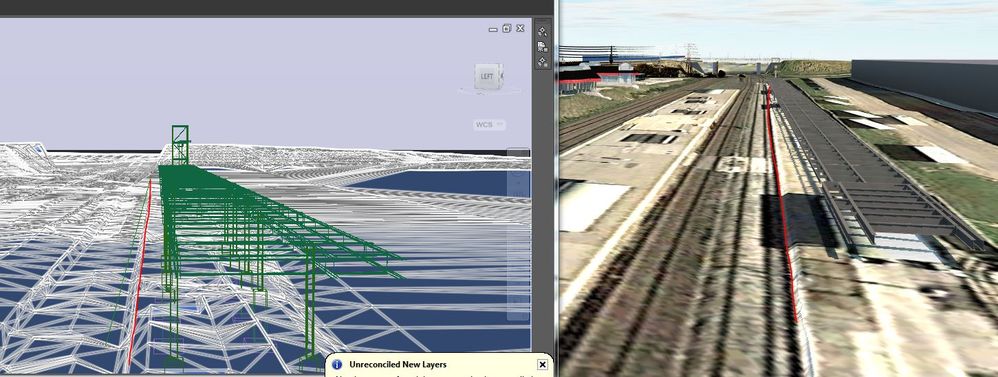
 

Civil _AIW Compare.JPGRevit.JPGCapture.JPG

0 Likes
Accepted solutions (1)
3,662 Views
19 Replies
Replies (19)
Message 2 of 20

Anonymous
Not applicable

Hi @NDM_USER,


1. question: why do you go to FBX?

2. have you tried this? https://thecadgeek.com/blog/2015/10/shared-coordinates-civil-3d-revit/

3. why do you turn it into IW and not into revit???


Best

Was this answer helpful? If so, please click the ACCEPT AS SOLUTION or the KUDO button


Nicola Ianeselli
BIM Manager

Twitter | LinkedIn

Infraworks Ambassador

Want to present in Infraworks? Vote this up!

0 Likes
Message 3 of 20

pat.lowe
Alumni
Alumni

Hi @NDM_USER


My name is Pat and I am with Autodesk Technical Support.  Why are you converting to FBX to bring it into Infraworks?  A different method is just to attached the file directly.  Here is a workflow for it.


Pat Lowe

Technical Support Specialist

Please click on "Accept as Solution" if post helped you resolve the issue.
Message 4 of 20

NDM_USER
Enthusiast
Enthusiast

First of all thanks for your response.


1. why FBX , because direct Revit import to IW messes up the geometry

2.My issue is not setting the  shared coordinate system....as I said before it works  pretty good between Revit and CAD

3.Sorry but I don't understand the questions.


0 Likes
Message 6 of 20

pat.lowe
Alumni
Alumni

Hi @NDM_USER


How  much of a gap between versus where the structures are and where they should be is there?


Pat Lowe

Technical Support Specialist

Please click on "Accept as Solution" if post helped you resolve the issue.
0 Likes
Message 7 of 20

NDM_USER
Enthusiast
Enthusiast

Within 1deg error.

0 Likes
Message 8 of 20

NDM_USER
Enthusiast
Enthusiast

Try to export a straight Wall of 300 linear meters from revit to IW. Then export the wall from Revit to CAD ( use shared coordinates system). Use  the wall to produce and SDF  and export to IW. Let me know if it's aligned .

0 Likes
Message 9 of 20

pat.lowe
Alumni
Alumni

Hi @NDM_USER


Sorry for the late response.  I apologize for that.  Was searching through Autodesk, and it turns out one other person has come across this.  https://forums.autodesk.com/t5/revit-structure-forum/british-national-grid-co-ordinates-revit-2015/m... We are determining now if this is a bug and if there is a workaround for it.


Pat Lowe

Technical Support Specialist

Please click on "Accept as Solution" if post helped you resolve the issue.
0 Likes
Message 10 of 20

olivier.berrier
Contributor
Contributor

Hello,

I have the same problem when I import a FBX file (representing a long 3DSolid) in Infraworks.It looks like it is rotated around its centroid in Infraworks.


Very simple test :

1) in AutoCAD, create a long square box (1 * 300 * 1), aligned by Y axis (imagine a very long square pipe network)

2) fbxexport to create the FBX file

3) import it in Infraworks : the 3DSolid is at the right place but slightly rotated around the centroid.


I tested the IFC format.

The IFC file of the 3DSolid is OK in Solibri (ie. coordinates are good), but in Infraworks it's rotated again !


Thanks for solving that problem.


Olivier BERRIER
www.geo-media.com
Message 11 of 20

Ellen.Yuan
Autodesk
Autodesk

@NDM_USER


Regarding the geometry messed up issue of Revit import, probably because the model is far away from the project base point. There is a known issue. You can work around it with different settings in Revit. Check attached document for reference if interested.


Maybe you can try to bring in the Revit model directly without FBX conversion to reduce precision lost.


Regards,

Ellen

0 Likes
Message 12 of 20

olivier.berrier
Contributor
Contributor

Hello,

I don't use Revit. I export directly my drawing (surface, networks, road components, road signs) from AutoCAD to Infraworks (see link below)


"There is a known issue" : so why it is not solved ? what is that angle ?

THe coordinates are big, but it's usual in a geolocated drawing.


I tried to simplify : in AutoCAD, translate the 3DSolid near (0,0), then export to FBX, then import in Infraworks and apply the offset in the data source configuration => same problem !


http://www.geo-media.com/solutions/bim-technologies/echanges-imx-des-donnees-infrastructures

Olivier BERRIER
www.geo-media.com
0 Likes
Message 13 of 20

NDM_USER
Enthusiast
Enthusiast

Any luck solving this issue ?

0 Likes
Message 14 of 20

Glenn.Coppard
Advocate
Advocate

Hi @NDM_USER sounds like the same issue we've always had (described here).


Thing to remember with IW, what you see on screen is a re-projection into a Psuedo (Web) Mercator Projection, (which is a spheroidal projection = easy maths).
IW re-projects most data sources (like SHP/SDF, Land XML, DEM's etc...) but not 'generic' 3d Models (like REVIT, FBX, 3d DWG, IFC etc...), these are treated as 'single point instances' (ie. a trash can, or a parked car), as such, for bigger objects, like bridges / tunnels / long railway platforms, these will have some degree of misalignment with other re-projected elements (like the road or railway).  That is why they match fine in AutoCAD / Navisworks / 3DS / 12d Model / BRT-OpenRoads etc... but not in IW.


Fudging things +1° +0.01m is still only to get a best fit, so YMMV. If you've verified that your data is coordinated properly (in your authoring packages), then the best IW can offer is a pretty picture.

Other similar posts / problems for reference:
 Here;  and Here; another; Flying cars is a good oneOne more

Message 15 of 20

NDM_USER
Enthusiast
Enthusiast

Pretty pictures indeed !!! 

In simple terms this is a conversion issue , conversion from  ground to grid coordinates and Autodesk is not interested in fixing this  major issue in IW.

0 Likes
Message 16 of 20

lippola
Alumni
Alumni
Accepted solution

Hey,

the rotation compensation for 3D model import into IW is fixed now. Currently it can be tested in the roling sandbox.

Message 17 of 20

NDM_USER
Enthusiast
Enthusiast

In the rolling sandbox I see the build 2293 from June 2019 ?Please confirm if the build 2293 includes the fix to the grid -ground conversion ( rotation issue) ?

Please confirm the latest release 2020.1 includes the build 2293?


0 Likes
Message 18 of 20

NDM_USER
Enthusiast
Enthusiast

Finally after so many years this issue has been fixed. Many thanks

Dorin

0 Likes
Message 19 of 20

Anonymous
Not applicable

Hi Dorin, 

After several weeks of research with the same problem and no solution, I can see now that you manage to sort this out.

Could you please confirm which version of IW has fixed this issue? I am running IW 20.1.62.0


Thanks

Chris

0 Likes
Message 20 of 20

NDM_USER
Enthusiast
Enthusiast

The fix is currently available only in Infraworks Rolling Sandbox. Not sure when they will release it .

0 Likes