i need help on this one

i need help on this one

Anonymous
Not applicable
6,138 Views
32 Replies
Message 1 of 33

i need help on this one

Anonymous
Not applicable

Hey everyone im trying to do a flag, the flag is shaped like it is blowing in the wind. i dont even know where to start on this project. i have spent over a week trying to figure out how to do this. all have not worked. i am open for suggestions. this project is made out of wood.  i'll post a picture of what it looks like. 


thanks everyone FYHDKJNJIUJXVD5.LARGE.jpg

0 Likes
6,139 Views
32 Replies
Replies (32)
Message 2 of 33

ToddHarris7556
Collaborator
Collaborator

Welcome to the forums, and that looks like a fun project.


When you say you're 'trying to do a flag'.... maybe you could be a little more specific?

What exactly are you trying to 'do'?


Personally, if I were using Fusion 360 to model that for eventual carving out of wood, my workflow might look like:

1) Extrude a rectangle for the basic stock shape.

2) Create a sketch of a wavy 'wind-blown' shape on the bottom edge of the flag.

3) Create a guide rail of some sort to use to sweep the wavy shape up at a diagonal across the face.

4) Use that sweep to cut out the stock, leaving an undulating face.

5) Throw it on the CNC router to rough out the surface, and finish by hand. 

6) Hand-paint/woodburn the stars & stripes in.


Conceivably, the stars & stripes could be sketched separately and projected to the surface for engraving, if you wanted either just faint guidlines, or some actual engraved/debossed features.


I don't know if that's what you were looking for? 


Todd
Product Design Collection (Inventor Pro, 3DSMax, HSMWorks)
Fusion 360 / Fusion Team
Message 3 of 33

melvinbrian3d
Advocate
Advocate

@ToddHarris7556 wrote:

Welcome to the forums, and that looks like a fun project.


When you say you're 'trying to do a flag'.... maybe you could be a little more specific?

What exactly are you trying to 'do'?


Personally, if I were using Fusion 360 to model that for eventual carving out of wood, my workflow might look like:

1) Extrude a rectangle for the basic stock shape.

2) Create a sketch of a wavy 'wind-blown' shape on the bottom edge of the flag.

3) Create a guide rail of some sort to use to sweep the wavy shape up at a diagonal across the face.

4) Use that sweep to cut out the stock, leaving an undulating face.

5) Throw it on the CNC router to rough out the surface, and finish by hand. 

6) Hand-paint/woodburn the stars & stripes in.


Conceivably, the stars & stripes could be sketched separately and projected to the surface for engraving, if you wanted either just faint guidlines, or some actual engraved/debossed features.


I don't know if that's what you were looking for? 


Totally AGREE!!


MelvinBrian3D
0 Likes
Message 4 of 33

jeff_strater
Community Manager
Community Manager
Accepted solution

here's how I would approach this:


  1. create a sketch that has the shape of the stars and stripes
  2. extrude each piece as a separate body
  3. create a Form feature
  4. create a plane
  5. rotate the plane how you want the "waves" to go
  6. using Edit Form, raise or lower the edge chains along your "waves"
  7. exit Form
  8. use the resulting surface body to split all the bodies from step 2
  9. Remove the top halves of each body
  10. apply appearances to each piece

Here is a screencast (sorry, no audio, did not want to disturb the family...), where I illustrate a simplified version of this (not the right number of stripes, only one star, and I did not finish applying the materials to the bodies).  If this is not clear, I can try to explain more fully later.


Jeff Strater
Engineering Director
Message 5 of 33

sanket223.patil
Collaborator
Collaborator
Accepted solution

I just tried this . I was going to try loft , Just remembered sweep is good tool for this .  


Sanket Patil
Mechanical Engineering
Expert Elite
0 Likes
Message 6 of 33

melvinbrian3d
Advocate
Advocate

interesting... thanks for sharing


MelvinBrian3D
0 Likes
Message 7 of 33

Anonymous
Not applicable


@AnonymousForm environment is used in such designs, you can simply create a plane in form modeling and lift every second column fully, now split it using a rectangle drawn at certain angle. Done!

________________________

RISHI ADITYA SHARMA
STUDENT EXPERT at AUTODESK

Logo

0 Likes
Message 8 of 33

Anonymous
Not applicable

is there anyway you can show it. im going to try each way. yours kinda makes sense just not really an expert with fushon 360. im learning

0 Likes
Message 9 of 33

Anonymous
Not applicable

wow you make it look so easy. ill try and do this. 

0 Likes
Message 10 of 33

sanket223.patil
Collaborator
Collaborator

Try that out . If you need I will share full video .

Sanket Patil
Mechanical Engineering
Expert Elite
0 Likes
Message 11 of 33

TrippyLighting
Consultant
Consultant

I would definitely use T-Splines here. While the screencast only shows the basic technique after you have created the base wavy structure you can modify individual T-Spline vertices and make the whole thing look a little more random just like a real flag.


I personally would probably use a cloth simulation in Blender and export the resulting mesh for use in Fusion 360.


EESignature

0 Likes
Message 12 of 33

Anonymous
Not applicable

@tippylighting i tried that the problem i had was it wouldnt round the peaks. it almost looked like mountains. you have any suggestions on how to round them?

0 Likes
Message 13 of 33

TrippyLighting
Consultant
Consultant

Try to switch to Smooth view mode


EESignature

0 Likes
Message 14 of 33

chrisplyler
Mentor
Mentor
Accepted solution


Model whatever you're going to model, and then cut the top off with something else.


Message 15 of 33

melvinbrian3d
Advocate
Advocate
Accepted solution

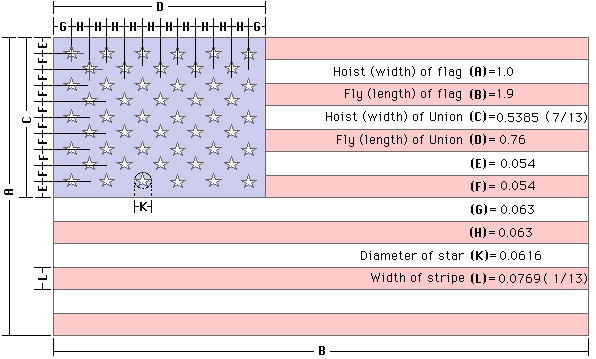
i Open a Sketch and Add all the dimensions there, i use this dimensions...

then as @chrisplyler said i extrude all Bodies in their corrects components, then i created a contruction plane at 45 angle from origin and draw a few waves, then extrude and cut against the entire flag


if you want the file, i can share with you.


Here are picture of a quick render

USA_Flag_2018-Aug-26_10-57-21PM.pngUSA_Flag_2018-Aug-26_10-57-50PM-000_CustomizedView26752391786.pngUSA_Flag_2018-Aug-26_10-56-54PM.png


MelvinBrian3D
Message 16 of 33

Anonymous
Not applicable

@melvinbrian3d that looks amazing. very well done. if you dont mind id like to use your file. 

thanks


0 Likes
Message 17 of 33

melvinbrian3d
Advocate
Advocate
Accepted solution

@Anonymous wrote:

@melvinbrian3d that looks amazing. very well done. if you dont mind id like to use your file. 

thanks


Thanks!!,


Enjoy Here Is The File.


MelvinBrian3D
0 Likes
Message 18 of 33

Anonymous
Not applicable

@melvinbrian3d thanks i will. but i still want to learn this fusion 360. its a powerful program. im looking forward to learning from all yall on here. i go home tomorrow. so i will be trying all yalls ways. 

0 Likes
Message 19 of 33

melvinbrian3d
Advocate
Advocate

@Anonymous wrote:

@melvinbrian3d thanks i will. but i still want to learn this fusion 360. its a powerful program. im looking forward to learning from all yall on here. i go home tomorrow. so i will be trying all yalls ways. 


if you have any doubts just post as this one....


if you found i helped you, do not forget to give me kudos.... and mark my comment as solution


MelvinBrian3D
Message 20 of 33

Anonymous
Not applicable
@melvinbriN3d what are the detentions of that Flag? Is the numbers on that flag 9mm or inches? How do you do your stars?
0 Likes