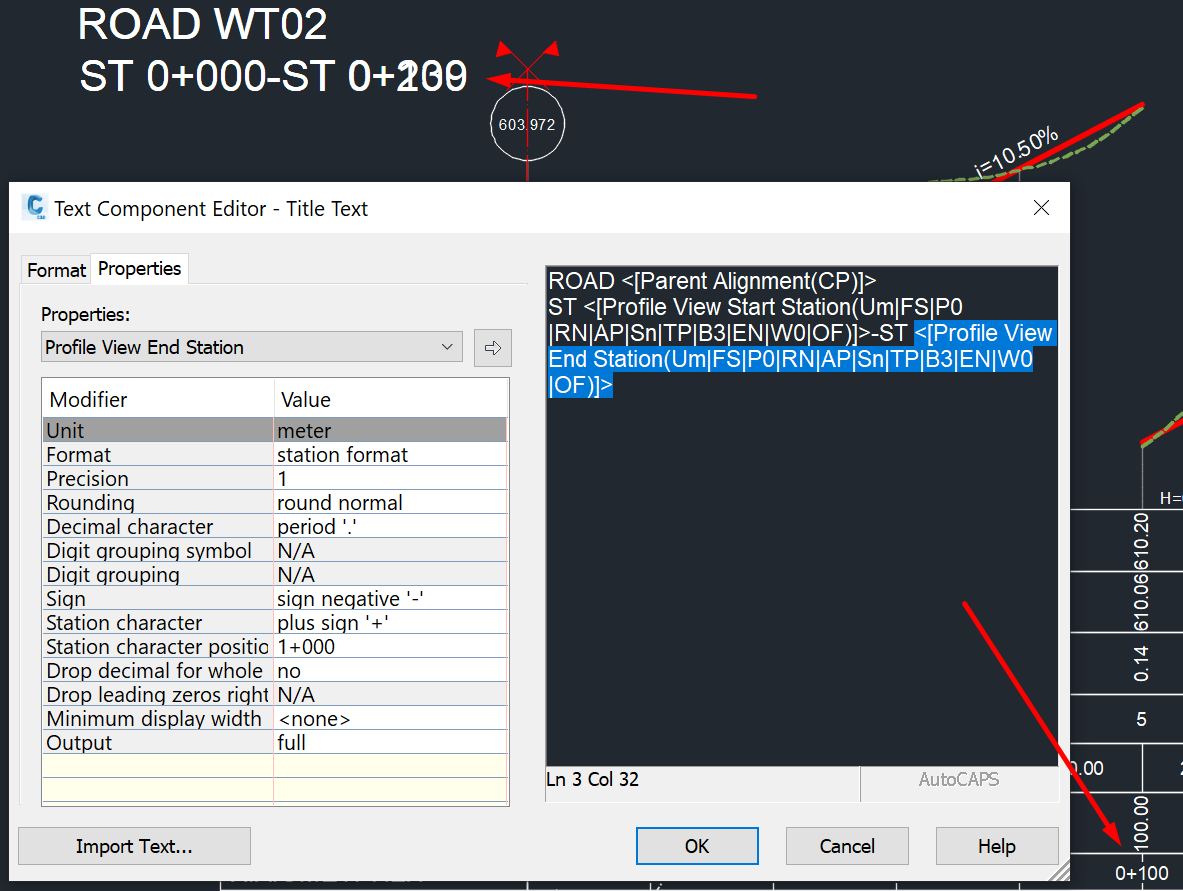
Splitted Profile View title text has multiple end stations

Splitted Profile View title text has multiple end stations

antonioygeo
Contributor Contributor
2,344 Views
6 Replies
Message 1 of 7

Splitted Profile View title text has multiple end stations

antonioygeo
Contributor
Contributor

Hello,


I have a split profile view and I'm trying to create a title text that will contain the Profile View End Station.

However it seems like the station which is splitted, is considered to be an End Station as well. So my title has more than one End Sations.


Is there a workaround?


Current Version: Autocad Civil 3D 2020

0 Likes
Accepted solutions (1)
2,345 Views
6 Replies
Replies (6)
Message 2 of 7

MMcCall402
Mentor
Mentor

I wasn't able to reproduce this.


Would it be possible to post a file with this issue?

Mark Mccall 
CAD Mangler


EESignature


VHB - Engineering, Inc.

0 Likes
Message 3 of 7

antonioygeo
Contributor
Contributor

Sure, I've created a new drawing from scratch, because in my drawing there are lots of greek characters.

0 Likes
Message 4 of 7

antonioygeo
Contributor
Contributor

Any solution anyone?

0 Likes
Message 5 of 7

MMcCall402
Mentor
Mentor
Accepted solution

Ok, I think I've got it.


Go to the Profile View Properties and to the Elevations tab.  In the Split profile view data area you'll see profile view styles applied to each of the profile view splits.  Note that the first split has a style of Standard and the others a style of standard No title.  That first split's style is where the duplicate end station labeling is coming from.  Edit the first split's style to also be standard No title and it will stop the duplicate labelling.


It appears that when there is a split that each split section of the view can act as a sort of sub-profile view within an overall profile view.  This can create view titles for each one separately along with one for the overall view.  Your titles were anchored to the left side so their placement coincided.  If they were anchored to the bottom middle it would have been easier to see. 


image.png

Mark Mccall 
CAD Mangler


EESignature


VHB - Engineering, Inc.

Message 6 of 7

antonioygeo
Contributor
Contributor

Ok, I did so many split views that I totally forgot that the profile view has its own style. That solved my problem.

Thanks a lot. 

0 Likes
Message 7 of 7

velenjani.dube
Explorer
Explorer

This shows the beginning and end stations for just one of the split profiles,. How do you show the start station of the first profile and end station of the last profile.


On the attached screen shot the title show station 100 to 150. I want show 50 to 150.


Anyone with solution.


The solution should be applicable for multi-splits per section.

0 Likes