cancel
Showing results for 
Show  only  | Search instead for 
Did you mean: 

BIM 360 DOCS - Share files outside of project

BIM 360 DOCS - Share files outside of project

Hi,

lots of clients upgrade from BIM 360 TEAM to BIM 360 DOCS, which is far superior. But DOCs is missing some really basic functionalities, like - File sharing OUTSIDE of the project (like TEAM can).

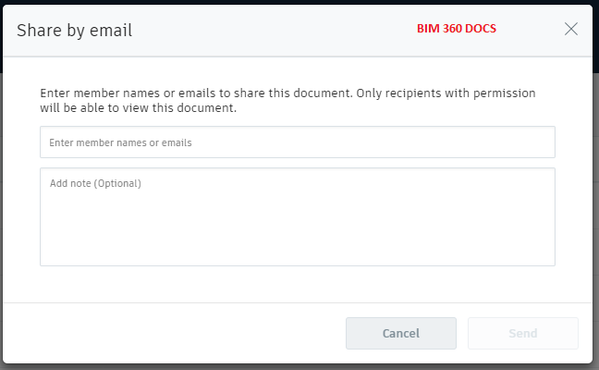
See below image of DOCS sharing options and TEAM sharing options. Docs can share only with project members (which is totally useless 😞 because they already have access to it). 

At least add the option to share it by link to anyone. 

BIM 360 TEAM sharing.pngBIM 360docs sharing file.png


Additionaly, you can add:

- Log of all shared files

- Set expiration to shared files

- Maybe add this option only to users with edit/upload permissions.


Please Autodesk, this is "Must have". You don't develop the BIM 360 TEAM anymore, which is fine, but lot of users switch to DOCs and this basic thing is missing.

Thx,

Matt

145 Comments
Anonymous
Not applicable

@Anonymous yes. we updated the https://transfer.contecht.eu/ to allow users access to BIM360 Team and Docs. We currently transfer files, no folders or complete projects. This is something on our to-do list. 

Currently, we transfer the last version of the file, although at the destination folder a new version is created if the file (with the same name) already exists. 

Anonymous
Not applicable

@Anonymous  Thanks, we have a bunch (~200) of projects which are just hosting DWFx that would like to move from Team to Docs, but need a share link function added to Docs by Autodesk (in the works they say) before we can. Moving versions, even as discrete named files (below) would be nice but not essential.

Will be  in touch when the time comes.


Team

Filename.dwfx Versions 1-3


Docs

Filename_V1.dwfx

Filename_V2.dwfx

Filename_V3.dwfx


Anonymous
Not applicable

@Anonymous moving the files with all the versions between the two platforms should not be a problem. I will let you know once we implemented this functionality. In the meantime, maybe you can give the app a try and let me know what you think. 

Accessing  BIM360 Team projects through https://transfer.contecht.eu/ only requires you to login to your Team account. 

Accessing BIM360 Docs projects requires to add our app as integration (you'll need admin rights). 

https://youtu.be/MoVINiMNI2Q

Kev_D
Collaborator

Has this been introduced yet? I remember there being a lot of talk about it in the last few months saying that this ability is coming soon. Any idea of a timeframe?

jsanders
Advocate

We are still waiting for this... So frustrating...

Anonymous
Not applicable

Near future = when ?

Next month / Next Year / ...

Anonymous
Not applicable

This is literally the only reason we are stuck on BIM 360 Teams. With remote working being a HUGE priority, now essential, soon to be mandated here, frustrating not to have this

deryushkin
Participant

IMG_20200320_191054_967.jpg

Congratulations, people!!

wlelek
Contributor

@deryushkinThose are great news!


Thank you Autodesk team for implementing this crucial feature.

m.fauchet
Advocate

Yessss!


Good News !


Great Thanks

ckline
Contributor

So a year and a half later we are still waiting for the ability to share files with outside sources without costing our company a license on BIM 360 Docs.  I know multiple people on here feel it should have been available at launch and I feel the same way.


Can we at least get an update as to when it will be available?

budzinauskas
Participant


@cklinethe feature was made available a couple of days ago! Check the few last posts! It works well!;)

 
Anonymous
Not applicable

Hi there,


It's great news that this feature is implemented now.


I have, however difficulties with using it. After activating "Public link for a project" option in advanced settings I'm trying to share a drawing. 


After selecting a drawing and hit on "share" button there is window with headline "Share with project members". I can't see how to share with people outside the project. 


Could you explain it to me @penny_yu ?


Thanks,

Anonymous
Not applicable
Click on "Share with project members", you should see a dropdown/flyout with share public as an option
Anonymous
Not applicable

I can't click it. There is no dropdown list here...


123.JPG

deryushkin
Participant

It works only in project files not plans

Anonymous
Not applicable

Nice feature, but not the same functionality as BIM360 TEAM had.

They need to download the files, so they need REVIT to view a model.


Using the viewer with a shared link was possible in BIM360 TEAM, why not in BIM360 DOCS ?

Now we need to copy a project back to BIM360 TEAM to have the ability to :

  • share a link for a longer period (DOCS limit is 3 months)
  • use the viewer for shared links (a suggestion to use REVIT as a viewer is useless for those not working with REVIT - they need a simple viewer)- Download is OK for PDF-files, but also there 

It feels like going back in time.  Why not keep the good things (public share in viewer, especially for REVIT) from BIM360 TEAM or BIM360 DOCS ?

Anonymous
Not applicable

PUBLIC SHARE_BIM360 TEAM.jpg

Anonymous
Not applicable

Agree @Anonymous  To have the share default to download is not helpful at all for our use. Given the length of time this feature has been 'coming soon' more than surprised it can not at least match the BIM 360 Team behavior.

MthulisiMdluli
Explorer

This is the reason why BIM 360 is becoming less of an option for those of us using it as a project CDE. It is so admin heavy it defeats one of the main objectives of investing in a CDE - efficiency and speed of information access! If we are to keep jumping between Plans and Projects, wouldn't it make so much sense to introduce a copy/paste or link between forlders if you name them the same? Or a simple 3 click workflow to duplicate files across? One would think recreating the functionality from BIM 360 Team would actually make this easier for the Autodesk Development team

Can't find what you're looking for? Ask the community or share your knowledge.

Submit Idea