Layout view dispays in Black & White

Layout view dispays in Black & White

Anonymous
Not applicable
94,134 Views
22 Replies
Message 1 of 23

Layout view dispays in Black & White

Anonymous
Not applicable
For some reason some of my files are displaying as black and white in Layout view. The files display as they should in color in model space. These files contain color layers but the color can only be viewed in Paper space when I select an object and am moving it.
0 Likes
Accepted solutions (1)
94,135 Views
22 Replies
Replies (22)
Message 2 of 23

Anonymous
Not applicable
PAGESETUP command for that layout, uncheck the box for displaying plot styles. -- Dean Saadallah Add-on products for LT http://www.pendean.com/lt --
Message 3 of 23

Anonymous
Not applicable

thanks, but its not showing the original given line thickness which i given in penstyle how to make that one 

Message 4 of 23

Charles_Shade
Mentor
Mentor
Accepted solution

What is your CAD version?

From the Command Line LINEWEIGHT and choose Display Lineweight

Or tap the fat + sign (LWT) in the Tray to turn Lineweight on.

Message 5 of 23

Anonymous
Not applicable

Thanks, its work

0 Likes
Message 6 of 23

Anonymous
Not applicable

hi, i would like to know why even I check the "display plot style" Im not able to see the black and white in my drawing, it is still on colors, what can i do?

0 Likes
Message 7 of 23

pendean
Community Legend
Community Legend
You have the wrong/incorrect PLOT STYLE TABLE selected.
OR
You may also be selecting the wrong type of plot style table: STBs don't work like CTBs for example.
OR
you just forgot to check the box called PLOT WITH PLOT STYLES.
0 Likes
Message 8 of 23

WALEED-131274
Community Visitor
Community Visitor

thanks

0 Likes
Message 9 of 23

Anonymous
Not applicable

Thanks Bro for resolving my issue. keep solving...

Message 10 of 23

Anonymous
Not applicable

This is not solved.  The question, and my current problem, is that the colors do not display in the viewport.  Displaying the lineweight does not work for me.

Message 11 of 23

pendean
Community Legend
Community Legend
Post your DWG file along with your plot style table, let's all have a look for ourselves.
0 Likes
Message 12 of 23

rkmcswain
Mentor
Mentor
@Anonymous - have you checked the third item in post #7 of this thread. That is what your issue sounds like.


0 Likes
Message 13 of 23

shabee.fatima
Explorer
Explorer

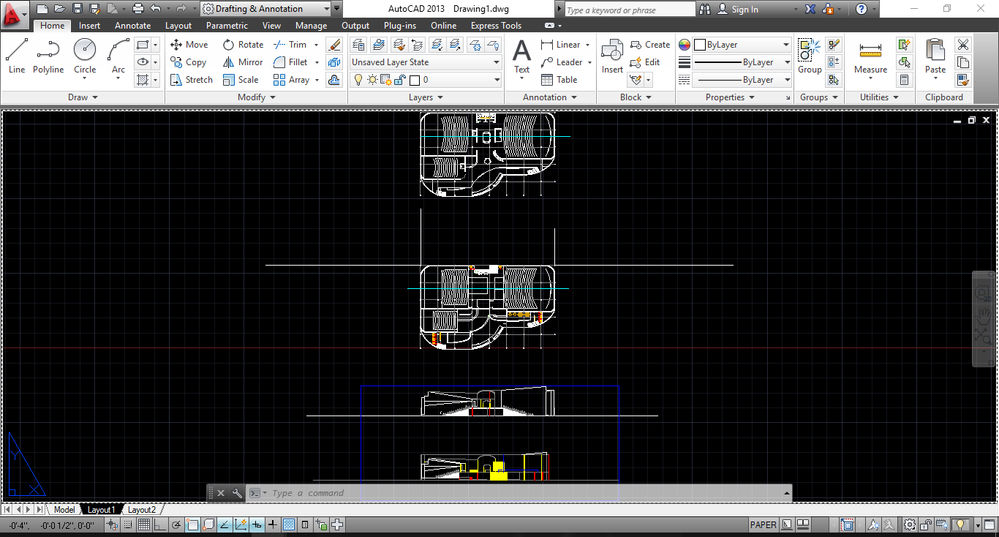
i have autocad 2013 and my layout window doesnot open like others as a white window and i can`t plot to scale

0 Likes
Message 14 of 23

pendean
Community Legend
Community Legend
Share screenshots of what you see and your source DWG file too.
0 Likes
Message 15 of 23

shabee.fatima
Explorer
Explorer

1.PNG2.PNG

0 Likes
Message 16 of 23

shabee.fatima
Explorer
Explorer

3.PNG

0 Likes
Message 17 of 23

pendean
Community Legend
Community Legend
What happens if you click on LAYOUT2?
What happens is you start a new file, then INSERT this file into it, then click on LAYOUT1 in that new file?

FYI AutoCAD2013 is not supported in Windows 10, hope that's not the real problem http://autode.sk/1IY4C2X
0 Likes
Message 18 of 23

shabee.fatima
Explorer
Explorer

the same thing happens in new file as well.

i have been using autocad 2013 in windows 10 always

0 Likes
Message 19 of 23

pendean
Community Legend
Community Legend
Can you share your DWG file here please?

>>>..using autocad 2013 in windows 10 always...<<<
FWIW you simply lucked out so far: one day it will stop working,so have a backup plan ready as no one at Autodesk will help and your clients will not accept the excuse.
0 Likes
Message 20 of 23

shabee.fatima
Explorer
Explorer

Here is the dwg file

okay then maybe autocad 2015-17 will work with windows 10?

0 Likes