About pixel shifts in viewport.

About pixel shifts in viewport.

Anonymous
Not applicable
2,977 Views
7 Replies
Message 1 of 8

About pixel shifts in viewport.

Anonymous
Not applicable

Hello, I'm a third year architecture student. I have been using autocad for 2 years, but for the last 1 week, the pixels on my viewport have started to shift. There is no such problem in other programs.. As you can see, shifts occur only in viewport. There is no disruption in the toolbar. I would be glad if you can help me. 

0 Likes
Accepted solutions (1)
2,978 Views
7 Replies
Replies (7)
Message 2 of 8

Alfred.NESWADBA
Consultant
Consultant

Hi,


>> the pixels on my viewport have started to shift.

Wow, you are the third one with this issue.

Previously I thought it's an hardware issue, but seeing now the third case it looks more like a defect driver update.


Can you please start command _ABOUT as well as _GRAPHICSCONFIG and show a screenshot of this dialog?

Also please let us know which updates (operating system or graphic card) was installed within the last few days.


This is one of the other users having this issue >>>click<<<

And here the third one >>>click<<<


Maybe the others can continue here and show their screenshots of command _GRAPHICSCONFIG too, maybe we find the piece which is the same for all of you ...


- alfred -

------------------------------------------------------------------------------------
Alfred NESWADBA
ISH-Solutions GmbH / Ingenieur Studio HOLLAUS
www.ish-solutions.at ... blog.ish-solutions.at ... LinkedIn ... CDay 2026
------------------------------------------------------------------------------------

(not an Autodesk consultant)
0 Likes
Message 3 of 8

Anonymous
Not applicable

I didn't expect you to answer that fast. Thank you! I did what you said, I added screenshots below.

0 Likes
Message 4 of 8

Alfred.NESWADBA
Consultant
Consultant

Hi,


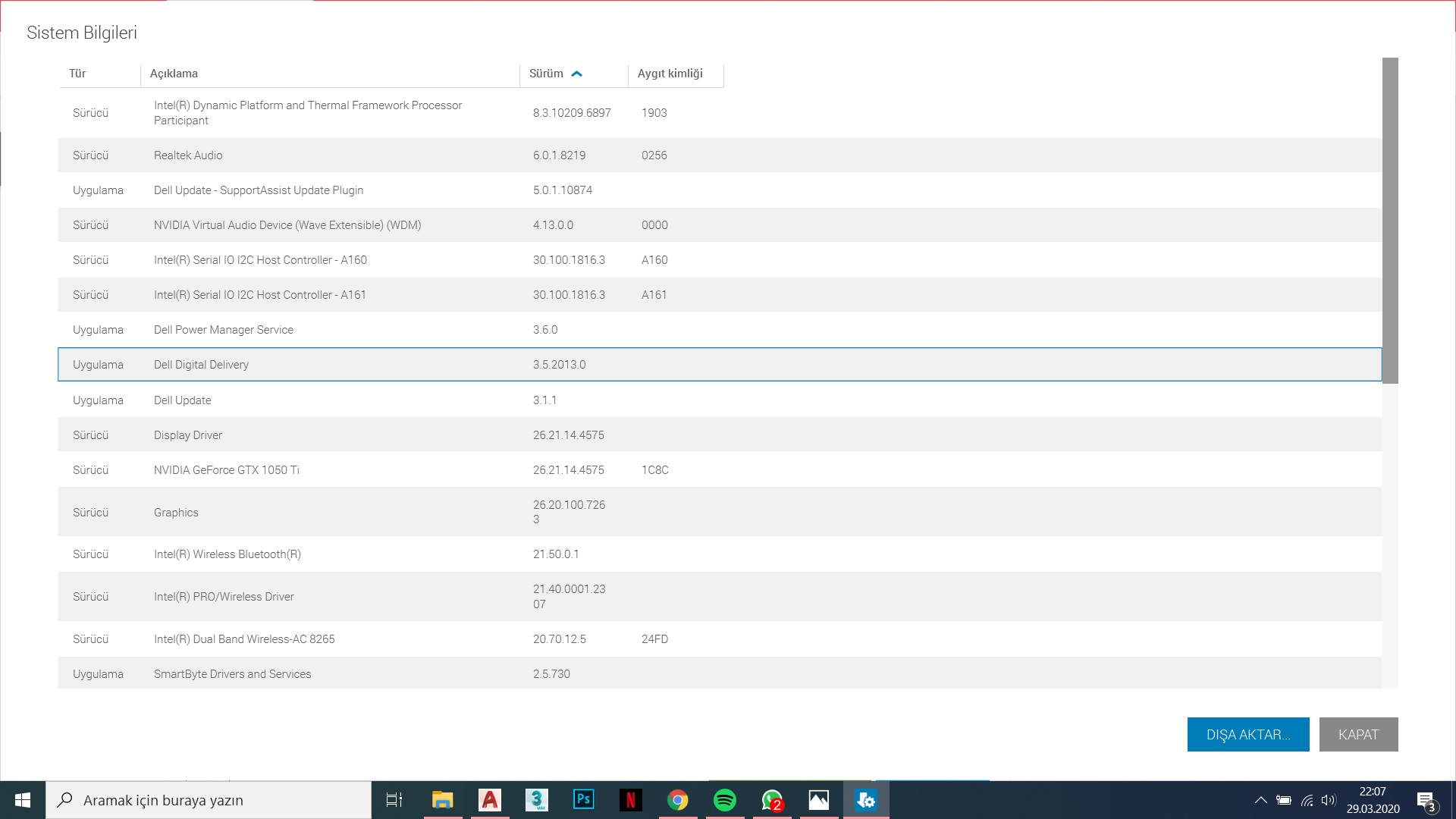
thank you, one of the others also have a nVidia GTX (1050Ti), but we don't know which driver, so we need to wait a bit.


- alfred -

------------------------------------------------------------------------------------
Alfred NESWADBA
ISH-Solutions GmbH / Ingenieur Studio HOLLAUS
www.ish-solutions.at ... blog.ish-solutions.at ... LinkedIn ... CDay 2026
------------------------------------------------------------------------------------

(not an Autodesk consultant)
0 Likes
Message 5 of 8

rahulkarna
Participant
Participant

attached 

0 Likes
Message 6 of 8

Alfred.NESWADBA
Consultant
Consultant
Accepted solution

Hi,


thank you for your screenshot ... you are both using driver version 26.21.14.4575

So I would recommend to install an older driver (and disable the automatic update for nVidia).


My version (for GTX 1070) is a bit older, but very stable:  26.21.14.4141


- alfred -

------------------------------------------------------------------------------------
Alfred NESWADBA
ISH-Solutions GmbH / Ingenieur Studio HOLLAUS
www.ish-solutions.at ... blog.ish-solutions.at ... LinkedIn ... CDay 2026
------------------------------------------------------------------------------------

(not an Autodesk consultant)
0 Likes
Message 7 of 8

rahulkarna
Participant
Participant

Yeah, this is a problem with the latest update. Apart from Autocad, I encountered the same problem with Photoshop so I wanted to go back to an earlier version as I didn't have a problem with the old one, but then I thought let's see if there is something else to it. Now, it is certain that the graphics driver update is causing the issue. Thanks 😀

0 Likes
Message 8 of 8

Anonymous
Not applicable

I have been having the exact same issue on my laptop and installing an older nvidia driver for GeForce GTX 1050 Ti worked. They actually came with a hotfix for version 445.75 of the driver; 445.78. This does NOT solve the problem. So I did a clean install of a driver from when I remebered autocad working properly, it was released on march 19 called version 442.74.


Thanks alot for the solution, now I'm finally able to work with school again.


0 Likes