
Load theme settings name from a list definition

Load theme settings name from a list definition

Richard.Vivanco
Advisor Advisor
1,087 Views
8 Replies
Message 1 of 9

Load theme settings name from a list definition

Richard.Vivanco
Advisor
Advisor

Hi, i created a list definition with several names that i need for my project (bathroom, kitchen, dinner room, deposit, laundry etc)

I use this list  to assign a name to my spaces, i make this in the properties panel

My question is: its possible to load my list definition to assign the names in the Display Theme?  Right now i create one by one the same name that appears in my list definition, so i think its inefficient workflow.

Any ideas please?

Thanks
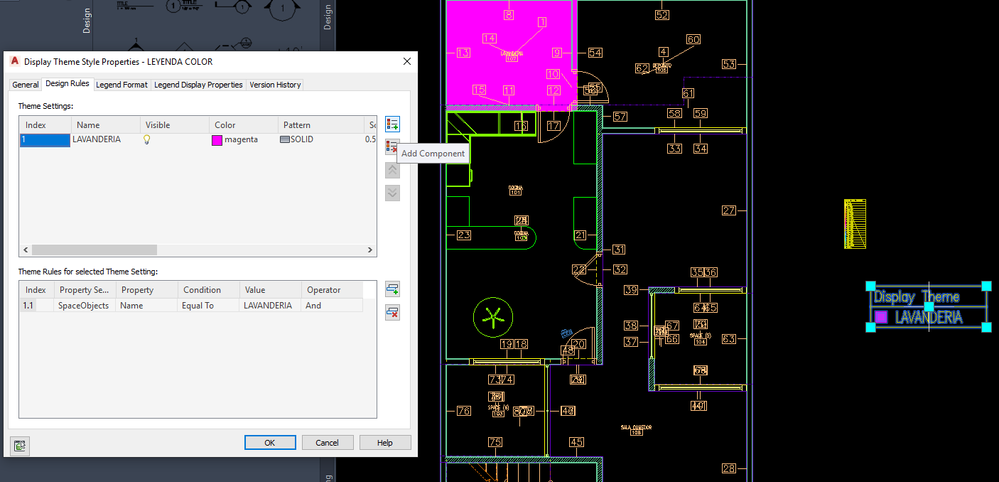
DISPLAY THEME.png


Richard Vivanco V.
Arq. BIM Manager + Autodesk Certified Instructor
Youtube | LinkedIn

autodesk 3DS pro

EESignature

0 Likes
1,088 Views
8 Replies
Replies (8)
Message 2 of 9

brian_adams
Collaborator
Collaborator

in my opinion it not possible

0 Likes
Message 3 of 9

Richard.Vivanco
Advisor
Advisor

Bad news...   if im not in a mistake, this workflow its possible in revit.  You create rooms, change the names, and then in the legend colors appears these names.

Maybe my AA workflow is not correct.


Richard Vivanco V.
Arq. BIM Manager + Autodesk Certified Instructor
Youtube | LinkedIn

autodesk 3DS pro

EESignature

0 Likes
Message 4 of 9

Anonymous
Not applicable

No, your workflow is correct. Just a limitation of the way themes in ACA work.

  • Would like to see the ACA Theme auto-populate like Revit does.
  • Would like Revit's themes to be applicable to any object type(not just rooms/spaces)/property like ACA's are.


Different platforms, different capabilities, One day...

Message 5 of 9

Anonymous
Not applicable

ACA/AMEP Zones are more akin to the room key in Revit graphically. Might be worth a look, but the workflow is still Edit Zone Template > Apply to spaces rather than dynamic from the space properties

Message 6 of 9

Richard.Vivanco
Advisor
Advisor

Thanks for the response, i will test it.


Richard Vivanco V.
Arq. BIM Manager + Autodesk Certified Instructor
Youtube | LinkedIn

autodesk 3DS pro

EESignature

0 Likes
Message 7 of 9

brian_adams
Collaborator
Collaborator

And it works good.! I use it this way...but the only problam is to make the exhaustive list of all posible rooms

0 Likes
Message 8 of 9

dbroad
Mentor
Mentor

This response is a possible partial workaround to the problem.

In the displaytheme style command, open the Display Theme Styles (Imperial) drawing.  Note the number of saved display theme styles.  Pick one (commercial, educational, medical, or residential). Then duplicate, and put your names in it.  Import the display theme style and save the display themes styles drawing. Not as automatic as importing an existing list but better than working from scratch.

Architect, Registered NC, VA, SC, & GA.
0 Likes
Message 9 of 9

Richard.Vivanco
Advisor
Advisor

Sounds good...i can use this in a template too

I will try.

Thanks 


Richard Vivanco V.
Arq. BIM Manager + Autodesk Certified Instructor
Youtube | LinkedIn

autodesk 3DS pro

EESignature

0 Likes
