Community
- Forums Home
- >
- Arnold
- >
- Arnold for Cinema 4D Forum
- >
- C4D lambert and surface material previews only render specularity and nothing else. Why is this?
Arnold for Cinema 4D Forum
Rendering with Arnold in CINEMA 4D using the C4DtoA plug-in.
Turn on suggestions
Auto-suggest helps you quickly narrow down your search results by suggesting possible matches as you type.
 This page has been translated for your convenience with an automatic translation service. This is not an official translation and may contain errors and inaccurate translations. Autodesk does not warrant, either expressly or implied, the accuracy, reliability or completeness of the information translated by the machine translation service and will not be liable for damages or losses caused by the trust placed in the translation service.
Translate
This page has been translated for your convenience with an automatic translation service. This is not an official translation and may contain errors and inaccurate translations. Autodesk does not warrant, either expressly or implied, the accuracy, reliability or completeness of the information translated by the machine translation service and will not be liable for damages or losses caused by the trust placed in the translation service.
Translate
C4D lambert and surface material previews only render specularity and nothing else. Why is this?
10 REPLIES 10
Reply
Topic Options
- Subscribe to RSS Feed
- Mark Topic as New
- Mark Topic as Read
- Float this Topic for Current User
- Bookmark
- Subscribe
- Printer Friendly Page
Message 1 of 11

Anonymous
1664 Views, 10 Replies
09-20-2017
01:24 PM
- Mark as New
- Bookmark
- Subscribe
- Mute
- Subscribe to RSS Feed
- Permalink
- Report
09-20-2017
01:24 PM
C4D lambert and surface material previews only render specularity and nothing else. Why is this?
Other types of Arnold shader types show visibly (such as "flat" and the texture shader networks). However, Arnold lambert and standard surface shaders only seem to show their specularity in the preview swatches. https://gyazo.com/e47bf0ffea65e74b495b2391d9da766f
10 REPLIES 10
Message 2 of 11


09-20-2017
03:05 PM
- Mark as New
- Bookmark
- Subscribe
- Mute
- Subscribe to RSS Feed
- Permalink
- Report
09-20-2017
03:05 PM
I don't see anything in the preview swatches. It looks like you created those shaders while the IPR was running, so the previews weren't rendered.
- While the IPR is running, material previews are not rendered because only one render session can be active in Arnold. Previews will be updated when the IPR is stopped. The last rendered preview is displayed with a small orange frame showing that the preview is delayed. The IPR is stopped when a render to Picture Viewer is started because of the same reason.
// Stephen Blair
// Arnold Renderer Support
Message 3 of 11
Anonymous
in reply to:
Anonymous
09-21-2017
07:36 AM
- Mark as New
- Bookmark
- Subscribe
- Mute
- Subscribe to RSS Feed
- Permalink
- Report
09-21-2017
07:36 AM
Hi Stephen - Thanks for the reply!
Unless it's turned 'on' by default even when it's window is hidden, I'm actually not certain that the Arnold IPR was running when I created the shaders, as I didn't even know it existed until you called it to my attention. It's possible that "Render View" (cmd+R) was in active mode for one of my viewports when I created the Arnold materials, which begs the question, will "cmd+R" automatically invoke the Arnold IPR in the active viewport if I have Arnold set as the active engine in the Render Settings panel?
In any event, I pulled up the Arnold IPR window from the Plugins menu. When I open the window, the start/stop render arrow is active (orange) by default, and the rendered image is visibly being calculated.
As the documentation states: "Previews will be updated when the IPR is stopped." I imagined that setting stop/start button to inactive (white) would turn off Arnold IPR altogether, and the material preview swatches would suddenly appear fully-rendered, but this is not what happened. Despite having turned off the Arnold IPR, the swatches still appear black.
Are there any other settings I ought to investigate in order to make the material preview swatches renderable?
Message 4 of 11
09-21-2017
08:11 AM
- Mark as New
- Bookmark
- Subscribe
- Mute
- Subscribe to RSS Feed
- Permalink
- Report
09-21-2017
08:11 AM
Try changing a parameter of the shader, or changing the preview model (right click a preview)
// Stephen Blair
// Arnold Renderer Support
Message 5 of 11
Anonymous
in reply to:
Anonymous
09-21-2017
01:14 PM
- Mark as New
- Bookmark
- Subscribe
- Mute
- Subscribe to RSS Feed
- Permalink
- Report
09-21-2017
01:14 PM
Stephen, thanks for your continued help. I gave both suggestions a try though I'm still not seeing any swatch update. I'm attaching a link to my scene file if you'd care to have a look https://www.dropbox.com/s/vveiver63lkhcyu/arnold-test-02.c4d?dl=0
Message 6 of 11
09-21-2017
02:01 PM
- Mark as New
- Bookmark
- Subscribe
- Mute
- Subscribe to RSS Feed
- Permalink
- Report
09-21-2017
02:01 PM
Hi Nik
I was able to get the swatches to render. I right-clicked a swatch and clicked Open Window.
The Arnold Material Preview Window is in auto-update mode by default, so then I just clicked each material in the Material Manager and the Preview Window updates with a rendered swatch.
Not sure why it doesn't work on your machine.
// Stephen Blair
// Arnold Renderer Support
Message 7 of 11


09-22-2017
02:28 AM
- Mark as New
- Bookmark
- Subscribe
- Mute
- Subscribe to RSS Feed
- Permalink
- Report
09-22-2017
02:28 AM
This happens when the plugin can not access the Arnold material preview scenes and the default C4D scene is used instead. When you right click on the preview you should see the Arnold scenes listed, like this:
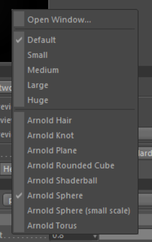
Make sure the scene files are in the [C4D install]/library/materialpreview folder and they are readable.
Message 8 of 11
Anonymous
in reply to:
Anonymous
09-22-2017
06:38 AM
- Mark as New
- Bookmark
- Subscribe
- Mute
- Subscribe to RSS Feed
- Permalink
- Report
09-22-2017
06:38 AM
Stephen, Peter,
Thanks for the responses. As it turns out, the material preview scene files ended up in a folder that was not the path [C4D install]/library/materialpreview but rather [C4D install]/plugin/library/materialpreview files. In the meantime, I copied them into the suggested folder and I can now see the preview swatches by right-clicking on the preview and choosing one of the Arnold options, as both of you suggested.
This does however make me wonder if I'd taken the best course of action when installing Arnold. As the documentation suggested, I pointed here when setting up my install destination: Applications/MAXON/CINEMA 4D R1x
Obviously, the material preview scenes ended up in the wrong place, so I have to wonder whether other things have as well. It appears most of Arnold's functions (lighting options, cameras, asset manager, etc.) are available to me through C4D's Plugins dropdown menu, but I'm not seeing icons for these types of things in my toolbar/shelf . Does this sound right?
Message 9 of 11
09-22-2017
06:50 AM
- Mark as New
- Bookmark
- Subscribe
- Mute
- Subscribe to RSS Feed
- Permalink
- Report
09-22-2017
06:50 AM
Yes, you have to point the installer to Applications/MAXON/CINEMA 4D R1x. That's the default, so you actually don't have to change anything just click Continue.I just tested the installer here and it works fine. What's your C4D, C4DtoA and Mac version?
The plugin files should be under Applications/MAXON/CINEMA 4D R1x/plugins/C4DtoA. For example the icons are in the res/icons subfolder.
Message 10 of 11

11-26-2018
02:25 PM
- Mark as New
- Bookmark
- Subscribe
- Mute
- Subscribe to RSS Feed
- Permalink
- Report
11-26-2018
02:25 PM
Is this thread still open? I can't seem to fix this. Everything is installed correctly but I can preview any shader. Pls help
Message 11 of 11
11-26-2018
02:28 PM
- Mark as New
- Bookmark
- Subscribe
- Mute
- Subscribe to RSS Feed
- Permalink
- Report
11-26-2018
02:28 PM
No, please ask a new question. And please specify what OS and what software versions you are using.
// Stephen Blair
// Arnold Renderer Support
Reply
Topic Options
- Subscribe to RSS Feed
- Mark Topic as New
- Mark Topic as Read
- Float this Topic for Current User
- Bookmark
- Subscribe
- Printer Friendly Page
