Continuing image file saving

Continuing image file saving

Dchimenti
Enthusiast Enthusiast
3,067 Views
7 Replies
Message 1 of 8

Continuing image file saving

Dchimenti
Enthusiast
Enthusiast


Hello, all.


I'm continuing to have image file saving problems with Max 2025. Problems that never existed in 2024,


First, while saving a PNG, I was not getting an alpha saved with it. Despite having the "alpha channel" box checked.

That problem continues to sit on the boards unsolved.


Now I'm simply trying to save a JPG file from the Active Shade screen and am getting differing results. What's being seen on screen is not being saved into the JPG.


I've attached the resulting JPG save,   as well as a screen grab of what the active shade window is actually showing.


Thank you.

0 Likes
Accepted solutions (2)
3,068 Views
7 Replies
Replies (7)
Message 2 of 8

RobH2
Advisor
Advisor
Accepted solution

I haven't tested the PNG issue you mention but I'll try to see if I have the same problems. 


As to the color, I've found the new OCIO option for Color Management problematic. I don't collaborate and share files with anyone so I just need for my files to look right. I don't use the OCIO color modes at all and use the Gamma Workflow and I don't have problems. I know that's "old school" but I don't have time to figure out all of the Color Mangement options with the new OCIO features that studios use. 


So, give Gamma Workflow a try or spend a week trying to figure out how OCIO works and what to do when you open it in Photoshop or UE and the colors are just all wrong...lol.... 🙂


Rob Holmes

EESignature

------------------------------------------------------------------------------------------------------------------------------------------
3ds Max (2025-2027), V-Ray 7, Ryzen 9 9950X3D Processor, DDR5 128MB, Gigabyte Aorus X870E Master motherboard, Sabrent Rocket NVMe Gen5 M.2 drives, NVidia RTX 4090, Space Pilot Pro, Windows 11 Pro x64, Tri-Monitor, Cintiq 13HD, Windows 11 x64
------------------------------------------------------------------------------------------------------------------------------------------
0 Likes
Message 3 of 8

RobH2
Advisor
Advisor

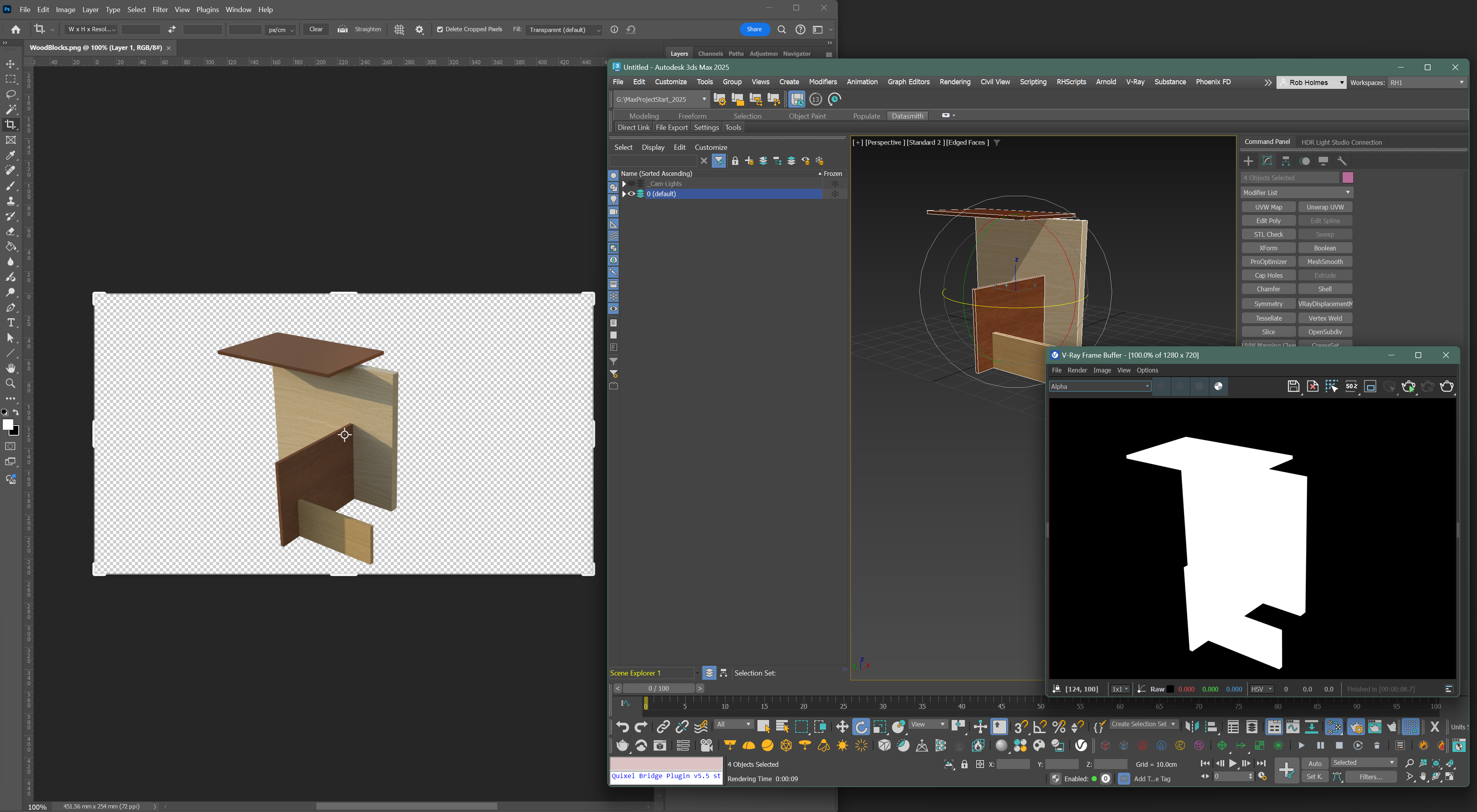
I tested exporting PNG renders from the Max Common Settings and it worked perfectly. I attached a shot showing Photoshop, Max and the V-Ray render window with 'Alpha' selected. What Render Engine are you using and could you have accidentally turned off a setting that it causing the problem?


Rob Holmes

EESignature

------------------------------------------------------------------------------------------------------------------------------------------
3ds Max (2025-2027), V-Ray 7, Ryzen 9 9950X3D Processor, DDR5 128MB, Gigabyte Aorus X870E Master motherboard, Sabrent Rocket NVMe Gen5 M.2 drives, NVidia RTX 4090, Space Pilot Pro, Windows 11 Pro x64, Tri-Monitor, Cintiq 13HD, Windows 11 x64
------------------------------------------------------------------------------------------------------------------------------------------
0 Likes
Message 4 of 8

RobH2
Advisor
Advisor

I went ahead and tested Arnold and no problems either. 


Rob Holmes

EESignature

------------------------------------------------------------------------------------------------------------------------------------------
3ds Max (2025-2027), V-Ray 7, Ryzen 9 9950X3D Processor, DDR5 128MB, Gigabyte Aorus X870E Master motherboard, Sabrent Rocket NVMe Gen5 M.2 drives, NVidia RTX 4090, Space Pilot Pro, Windows 11 Pro x64, Tri-Monitor, Cintiq 13HD, Windows 11 x64
------------------------------------------------------------------------------------------------------------------------------------------
0 Likes
Message 5 of 8

Dchimenti
Enthusiast
Enthusiast
Accepted solution

OK!!!!!


It turns out it was the #%@%ing default OCIO setting. Switched it to GAMA and I'm now getting alpha with my PNG sequence.    Unbelievable that I lost all those basic hours banging my head against the wall because Autodesk decided to flip a new switch by default.

Message 6 of 8

RobH2
Advisor
Advisor

You marked the wrong post as the solution as you just did what I had suggested. Users will figure it out and benefit from it regardless. Glad you are going again. 


Rob Holmes

EESignature

------------------------------------------------------------------------------------------------------------------------------------------
3ds Max (2025-2027), V-Ray 7, Ryzen 9 9950X3D Processor, DDR5 128MB, Gigabyte Aorus X870E Master motherboard, Sabrent Rocket NVMe Gen5 M.2 drives, NVidia RTX 4090, Space Pilot Pro, Windows 11 Pro x64, Tri-Monitor, Cintiq 13HD, Windows 11 x64
------------------------------------------------------------------------------------------------------------------------------------------
Message 7 of 8

MartinBeh
Advisor
Advisor

If OCIO indeed breaks the alpha channel in PNGs this should be reported as a bug.

Can anyone reproduce this?

Martin B   EESignature
→ please 'Like' posts that are helpful; if a post answers your question please click the "Accept Solution" button.
0 Likes
Message 8 of 8

RobH2
Advisor
Advisor

Can you explain the precice steps you are taking that lead to a broken alpha channel in PNGs? That way, people can do exactly what you are doing and see if they have the same issue.


If so, anyone who has the issue should report it as a bug. The more reports, the more attention it will get. 


Rob Holmes

EESignature

------------------------------------------------------------------------------------------------------------------------------------------
3ds Max (2025-2027), V-Ray 7, Ryzen 9 9950X3D Processor, DDR5 128MB, Gigabyte Aorus X870E Master motherboard, Sabrent Rocket NVMe Gen5 M.2 drives, NVidia RTX 4090, Space Pilot Pro, Windows 11 Pro x64, Tri-Monitor, Cintiq 13HD, Windows 11 x64
------------------------------------------------------------------------------------------------------------------------------------------
0 Likes