Lisp for creating table with selected text

Lisp for creating table with selected text

Anonymous
Not applicable
11,344 Views
21 Replies
Message 1 of 22

Lisp for creating table with selected text

Anonymous
Not applicable

Good Day!

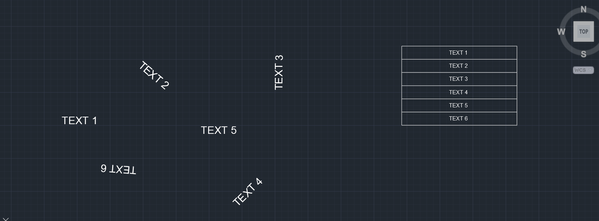
I would like to know if it is possible to create a table with a selected text. Please refer to the image attached.

Example:
If you select the texts "TEXT 1" , "TEXT 2", "TEXT 3", "TEXT 4", "TEXT 5", and "TEXT 6" respectively, regardless if it is rotated or not, it will transform into a table arrangement.
REQUEST.png

0 Likes
11,345 Views
21 Replies
Replies (21)
Message 2 of 22

rkmcswain
Mentor
Mentor

Do you want the text to be inserted into a single column, in the same order that you select them (presuming you pick them one at a time). Or do you want to window the text objects and then sort them somehow? If so, how?

0 Likes
Message 3 of 22

Anonymous
Not applicable

The same order if you select them respectively. Is that possible?

0 Likes
Message 4 of 22

rkmcswain
Mentor
Mentor
Accepted solution

Here is a simple example, feel free to edit as needed, it's a modified version of this.


(vl-load-com)
(defun C:Foo ( / *MS* A CNT I LST MYTABLE PT1 ROW SSET TLST)

  ; create an empty list, set a counter variable, and
  ; set a reference to the current model space.
  (setq lst '()
 i 0
 *ms* (vla-get-modelspace
             (vla-get-activedocument
             (vlax-get-acad-object)))
  )
  ; prompt the user to select text
  (princ "\n Select text ")
  (if (setq sset (ssget '((0 . "TEXT"))))
    ; if a valid selection set was generated, then proceed.
    (progn
    
      ; for each Text object selected, grab the string and store these values in a list
      (repeat (setq cnt (sslength sset))
	(setq ent (entget (ssname sset i)))
        (setq string (cdr (assoc 1 ent)))
        (setq lst (cons string lst))
        (setq i (1+ i))
      )
      (setq lst (reverse lst))
      ; pick a point for the table
      (setq pt1 (getpoint "\nPick point for table "))
      ; add the new table
      (setq myTable (vla-AddTable 
                    *ms* 
                    (vlax-3d-point pt1)
                    cnt
                    1 
                    0.7
                    2.5))
      (setq row 0)
      
      ; loop through the list of text strings
      ; putting that string in the table
      (foreach item lst
        (vla-setText mytable
                     row
                     0 
                     item)        
        (setq row (1+ row))
      )      
      ; release "myTable" and *ms*
      (vlax-release-object myTable)      
      (vlax-release-object *ms*)      
    ); end progn
    (princ "\nNo text selected. ")
  ); end if
  (princ)
); end defun
Message 5 of 22

Sea-Haven
Mentor
Mentor
Accepted solution

No need for the list just use vl-add row and put text. a bit shorter.


; simple single column table
; By Alan H Aug 2019

(vl-load-com)

(defun c:AH1col ( / pt1 numrows numcolumns rowheight colwidth ent doc curspace obj objtable) 
(setq doc (vla-get-activedocument (vlax-get-acad-object))) (setq curspace (vla-get-modelspace doc)) ; now do table (setq pt1 (vlax-3d-point (getpoint "\nPick point for top left hand of table: "))) (setq numrows 2) (setq numcolumns 1) (setq rowheight 2.5) (setq colwidth 40) (setq objtable (vla-addtable curspace pt1 numrows numcolumns rowheight colwidth)) (vla-settext objtable 0 0 "Heading 1") (vla-settext objtable 1 0 "Title 1") (setq objtable (vlax-ename->vla-object (entlast))) (while (setq ent (entsel "pick text object")) (setq obj (vlax-ename->vla-object (car ent))) (if (= (vla-get-objectname obj) "AcDbText") (progn (vla-InsertRows objtable numrows 2.5 1) (vla-settext objtable numrows 0 (vla-get-textstring obj)) (setq numrows (+ numrows 1)) ) (alert "pick again not a text") ) ) (vlax-release-object objtable) (princ) ) ; defun (c:ah1col)
Message 6 of 22

Anonymous
Not applicable

Wow guys this is amazing this is exactly the lisp I'm trying to find out. Hmmm I do have another question. How will you add a blank cell/row below at each selected text?

For Example:
Row 1 : "Text 1"

Row 2: (blank cell)
Row 3: "Text 2"
Row 4: (blank cell)

Row 5: "Text 3"
So on and so forth...

0 Likes
Message 7 of 22

dbhunia
Advisor
Advisor
Accepted solution

Try with this change.......


.......
      (foreach item lst
        (vla-setText mytable
                     row
                     0 
                     item)     
	(setq row (1+ row))
	(vla-setText mytable row 0  "")      					 
        (setq row (1+ row))
      )  
.......


Debashis Bhunia
Co-Founder of Geometrifying Trigonometry(C)
________________________________________________
Walking is the First step of Running, Technique comes Next....
Message 8 of 22

Anonymous
Not applicable

I'm really struggling about these codes hahaha. You guys really are awesome and have been a really big help to me. By the way, if I were to do a two column with the same idea of selecting texts respectively, how are the codes should be?  It's just like my first question, just making it two column.


Example:

Column 1             Column 2

"Text 1"                 "Text 2"

"Text 3"                 "Text 4"

"Text 5"                 "Text 6"

0 Likes
Message 9 of 22

Sea-Haven
Mentor
Mentor

Need to confirm 2 rows, pick order as per your previous post.

A blank line in between ?????

Title is ?????

Header is ??????

0 Likes
Message 10 of 22

Anonymous
Not applicable

Title and Header is anything actually hehehe, the important part actually is when I select texts continuously, it will be on the table and the code you guys made last time is helping me right now. I'm also trying to figure out a code that will make a table with selected texts continuously or respectively, but this time, it will be two columns instead of one, blank is not necessarily this time.

0 Likes
Message 11 of 22

Sea-Haven
Mentor
Mentor

A how many columns is probably the better approach and you can mix and match then by using say - as a blank entry. Need to have a think. 

0 Likes
Message 12 of 22

Anonymous
Not applicable

Say, if I have multiple texts like a hundreds of text maybe, then if I will select it continuously, it will create a table something like this:


                    Column 1                     Column 2

Row 1           Text 1                             Text 2

Row 2           Text 3                            Text 3

Row 3           Text 4                            Text 5

.....

And so on....


Something like that maybe. It's more likely the same with the first one, except that it has two columns rather than one column. Is that possible?

0 Likes
Message 13 of 22

dbhunia
Advisor
Advisor
Accepted solution

@Anonymous  Try with this modified code of @Sea-Haven 


(defun c:AH1col ( / pt1 numrows numcolumns rowheight colwidth ent doc curspace obj objtable col) 
(vl-load-com)
(setq doc (vla-get-activedocument (vlax-get-acad-object)))
(setq curspace (vla-get-modelspace doc))
; now do table 
(setq pt1 (vlax-3d-point (getpoint "\nPick point for top left hand of table:  ")))
(setq numrows 2)
(setq numcolumns 2)
(setq rowheight 2.5)
(setq colwidth 20)
(setq objtable (vla-addtable curspace pt1 numrows numcolumns rowheight colwidth))
(vla-settext objtable 0 0 "TABLE")
;(vla-settext objtable 1 0 "Title 1")
(vla-settext objtable 1 0 "COLUMN 1")
(vla-settext objtable 1 1 "COLUMN 2")

(setq objtable (vlax-ename->vla-object (entlast)))
(setq col 0)
(while (setq ent  (entsel "pick text object"))
	(setq obj (vlax-ename->vla-object (car ent)))
	(if (= (vla-get-objectname obj) "AcDbText")
		(progn
			; (vla-InsertRows objtable numrows 2.5 1)
			; (vla-settext objtable numrows 0  (vla-get-textstring obj))
			; (setq numrows (+ numrows 1))
			(if (= col 0)
				(progn
					(vla-InsertRows objtable numrows 2.5 1)
					(vla-setText objtable numrows col (vla-get-textstring obj))
					(setq col (1+ col))
				)
				(progn
					(vla-setText objtable numrows col (vla-get-textstring obj))  
					(setq col 0)
					(setq numrows (1+ numrows))
				)
			)
		)
		(alert "pick again not a text")
	)
)
(vlax-release-object objtable)
(princ)
)


Debashis Bhunia
Co-Founder of Geometrifying Trigonometry(C)
________________________________________________
Walking is the First step of Running, Technique comes Next....
Message 14 of 22

Sea-Haven
Mentor
Mentor

My idea was ask for how many columns and then insert rows, the entry would be pick pick pick but would have a if nil then exit the input this way if entries are not = 3 will still work. can use a (exit) to force a hard close of the program. This way if next request is 3 columns it is done. Just need some time.


0 Likes
Message 15 of 22

Sea-Haven
Mentor
Mentor
Accepted solution

Try this 

(defun c:AHxcol ( / pt1 numrows numcolumns rowheight colwidth ent doc curspace obj objtable col) 
(vl-load-com)
(setq doc (vla-get-activedocument (vlax-get-acad-object)))
(setq curspace (vla-get-modelspace doc))
; now do table 
(setq pt1 (vlax-3d-point (getpoint "\nPick point for top left hand of table:  ")))
(setq numcolumns (getint "how many columns"))
(setq txtsz (getreal "enter text size"))

(setq numrows 2)
(setq rowheight txtsz)
(setq colwidth (* 10 txtsz))
(setq objtable (vla-addtable curspace pt1 numrows numcolumns rowheight colwidth))
(vla-settext objtable 0 0 "TABLE")
(setq x 1)
(repeat numcolumns
	(vla-settext objtable 1 (- x 1) (strcat "COLUMN " (rtos x 2 0)))
	(setq x (+ x 1))
)

(setq objtable (vlax-ename->vla-object (entlast)))
(vla-InsertRows objtable numrows txtsz 1)
(setq col 0)
(while (setq ent  (entsel "pick text object"))
	(setq obj (vlax-ename->vla-object (car ent)))
	(if (= (vla-get-objectname obj) "AcDbText")
		(progn
			(vla-settext objtable numrows col  (vla-get-textstring obj))
			(setq col (+ col 1))
			(if (= col numcolumns)
				(progn
				(setq col 0)
				(setq numrows (+ numrows 1))
				(vla-InsertRows objtable numrows txtsz 1)
				)
			)
		)
	)
)
(vlax-release-object objtable)
(princ)
)

(c:AHxcol)


Message 16 of 22

Anonymous
Not applicable

Wow @Sea-Haven  your idea was great and incredible, I really liked the way it will ask how many columns I need which actually is helping alot with the one I am working with right now. Thank you all brothers you've been a great help and I liked all your ideas 🙂

I have another question though, is there a way I could unselect the text or maybe remove the text that was in the table like maybe holding SHIFT or something?

0 Likes
Message 17 of 22

Sea-Haven
Mentor
Mentor

Unfortunately if you make a mistake there is no quick way to un select to put a confirm would slow it down so much.  Rather it could be add to existing table so just stop erase item, then continue on. It would need a re-work of the code. Would that be suitable ? But I would need time to do.

0 Likes
Message 18 of 22

Sea-Haven
Mentor
Mentor
There is a question about text height you should be able to put 500 in it. Did you use my last posted version ?

Let me know or post a sample dwg I can re-run over the table with a resize.
0 Likes
Message 19 of 22

Anonymous
Not applicable

You're right it's kinda bothering if you made a minor mistake on clicking hahaha. Well if it's okay for you that would be a big help, but I do not want to take your time, maybe if you have free time that would be okay for me. You're already giving me so much help and I am thankful for that and I don't want to take too much time for you. 

PS: I already found a solution for the text height, I just need to go to tablestyle to edit it hahaha 🙂

0 Likes
Message 20 of 22

Sea-Haven
Mentor
Mentor

I fixed the text height problem in this version. Making tables has a few quirks. See attached, there is a way also of checking each text and making the columns wider but complicated for this type of table randomly picking.


0 Likes