Announcements
Notice: Upload of PDF documents is currently unavailable across the Community due to an ongoing issue.

Lisp for creating table with selected text

Lisp for creating table with selected text

Anonymous
Not applicable
11,384 Views
21 Replies
Message 1 of 22

Lisp for creating table with selected text

Anonymous
Not applicable

Good Day!

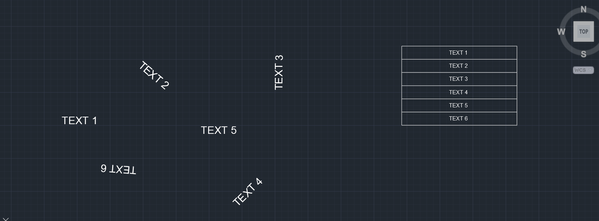
I would like to know if it is possible to create a table with a selected text. Please refer to the image attached.

Example:
If you select the texts "TEXT 1" , "TEXT 2", "TEXT 3", "TEXT 4", "TEXT 5", and "TEXT 6" respectively, regardless if it is rotated or not, it will transform into a table arrangement.
REQUEST.png

0 Likes
11,385 Views
21 Replies
Replies (21)
Message 2 of 22

rkmcswain
Mentor
Mentor

Do you want the text to be inserted into a single column, in the same order that you select them (presuming you pick them one at a time). Or do you want to window the text objects and then sort them somehow? If so, how?

0 Likes
Message 3 of 22

Anonymous
Not applicable

The same order if you select them respectively. Is that possible?

0 Likes
Message 4 of 22

rkmcswain
Mentor
Mentor
Accepted solution

Here is a simple example, feel free to edit as needed, it's a modified version of this.


(vl-load-com)
(defun C:Foo ( / *MS* A CNT I LST MYTABLE PT1 ROW SSET TLST)

  ; create an empty list, set a counter variable, and
  ; set a reference to the current model space.
  (setq lst '()
 i 0
 *ms* (vla-get-modelspace
             (vla-get-activedocument
             (vlax-get-acad-object)))
  )
  ; prompt the user to select text
  (princ "\n Select text ")
  (if (setq sset (ssget '((0 . "TEXT"))))
    ; if a valid selection set was generated, then proceed.
    (progn
    
      ; for each Text object selected, grab the string and store these values in a list
      (repeat (setq cnt (sslength sset))
	(setq ent (entget (ssname sset i)))
        (setq string (cdr (assoc 1 ent)))
        (setq lst (cons string lst))
        (setq i (1+ i))
      )
      (setq lst (reverse lst))
      ; pick a point for the table
      (setq pt1 (getpoint "\nPick point for table "))
      ; add the new table
      (setq myTable (vla-AddTable 
                    *ms* 
                    (vlax-3d-point pt1)
                    cnt
                    1 
                    0.7
                    2.5))
      (setq row 0)
      
      ; loop through the list of text strings
      ; putting that string in the table
      (foreach item lst
        (vla-setText mytable
                     row
                     0 
                     item)        
        (setq row (1+ row))
      )      
      ; release "myTable" and *ms*
      (vlax-release-object myTable)      
      (vlax-release-object *ms*)      
    ); end progn
    (princ "\nNo text selected. ")
  ); end if
  (princ)
); end defun
Message 5 of 22

Sea-Haven
Mentor
Mentor
Accepted solution

No need for the list just use vl-add row and put text. a bit shorter.


; simple single column table
; By Alan H Aug 2019

(vl-load-com)

(defun c:AH1col ( / pt1 numrows numcolumns rowheight colwidth ent doc curspace obj objtable) 
(setq doc (vla-get-activedocument (vlax-get-acad-object))) (setq curspace (vla-get-modelspace doc)) ; now do table (setq pt1 (vlax-3d-point (getpoint "\nPick point for top left hand of table: "))) (setq numrows 2) (setq numcolumns 1) (setq rowheight 2.5) (setq colwidth 40) (setq objtable (vla-addtable curspace pt1 numrows numcolumns rowheight colwidth)) (vla-settext objtable 0 0 "Heading 1") (vla-settext objtable 1 0 "Title 1") (setq objtable (vlax-ename->vla-object (entlast))) (while (setq ent (entsel "pick text object")) (setq obj (vlax-ename->vla-object (car ent))) (if (= (vla-get-objectname obj) "AcDbText") (progn (vla-InsertRows objtable numrows 2.5 1) (vla-settext objtable numrows 0 (vla-get-textstring obj)) (setq numrows (+ numrows 1)) ) (alert "pick again not a text") ) ) (vlax-release-object objtable) (princ) ) ; defun (c:ah1col)
Message 6 of 22

Anonymous
Not applicable

Wow guys this is amazing this is exactly the lisp I'm trying to find out. Hmmm I do have another question. How will you add a blank cell/row below at each selected text?

For Example:
Row 1 : "Text 1"

Row 2: (blank cell)
Row 3: "Text 2"
Row 4: (blank cell)

Row 5: "Text 3"
So on and so forth...

0 Likes
Message 7 of 22

dbhunia
Advisor
Advisor
Accepted solution

Try with this change.......


.......
      (foreach item lst
        (vla-setText mytable
                     row
                     0 
                     item)     
	(setq row (1+ row))
	(vla-setText mytable row 0  "")      					 
        (setq row (1+ row))
      )  
.......


Debashis Bhunia
Co-Founder of Geometrifying Trigonometry(C)
________________________________________________
Walking is the First step of Running, Technique comes Next....
Message 8 of 22

Anonymous
Not applicable

I'm really struggling about these codes hahaha. You guys really are awesome and have been a really big help to me. By the way, if I were to do a two column with the same idea of selecting texts respectively, how are the codes should be?  It's just like my first question, just making it two column.


Example:

Column 1             Column 2

"Text 1"                 "Text 2"

"Text 3"                 "Text 4"

"Text 5"                 "Text 6"

0 Likes
Message 9 of 22

Sea-Haven
Mentor
Mentor

Need to confirm 2 rows, pick order as per your previous post.

A blank line in between ?????

Title is ?????

Header is ??????

0 Likes
Message 10 of 22

Anonymous
Not applicable

Title and Header is anything actually hehehe, the important part actually is when I select texts continuously, it will be on the table and the code you guys made last time is helping me right now. I'm also trying to figure out a code that will make a table with selected texts continuously or respectively, but this time, it will be two columns instead of one, blank is not necessarily this time.

0 Likes
Message 11 of 22

Sea-Haven
Mentor
Mentor

A how many columns is probably the better approach and you can mix and match then by using say - as a blank entry. Need to have a think. 

0 Likes
Message 12 of 22

Anonymous
Not applicable

Say, if I have multiple texts like a hundreds of text maybe, then if I will select it continuously, it will create a table something like this:


                    Column 1                     Column 2

Row 1           Text 1                             Text 2

Row 2           Text 3                            Text 3

Row 3           Text 4                            Text 5

.....

And so on....


Something like that maybe. It's more likely the same with the first one, except that it has two columns rather than one column. Is that possible?

0 Likes
Message 13 of 22

dbhunia
Advisor
Advisor
Accepted solution

@Anonymous  Try with this modified code of @Sea-Haven 


(defun c:AH1col ( / pt1 numrows numcolumns rowheight colwidth ent doc curspace obj objtable col) 
(vl-load-com)
(setq doc (vla-get-activedocument (vlax-get-acad-object)))
(setq curspace (vla-get-modelspace doc))
; now do table 
(setq pt1 (vlax-3d-point (getpoint "\nPick point for top left hand of table:  ")))
(setq numrows 2)
(setq numcolumns 2)
(setq rowheight 2.5)
(setq colwidth 20)
(setq objtable (vla-addtable curspace pt1 numrows numcolumns rowheight colwidth))
(vla-settext objtable 0 0 "TABLE")
;(vla-settext objtable 1 0 "Title 1")
(vla-settext objtable 1 0 "COLUMN 1")
(vla-settext objtable 1 1 "COLUMN 2")

(setq objtable (vlax-ename->vla-object (entlast)))
(setq col 0)
(while (setq ent  (entsel "pick text object"))
	(setq obj (vlax-ename->vla-object (car ent)))
	(if (= (vla-get-objectname obj) "AcDbText")
		(progn
			; (vla-InsertRows objtable numrows 2.5 1)
			; (vla-settext objtable numrows 0  (vla-get-textstring obj))
			; (setq numrows (+ numrows 1))
			(if (= col 0)
				(progn
					(vla-InsertRows objtable numrows 2.5 1)
					(vla-setText objtable numrows col (vla-get-textstring obj))
					(setq col (1+ col))
				)
				(progn
					(vla-setText objtable numrows col (vla-get-textstring obj))  
					(setq col 0)
					(setq numrows (1+ numrows))
				)
			)
		)
		(alert "pick again not a text")
	)
)
(vlax-release-object objtable)
(princ)
)


Debashis Bhunia
Co-Founder of Geometrifying Trigonometry(C)
________________________________________________
Walking is the First step of Running, Technique comes Next....
Message 14 of 22

Sea-Haven
Mentor
Mentor

My idea was ask for how many columns and then insert rows, the entry would be pick pick pick but would have a if nil then exit the input this way if entries are not = 3 will still work. can use a (exit) to force a hard close of the program. This way if next request is 3 columns it is done. Just need some time.


0 Likes
Message 15 of 22

Sea-Haven
Mentor
Mentor
Accepted solution

Try this 

(defun c:AHxcol ( / pt1 numrows numcolumns rowheight colwidth ent doc curspace obj objtable col) 
(vl-load-com)
(setq doc (vla-get-activedocument (vlax-get-acad-object)))
(setq curspace (vla-get-modelspace doc))
; now do table 
(setq pt1 (vlax-3d-point (getpoint "\nPick point for top left hand of table:  ")))
(setq numcolumns (getint "how many columns"))
(setq txtsz (getreal "enter text size"))

(setq numrows 2)
(setq rowheight txtsz)
(setq colwidth (* 10 txtsz))
(setq objtable (vla-addtable curspace pt1 numrows numcolumns rowheight colwidth))
(vla-settext objtable 0 0 "TABLE")
(setq x 1)
(repeat numcolumns
	(vla-settext objtable 1 (- x 1) (strcat "COLUMN " (rtos x 2 0)))
	(setq x (+ x 1))
)

(setq objtable (vlax-ename->vla-object (entlast)))
(vla-InsertRows objtable numrows txtsz 1)
(setq col 0)
(while (setq ent  (entsel "pick text object"))
	(setq obj (vlax-ename->vla-object (car ent)))
	(if (= (vla-get-objectname obj) "AcDbText")
		(progn
			(vla-settext objtable numrows col  (vla-get-textstring obj))
			(setq col (+ col 1))
			(if (= col numcolumns)
				(progn
				(setq col 0)
				(setq numrows (+ numrows 1))
				(vla-InsertRows objtable numrows txtsz 1)
				)
			)
		)
	)
)
(vlax-release-object objtable)
(princ)
)

(c:AHxcol)


Message 16 of 22

Anonymous
Not applicable

Wow @Sea-Haven  your idea was great and incredible, I really liked the way it will ask how many columns I need which actually is helping alot with the one I am working with right now. Thank you all brothers you've been a great help and I liked all your ideas 🙂

I have another question though, is there a way I could unselect the text or maybe remove the text that was in the table like maybe holding SHIFT or something?

0 Likes
Message 17 of 22

Sea-Haven
Mentor
Mentor

Unfortunately if you make a mistake there is no quick way to un select to put a confirm would slow it down so much.  Rather it could be add to existing table so just stop erase item, then continue on. It would need a re-work of the code. Would that be suitable ? But I would need time to do.

0 Likes
Message 18 of 22

Sea-Haven
Mentor
Mentor
There is a question about text height you should be able to put 500 in it. Did you use my last posted version ?

Let me know or post a sample dwg I can re-run over the table with a resize.
0 Likes
Message 19 of 22

Anonymous
Not applicable

You're right it's kinda bothering if you made a minor mistake on clicking hahaha. Well if it's okay for you that would be a big help, but I do not want to take your time, maybe if you have free time that would be okay for me. You're already giving me so much help and I am thankful for that and I don't want to take too much time for you. 

PS: I already found a solution for the text height, I just need to go to tablestyle to edit it hahaha 🙂

0 Likes
Message 20 of 22

Sea-Haven
Mentor
Mentor

I fixed the text height problem in this version. Making tables has a few quirks. See attached, there is a way also of checking each text and making the columns wider but complicated for this type of table randomly picking.


0 Likes