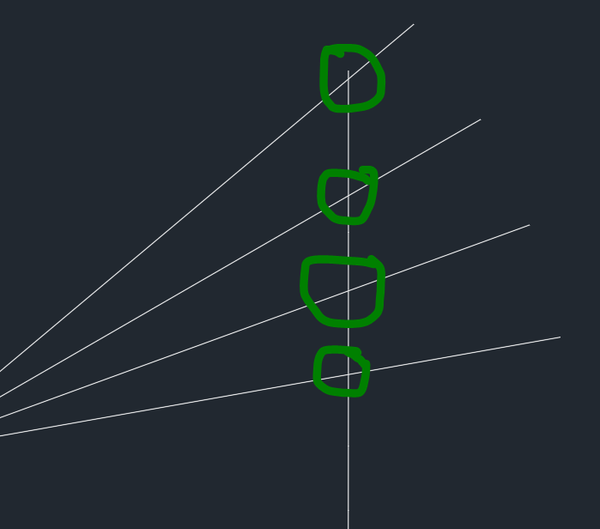
Find Intersection point automatically

Find Intersection point automatically

Anonymous
Not applicable
13,608 Views
51 Replies
Message 1 of 52

Find Intersection point automatically

Anonymous
Not applicable

Hello, 


alixbita_0-1602164802096.png

I have a lot of line which have to cut a single line. I need to know all intersection point location. How can I find it easily? Can I do it with a single command? 


Thanks in advance. 

13,609 Views
51 Replies
Replies (51)
Message 21 of 52

hak_vz
Advisor
Advisor

@Anonymous wrote:

Sir, I successfully load the app. After that I cannot do what it wants. It is asking for base objects. 


base object -> select rectangle or a line

intersection objects -> all red lines


You will receive a list

(((-18.4165 7.10543e-15 0.0) (18.4165 7.10543e-15 0.0)) ((-18.4165 -2.32654 0.0) (18.4165 2.32654 0.0)) ((-18.4165 -4.72855 0.0) (18.4165 4.72855 0.0)) ((-18.4165 -7.29161 0.0) (18.4165 7.29161 0.0)) ((-18.4165 -10.1246 0.0) (18.4165 10.1246 0.0)) ((-18.4165 -13.3804 0.0) (18.4165 13.3804 0.0)) ((18.4165 17.2942 0.0) (-14.2687 -13.3992 0.0)) ((14.9473 18.0682 0.0) (-11.0848 -13.3992 0.0)) ((11.4665 18.0682 0.0) (-8.5034 -13.3992 0.0)) ((8.50227 18.0682 0.0) (-6.30519 -13.3992 0.0)) ((5.87073 18.0682 0.0) (-4.35367 -13.3992 0.0)) ((3.4467 18.0682 0.0) (-2.55604 -13.3992 0.0)) ((1.13676 18.0682 0.0) (-0.843007 -13.3992 0.0)) ((-1.13676 18.0682 0.0) (0.843007 -13.3992 0.0)) ((-3.4467 18.0682 0.0) (2.55604 -13.3992 0.0)) ((-5.87073 18.0682 0.0) (4.35367 -13.3992 0.0)) ((-8.50227 18.0682 0.0) (6.30519 -13.3992 0.0)) ((-11.4665 18.0682 0.0) (8.5034 -13.3992 0.0)) ((-14.9473 18.0682 0.0) (11.0848 -13.3992 0.0)) ((-18.4165 17.2942 0.0) (14.2687 -13.3992 0.0)) ((-18.4165 13.3804 0.0) (18.4165 -13.3804 0.0)) ((-18.4165 10.1246 0.0) (18.4165 -10.1246 0.0)) ((-18.4165 7.29161 0.0) (18.4165 -7.29161 0.0)) ((-18.4165 4.72855 0.0) (18.4165 -4.72855 0.0)) ((-18.4165 2.32654 0.0) (18.4165 -2.32654 0.0)) ((-18.4165 -1.77636e-14 0.0) (18.4165 2.84217e-14 0.0)) ((-18.4165 -2.32654 0.0) (18.4165 2.32654 0.0)) ((-18.4165 -4.72855 0.0) (18.4165 4.72855 0.0)) ((-18.4165 -7.29161 0.0) (18.4165 7.29161 0.0)) ((-18.4165 -10.1246 0.0) (18.4165 10.1246 0.0)) ((-18.4165 -13.3804 0.0) (18.4165 13.3804 0.0)) ((18.4165 17.2942 0.0) (-14.2687 -13.3992 0.0)) ((14.9473 18.0682 0.0) (-11.0848 -13.3992 0.0)) ((11.4665 18.0682 0.0) (-8.5034 -13.3992 0.0)) ((8.50227 18.0682 0.0) (-6.30519 -13.3992 0.0)) ((5.87073 18.0682 0.0) (-4.35367 -13.3992 0.0)) ((3.4467 18.0682 0.0) (-2.55604 -13.3992 0.0)) ((1.13676 18.0682 0.0) (-0.843007 -13.3992 0.0)) ((-1.13676 18.0682 0.0) (0.843007 -13.3992 0.0)) ((-3.4467 18.0682 0.0) (2.55604 -13.3992 0.0)) ((-5.87073 18.0682 0.0) (4.35367 -13.3992 0.0)) ((-8.50227 18.0682 0.0) (6.30519 -13.3992 0.0)) ((-11.4665 18.0682 0.0) (8.5034 -13.3992 0.0)) ((-14.9473 18.0682 0.0) (11.0848 -13.3992 0.0)) ((-18.4165 17.2942 0.0) (14.2687 -13.3992 0.0)) ((-18.4165 13.3804 0.0) (18.4165 -13.3804 0.0)) ((-18.4165 10.1246 0.0) (18.4165 -10.1246 0.0)) ((-18.4165 7.29161 0.0) (18.4165 -7.29161 0.0)) ((-18.4165 4.72855 0.0) (18.4165 -4.72855 0.0)) ((-18.4165 2.32654 0.0) (18.4165 -2.32654 0.0)))

But I don't know how will you use it

Miljenko Hatlak

EESignature

Did you find this post helpful? Feel free to Like this post.
Did your question get successfully answered? Then click on the ACCEPT SOLUTION button.
0 Likes
Message 22 of 52

Patchy
Mentor
Mentor
Accepted solution

I use the Autodesk Land Desktop (daddy of now civil 3d) to get the coordinates. It's old and not available anymore.

You can use this:

http://www.lee-mac.com/ptmanager.html

http://www.lee-mac.com/midlen.html

and use Dataextraction to get coordinates


Message 23 of 52

Anonymous
Not applicable

Oh, That's great. I have done it. Thanks a lot sir. 😄

For my learning purpose, I would like to request @Patchy sir, please tell me your process elaborately. And your output will be more efficient for me. 

0 Likes
Message 24 of 52

Anonymous
Not applicable

Thanks a lot sir. Could you please send me a video of that, it will be more helpful for me. I am requesting you, If you could do that. 

0 Likes
Message 25 of 52

hak_vz
Advisor
Advisor

You didn't answer a question from @pendean  about how you want intersection points to be presented.

Do you want them extracted to spreadsheet (Excel), create a table inside autocad file, else?


Miljenko Hatlak

EESignature

Did you find this post helpful? Feel free to Like this post.
Did your question get successfully answered? Then click on the ACCEPT SOLUTION button.
Message 26 of 52

Anonymous
Not applicable

I am sorry sir, I want the output as Excel. 

0 Likes
Message 27 of 52

hak_vz
Advisor
Advisor
Accepted solution

Here you have it. It exports intersection points to CSV file that you can open with Excel.

(defun c:intersections nil(intersections))

(defun intersections ( / e eo ss i getintersections mappend mklist flatten pointlist3d io int all);

(defun getintersections	(obj1 obj2 / var)
     ; from RonJonP
     (setq var (vlax-variant-value (vla-intersectwith obj1 obj2 0)))
     (if (< 0 (vlax-safearray-get-u-bound var 1))
	  (vlax-safearray->list var)
     ) ;_ end of if
) ;_ end of defun
(defun mappend (fn lst) ; Peter Norvig ??
     ; Append the results of calling fn on each element of list.
     ; Like mapcon, but uses append instead of nconc."
     ; One thing to notice is that fn must return a list, otherwise, it will go wrong.
     ; usage: (mappend '(lambda (x) (list x (* x x))) '(1 2 3))
     (apply 'append (mapcar fn lst))
) ;_ end of defun
(defun mklist (x)
     ; If x is a list return it, otherwise return the list of x
     (if (listp x)
	  x
	  (list x)
     ) ;_ end of if
) ;_ end of defun

(defun flatten (expr)
     ; Get rid of imbedded lists (to one level only)."
     (mappend 'mklist expr)
) ;_ end of defun

(defun pointlist3d (lst / ret)
     ; converts one dimensional list (vector) to list of 3d points 
     (while lst
	  (setq	ret (cons (list (car lst) (cadr lst) (caddr lst)) ret)
		lst (cdddr lst)
	  ) ;_ end of setq
     ) ;_ end of while
     (reverse ret)
) ;_ end of defun

(while (not e )(setq e (car (entsel "\nSelect base object > "))))
(setq eo (vlax-ename->vla-object e))
(princ "\nSelect intersection objects >")
(setq ss (ssget) i 0)
(repeat (sslength ss)
	(setq io (vlax-ename->vla-object (ssname ss i)))
	(setq int (pointlist3d(flatten(getintersections eo io))))
	(if (and int)(setq all (cons int all)))
	(setq i (+ i 1))
)
(setq all (flatten all))
(cond 
	((and (setq f (getfiled "Output .csv file:" (getvar "dwgprefix") "csv" 3)))
		(setq 
			outstring (strcat "\nIntersections points are saved to file: " f)
			file1 (open f "w")
			i -1
		)
		(while (< (setq i (+ i 1)) (length all))
			(write-line 
				(apply 'strcat 
					(mapcar 'strcat 
						(mapcar '(lambda (x) (rtos x 2 3)) (nth i all))
						'(";" ";" "")
					)
				)
				file1
			)
		)
		(princ outstring)
		(close file1)
	)
(princ)
)
)
(princ "\nType INTERSECTIONS to run command")
(princ)

Miljenko Hatlak

EESignature

Did you find this post helpful? Feel free to Like this post.
Did your question get successfully answered? Then click on the ACCEPT SOLUTION button.
Message 28 of 52

Anonymous
Not applicable

WOW! Thanks a lot sir 😄

Message 29 of 52

Anonymous
Not applicable

@Patchy  Sir, I am sorry. I am unable to use Point Manager, which you referred. 

alixbita_0-1602226765147.png

Could you please tell me the details procedure? 😞

0 Likes
Message 30 of 52

Patchy
Mentor
Mentor
Accepted solution

Need to run this :

https://www.cadstudio.cz/en/download.asp?file=IntLines

to get the nodes (Points)

then use the PT manager.

0 Likes
Message 31 of 52

Anonymous
Not applicable

OK sir

0 Likes
Message 32 of 52

Anonymous
Not applicable

alixbita_0-1602262281602.png

Sir it looks like this

0 Likes
Message 33 of 52

Patchy
Mentor
Mentor

You mean the point style? change it using DDPTYPE

0 Likes
Message 34 of 52

Anonymous
Not applicable

Sir, I know about ddtype. But. In your drawing, there are point number also. after that, I used PTM. Input as Point and Output as file. Get output, but not like you. 

alixbita_0-1602266730798.png

alixbita_1-1602266752622.png


0 Likes
Message 35 of 52

Patchy
Mentor
Mentor

I forgot to mention that feature was using Land Desktop (Now Civil 3d)

PT manager was the alternative to get your xyz.

You have to get Civil3d to do that.

0 Likes
Message 36 of 52

hak_vz
Advisor
Advisor

@Anonymous  Describe how you want your points record to be created, and I will update my script.

You don 't  need to use 5 scripts to extract something as simple as object intersections.


How you want it: let say

Point number, x,y,z,......


Miljenko Hatlak

EESignature

Did you find this post helpful? Feel free to Like this post.
Did your question get successfully answered? Then click on the ACCEPT SOLUTION button.
0 Likes
Message 37 of 52

Patchy
Mentor
Mentor

It's easy to extract XYZ, but it's not easy to tell where the XYZ from Xcel taking from the drawing without labeling the point.

0 Likes
Message 38 of 52

hak_vz
Advisor
Advisor

Everything can be done but the task has to be clearly set. How points should be labeled, in what direction. Do he needs them arranged by intersection object  or else. It can be done automatically through the script, or simply by picking points at order in humanly more acceptable manner.

Miljenko Hatlak

EESignature

Did you find this post helpful? Feel free to Like this post.
Did your question get successfully answered? Then click on the ACCEPT SOLUTION button.
0 Likes
Message 39 of 52

Anonymous
Not applicable

@hak_vz  sir, I want a excel sheet where x y and z value will save in different column. And I need the distance from the p point as well in excel sheet in different column. 

I have attached a pic. Here the blue line is an arbitrary object. it will cut by red lines. I need the distance of every intersection point from point P. 

If I can name every line as 1, 2, 3... it will more helpful for me. I have also attached a sample excel chart. 

alixbita_2-1602273485019.png


alixbita_3-1602273513642.png


0 Likes
Message 40 of 52

hak_vz
Advisor
Advisor

OK. I will update the code tomorrow. It is a little bit late here at my location. Before writing  down the code lets define center point P. It is supposed to be placed at P(0,0).


Is this some arbitrary point or it has to be something like center of mass to enclosing object. Instead creating red lines to go across whole object we will have a set of lines that spreed from point P. Are this lines needed in your further work, or we can create intersection points for a set of line that enclose some angle (let say every 5 deg).

Do you want to have a point P selected from a script, or let me assume it is 0,0.

Do you need point object created  at intersection or just label text displaced for some distance in direction of a red line? 

Since this is a 2D problem is Z coordonate needed?

What precision you need (2 3 or more decimal places)?

Are corner point of enclosing object also needed?

Angle from point p to intersection point added to table?


What about dividing each segment of  enclosing object at peaces of equal length (some step value).

With your method as stated now you will have a segments of enclosing object in "shaddow" zone, so it meigth

happen you won't have intersection points at that position. See upper right corner of your sample for clearance.


Answer this questions line by line after quoting separately each my question.

Miljenko Hatlak

EESignature

Did you find this post helpful? Feel free to Like this post.
Did your question get successfully answered? Then click on the ACCEPT SOLUTION button.