Converting Splines to Flattened Bezier Curves

Converting Splines to Flattened Bezier Curves

Anonymous
Not applicable
3,802 Views
5 Replies
Message 1 of 6

Converting Splines to Flattened Bezier Curves

Anonymous
Not applicable

Background:

     I am using python to modify elements in large AutoCAD files. I want to make changes to entities without using the "sendCommand" function. The end resulting drawings cannot contain any splines, among other things. In order to accomplish this I am converting the splines to flattened Bezier Curves (PolyLine). Image 1 helps illustrate this idea.
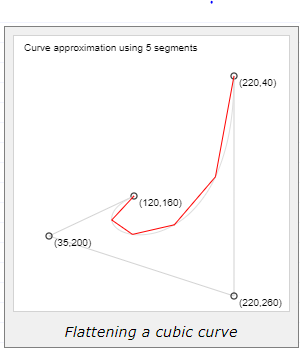
Image 1: Flattened Bezier Curve, Source: https://pomax.github.io/bezierinfo/Image 1: Flattened Bezier Curve, Source: https://pomax.github.io/bezierinfo/


Problem:

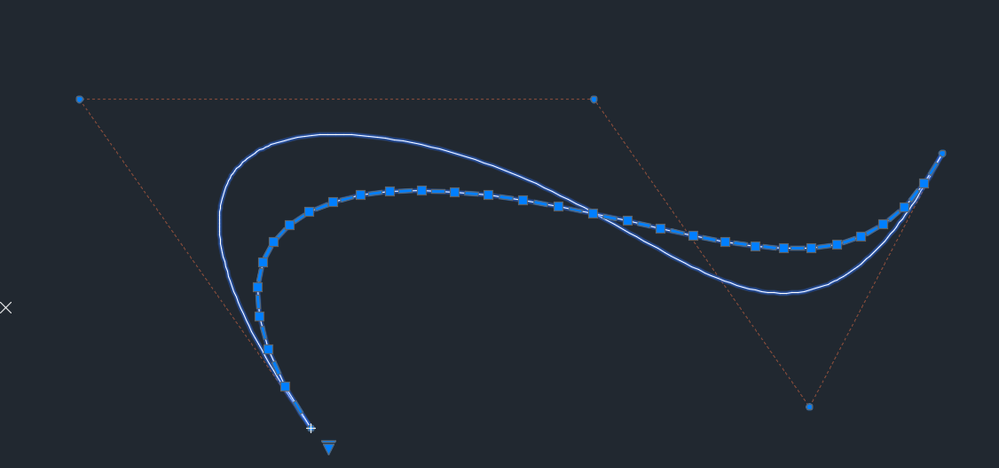
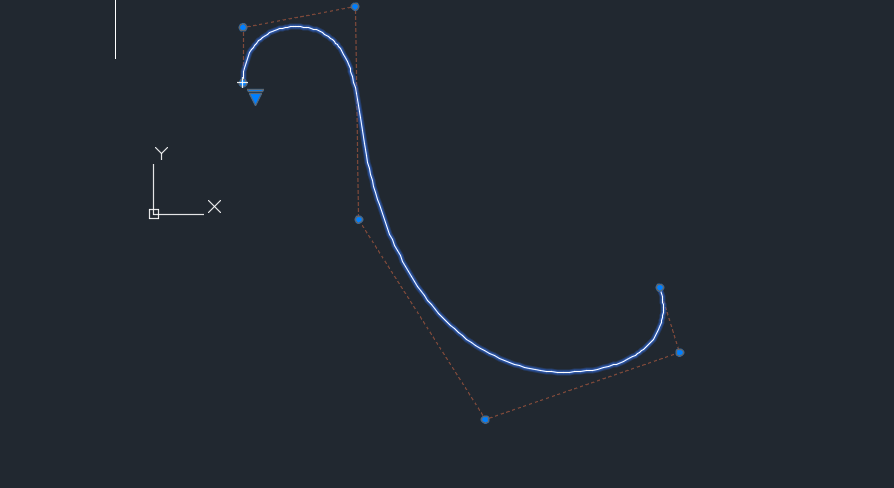
   I succeeded in creating flattened Bezier Curves, although above degree 3, splines in AutoCAD no longer resemble Bezier Curves as seen below. Degree 3 Spline CV resembles flattened Bezier CurveDegree 3 Spline CV resembles flattened Bezier Curve
Degree 4 curve does not match flattened Bezier CurveDegree 4 curve does not match flattened Bezier CurveQuestion:

   How does AutoCAD define splines over degree 4? It appears that the AutoCAD spline is weighted, but when I ask for the weights of the spline i get the following error. Capture.PNG

Any help would be greatly appreciated


Thanks for reading

0 Likes
Accepted solutions (2)
3,803 Views
5 Replies
Replies (5)
Message 2 of 6

Moshe-A
Mentor
Mentor

Flakeh,


the SPLINEDIT command has an option 'convert to Polyline'


moshe


0 Likes
Message 3 of 6

Anonymous
Not applicable
Yes, but like I mentioned, using "SendCommand" is not an option in this case.

0 Likes
Message 4 of 6

Moshe-A
Mentor
Mentor

here is a lisp function to convert spline to polyline

can you send a command like this: 


SendCommnad("(spline->pline entity)")


the obj argument can be VLA-OBJECT or ENAME


moshe


(defun spline->pline (obj / execmd ;| local function |;)

 (defun execmd (ename)
  (command "._splinedit" ename "p" "")
 ); execmd
  
 (cond
  ((eq (type obj) 'VLA-OBJECT)
   (execmd (vlax-vla-object->ename obj))
  ); case
  ((eq (type obj) 'ENAME)
   (execmd obj)
  ); case
  ( t
   (prompt "\nerror: invalid argument.")
  ); case
 ); cond
); spline->pline

0 Likes
Message 5 of 6

Anonymous
Not applicable
Accepted solution

I ended up answering my own question. The splines used in AutoCAD are B-splines. You can use the knots and control points along with the scipy.interpolate module in python to calculate sample points. Polyline approximation of a spline. The circles represent the control points calculatedPolyline approximation of a spline. The circles represent the control points calculatedOriginal spline, degree 3, 7 control pointsOriginal spline, degree 3, 7 control points

0 Likes
Message 6 of 6

Anonymous
Not applicable
Accepted solution

This is the python code i used to convert the splines into polylines. 

It's useful because, like someone mentioned a couple times, there is a SPLINEDIT command to convert splines to polylines, but I prefer not to use "SendCommand". This code allows you to accomplish the same thing without using "SendCommand". The logic is all there so whomever finds this helpful can just transcribe it to LISP or VBA. 


def my_B_spline(obj,resolution):
    knots=obj.knots
    points=obj.controlpoints
    degree=obj.degree
    mtx,numP=form_matrix(points)
    def N(i,p,u):
        if p==0:
            if knots[i]<=u<knots[i+1]:
                return 1
            else:
                return 0
        else:
            if not (knots[i+p]-knots[i])==0:
                eq1=(u-knots[i])/(knots[i+p]-knots[i])
            else:
                eq1=0
            if not (knots[i+p+1]-knots[i+1])==0:
                eq2=(knots[i+p+1]-u)/(knots[i+p+1]-knots[i+1])
            else:
                eq2=0
            
            return eq1*N(i,p-1,u)+eq2*N(i+1,p-1,u)
    output=mtx[0]
    for u in np.linspace(knots[0],knots[-1],num=resolution,endpoint=False)[1:]:
        nextPoint=np.array([0,0,0],dtype='float')
        print("new time called")
        for i in range(0,numP):
            nextPoint+=N(i,degree,u)*mtx[i]
        output=np.vstack([output,nextPoint])
    return np.vstack([output,mtx[-1]])

It takes a spline object and resolution(how many points you want to divide the spline into) and returns an array of sample points on the spline. 

0 Likes