VBA code to save the file with another name

VBA code to save the file with another name

Anonymous
Not applicable
7,735 Views
11 Replies
Message 1 of 12

VBA code to save the file with another name

Anonymous
Not applicable

Dear Folks...
I have a task to save the template drawing with 15 different (for 15 each typical level of a tower).
I am looking to have a code for that. 
Initial try was to start with excel.. but got struck there. 

Any help in this will be highly appreciated.

 Many Thanks in advance.

0 Likes
Accepted solutions (1)
7,736 Views
11 Replies
Replies (11)
Message 2 of 12

norman.yuan
Mentor
Mentor
Accepted solution

This is AutoCAD VBA forum, I am not sure why you need to start with Excel to save AutoCAD drawing (as different drawing file name).


You use AcadDocument.SaveAs() to save current drawing to a given file name. Say, you have a template opened in AutoCAD, and want to save it as "MyDwg01.dwg", "MyDwg02.dwg"... "MyDwg15.dwg", you can:


Dim folder As String

Dim i as Integer

Dim fName As String


folder="C:\MyWork"

For i = 1 To 15

    fName="MyDwg" & Iif(i<10,"0" & i, i) & ".dwg"

    ThisDrawing.SaveAs folder & "\" & fName

Next


Note, after the For...loop, in the folder "C:\MyWork", you will see 15 drawing file saved, but in AutoCAD, only one drawing is open ("MyDwg15.dwg").


Norman Yuan

Drive CAD With Code

EESignature

Message 3 of 12

Anonymous
Not applicable

Dear Yuan, 
Thanks for the immediate response. The reasons starting with excel is, I don't any knowledge of VBA coding in ACAD, its setup and syntax. Another reason is I have a list of drawing names in a column in excel.
I appreciate your approach stating that this is Autodesk Forum, I would like to ask, is there any way we can open excel from ACAD application and read the names in cell say B1:B10 and start saving the CAD Template with these names.

0 Likes
Message 4 of 12

Anonymous
Not applicable

Sir,

I tried writing the below code in VBA of AutoCAD and then i save the files as "Save As 01.dvb"


It worked like a charm. 


[Code]

Sub Save()
Dim folder As String
Dim i As Integer

Dim fName As String
folder = "C:\MyWork"
For i = 1 To 15
fName = "MyDwg" & IIf(i < 10, "0" & i, i) & ".dwg"
ThisDrawing.SaveAs folder & "\" & fName
Next
End Sub

[/Code]


Can you please guide me through accessing the list from excel and saving these files with those names.

Many Thanks in advance. 

0 Likes
Message 5 of 12

norman.yuan
Mentor
Mentor

There are a lot sample code you can find if you google the net for Excel automation. Here is some quick code off my head without actual test:


Public Sub SaveNewDrawings()

    Dim fileNames as Variant

    Dim folder As String

    Dim i As Integer


    folder="C:\MyDrawings\"

    fileNames = GetFileNamesFromExcelSheet("C:\MyDrawings\MyFileList.xlsx")

    If Ubound(fileNames)<0 Then Exit Sub

    For i=0 to Ubound(fileNames)

        ThisDrawing.SaveAs folder & fileNames(i)

    Next

End Sub


Private Function GetFileNamesFromExcelSheet(sheehFile As String) As Variant

    Dim fNames() As String

    Dim fName As String

    Dim i As Integer

    Dim xlsApp As Excel.Application

    Dim sheet As Worksheet

    Dim excelStarted As Boolean


    On Error Resume Next

    Set xlsApp=GetObject( , "Excel.Application")

    If Err.Number<>0 Then

        Err.Clear

        Set xlsApp=CreateObject("Excel.Application")

        excelStarted = True

    Enhd If

    On Error Goto 0

    If xlsApp Is Nothing Then

        MsgBox "Cannot open Excel application!"

    Else

        xlsApp.Workbooks.Open sheetFile

        '' Assume the active sheet is the sheet containing the data (A1 to A15)

        '' otherwise you need to identify which sheet to read the data

        For i=0 to 14

            fName=CStr(ActiveSheet.Range("A" & i+1).Value)

            ReDim Preserve fNames(i)

            fNames(i)=fName

        Next

    End If

    If excelStarted then xlsApp.Quit

    GetFileNamesFromExcelSheet=fNames

End Function


Again, the code is not tested. Just give you an idea. 

HTH


Norman Yuan

Drive CAD With Code

EESignature

Message 6 of 12

Anonymous
Not applicable

@norman.yuan 


Hi, I just found this post and it's exactly what I've been trying to do. I've got a AutoCAD template and would like to save any number of copies based on a list of names in Excel. When I ran the untested code, I got the below error. My excel has no headers and the names are in A1:A5. I appreciate any help you can provide.


error.png

0 Likes
Message 7 of 12

norman.yuan
Mentor
Mentor

Luckily, I did claim my code was "off my head without actual test"Smiley Happy


Since the code runs in AutoCAD side, it will not automatically know what "ActiveSheet" is. So for the line of code that raises the error, change it to:


fName=CStr(xlaApp.ActiveSheet.Range("A" & i+1).Value)


HTH


Norman Yuan

Drive CAD With Code

EESignature

Message 8 of 12

Anonymous
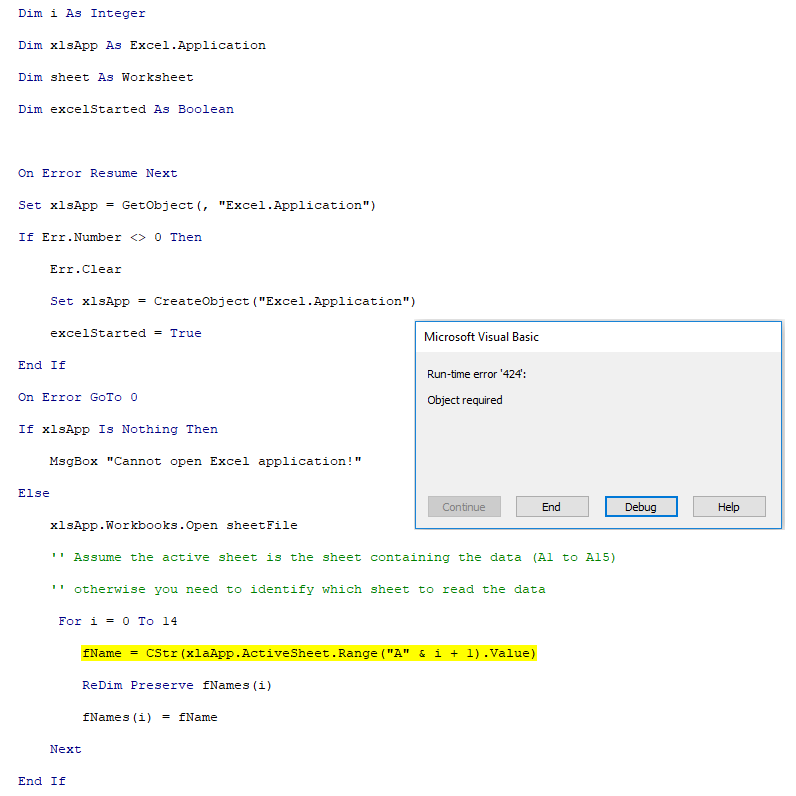
Not applicable

I updated the code and it resolved the error I was having, but created a new error. Thanks for any help you can provide.


error1.png

0 Likes
Message 9 of 12

Ed__Jobe
Mentor
Mentor

You misspelled xlsApp as xlaApp.

Ed


Did you find this post helpful? Feel free to Like this post.
Did your question get successfully answered? Then click on the ACCEPT SOLUTION button.
How to post your code.

EESignature

Message 10 of 12

Anonymous
Not applicable

I can't believe I missed that. It works now. Thanks!

Message 11 of 12

Ed__Jobe
Mentor
Mentor

If you use Option Explicit at the beginning of your module's declaration section, vba will alert you when you type a variable name without first explicitly declaring it.

Ed


Did you find this post helpful? Feel free to Like this post.
Did your question get successfully answered? Then click on the ACCEPT SOLUTION button.
How to post your code.

EESignature

Message 12 of 12

Anonymous
Not applicable

Dear Yuan,
thanks for your codes and guidance. It has really helped a lot and saved a lot of time.

Really appreciated.

Thanks a ton 

Cheers !!!


@norman.yuan wrote:

There are a lot sample code you can find if you google the net for Excel automation. Here is some quick code off my head without actual test:


Public Sub SaveNewDrawings()

    Dim fileNames as Variant

    Dim folder As String

    Dim i As Integer


    folder="C:\MyDrawings\"

    fileNames = GetFileNamesFromExcelSheet("C:\MyDrawings\MyFileList.xlsx")

    If Ubound(fileNames)<0 Then Exit Sub

    For i=0 to Ubound(fileNames)

        ThisDrawing.SaveAs folder & fileNames(i)

    Next

End Sub


Private Function GetFileNamesFromExcelSheet(sheehFile As String) As Variant

    Dim fNames() As String

    Dim fName As String

    Dim i As Integer

    Dim xlsApp As Excel.Application

    Dim sheet As Worksheet

    Dim excelStarted As Boolean


    On Error Resume Next

    Set xlsApp=GetObject( , "Excel.Application")

    If Err.Number<>0 Then

        Err.Clear

        Set xlsApp=CreateObject("Excel.Application")

        excelStarted = True

    Enhd If

    On Error Goto 0

    If xlsApp Is Nothing Then

        MsgBox "Cannot open Excel application!"

    Else

        xlsApp.Workbooks.Open sheetFile

        '' Assume the active sheet is the sheet containing the data (A1 to A15)

        '' otherwise you need to identify which sheet to read the data

        For i=0 to 14

            fName=CStr(ActiveSheet.Range("A" & i+1).Value)

            ReDim Preserve fNames(i)

            fNames(i)=fName

        Next

    End If

    If excelStarted then xlsApp.Quit

    GetFileNamesFromExcelSheet=fNames

End Function


Again, the code is not tested. Just give you an idea. 

HTH


@norman.yuan wrote:

There are a lot sample code you can find if you google the net for Excel automation. Here is some quick code off my head without actual test:


Public Sub SaveNewDrawings()

    Dim fileNames as Variant

    Dim folder As String

    Dim i As Integer


    folder="C:\MyDrawings\"

    fileNames = GetFileNamesFromExcelSheet("C:\MyDrawings\MyFileList.xlsx")

    If Ubound(fileNames)<0 Then Exit Sub

    For i=0 to Ubound(fileNames)

        ThisDrawing.SaveAs folder & fileNames(i)

    Next

End Sub


Private Function GetFileNamesFromExcelSheet(sheehFile As String) As Variant

    Dim fNames() As String

    Dim fName As String

    Dim i As Integer

    Dim xlsApp As Excel.Application

    Dim sheet As Worksheet

    Dim excelStarted As Boolean


    On Error Resume Next

    Set xlsApp=GetObject( , "Excel.Application")

    If Err.Number<>0 Then

        Err.Clear

        Set xlsApp=CreateObject("Excel.Application")

        excelStarted = True

    Enhd If

    On Error Goto 0

    If xlsApp Is Nothing Then

        MsgBox "Cannot open Excel application!"

    Else

        xlsApp.Workbooks.Open sheetFile

        '' Assume the active sheet is the sheet containing the data (A1 to A15)

        '' otherwise you need to identify which sheet to read the data

        For i=0 to 14

            fName=CStr(ActiveSheet.Range("A" & i+1).Value)

            ReDim Preserve fNames(i)

            fNames(i)=fName

        Next

    End If

    If excelStarted then xlsApp.Quit

    GetFileNamesFromExcelSheet=fNames

End Function


Again, the code is not tested. Just give you an idea. 

HTH


0 Likes