Thumbnails not displaying randomly in Vault Pro 2025

- Mark as New
- Bookmark
- Subscribe
- Mute
- Subscribe to RSS Feed
- Permalink
- Report
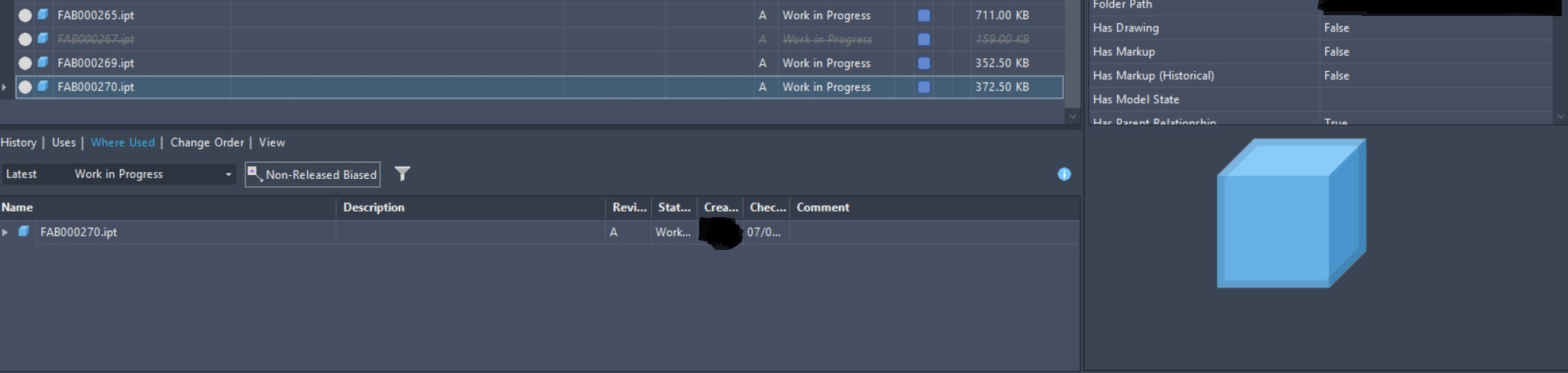
I have recently setup Vault Professional/Inventor Professional on an Azure VM environment with ~5 users. I've noticed (seemingly random) that some files (both assemblies and parts) generated in Inventor do not display the thumbnail of the part or assembly when saved and checked into the vault.
-It appears to be random
-It happens to all users independently it seems
-Thumbnails for Windows, Inventor, Vault Visualizer all display fine
-I've followed all of the steps from this https://www.autodesk.com/support/technical/article/caas/sfdcarticles/sfdcarticles/Thumbnail-previews... but this issue is definitely not resolved as stated in the post...The "work around" in this post doesn't work and if it did, I have 1000's of files. I can't do this to each of them.
-I've restarted the VM, Vault and IIS services but no luck.
-I've verified that the visualizer works for all files
-I've seen in another post that "This sounds like you have a permissions problem on your server with the file store or an over active anti-virus scanner that might be causing this." If this was the issue you'd think that it wouldn't be random. It would either work or not if its being blocked, until it is unblocked.
-One "fix" that I've seen in a couple of the forums here is to re-index the vault but I was hesitant to do that until I understood the process (I've been vaulting for 15 years but am newer to Administrator/Manager role for a vault)
Thanks in advance/Met vriendelijke groet!