Pen sensitivity not working properly

Pen sensitivity not working properly

Anonymous
Not applicable
49,898 Views
25 Replies
Message 1 of 26

Pen sensitivity not working properly

Anonymous
Not applicable
Whenever I open Sketchbook and start drawing, the brush acts like I'm using full pressure with my pen when I'm not and I don't know how to fix it. Help!
I use a Windows HP Pavillion Sleekbook 15.
Reply
Reply
0 Likes
Accepted solutions (1)
49,899 Views
25 Replies
Replies (25)
Message 2 of 26

Anonymous
Not applicable

Have you gone to " preferences " to see if you can set your options from there , or try factory default also found in preferences and reset it from there. See if that helps.

Reply
Reply
0 Likes
Message 3 of 26

Anonymous
Not applicable
I just did, nothing changed though. Thanks anyway.
Reply
Reply
0 Likes
Message 4 of 26

patrick.muenster
Advocate
Advocate

I got this issues sometimes with my Wacom tablets. This failure is caused of a service for pen input that influences your default input. Maybe there are some other services running?

For me, I've found the following three services and one options that have made problems sometimes:

  • TabletInputService
  • Pen_Tablet.exe
  • Wacom Consumer Service (only for Wacom user)
  • Windows Freehand option (option only for Wacom user) 

You can try to end them and see what's happening. You can't do anything wrong by trying. 


Reply
Reply
0 Likes
Message 5 of 26

Anonymous
Not applicable
I had also replied to this issue , but it wasn't me with the issue. It was jogo257
Reply
Reply
0 Likes
Message 6 of 26

Anonymous
Not applicable
Forgot to add that I use a Wacom Cintiq 13HD
Reply
Reply
0 Likes
Message 7 of 26

patrick.muenster
Advocate
Advocate

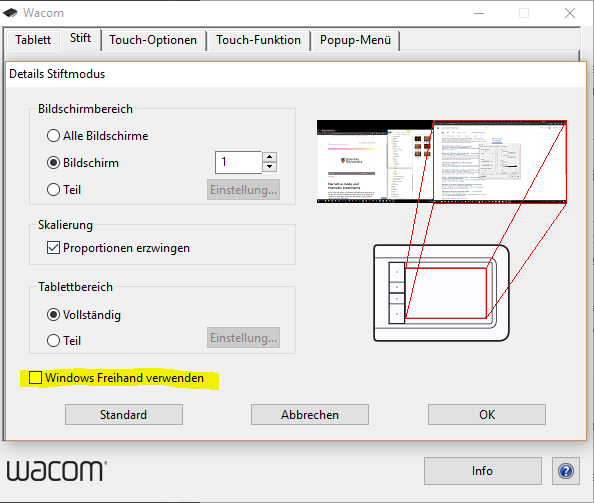
If your using a Wacom Cintiq, then please try the marked option in the image.
I'm sorry, but I don't know how it is called in English. You can find this option in your extended pen settings.

It worked in Sketchbook with my Cintiq 21UX.

Reply
Reply
Message 8 of 26

Anonymous
Not applicable

The tablet Properties tab looks different on the Cintiq.Capture.JPG

Reply
Reply
0 Likes
Message 9 of 26

patrick.muenster
Advocate
Advocate

The settings should be under "options..." or "calibrate".

I currently have no Cintiq connected to my PC. Maybe I can send you an image from my Cintiq settings later.

Reply
Reply
0 Likes
Message 10 of 26

Anonymous
Not applicable

- the Cintiq 13HD I mean.

Reply
Reply
0 Likes
Message 11 of 26

Anonymous
Not applicable

That would help. Thanks

Reply
Reply
0 Likes
Message 12 of 26

patrick.muenster
Advocate
Advocate
Accepted solution

So now I got a picture from my Cintiq Companion setting.

You can find the windows freehand under the calibrate tab at the bottom.

Try to activate or deactivate this option. Maybe you have to restart Sketchbook to see the effect. At my device pressure sensitivity is been deactivated immediately.

windows-freehand.PNG

Reply
Reply
Message 13 of 26

Anonymous
Not applicable

It worked! Thank you!

Reply
Reply
0 Likes
Message 14 of 26

Anonymous
Not applicable
That's terrific !
Reply
Reply
0 Likes
Message 15 of 26

patrick.muenster
Advocate
Advocate

You are welcome! 🙂

Just for my personal information: Would you please tell me how this option is called in the English version?

Reply
Reply
0 Likes
Message 16 of 26

Anonymous
Not applicable
What would be Windows Freehand on your system, it's called Windows Ink on mine.
Reply
Reply
Message 17 of 26

Anonymous
Not applicable

I have a Trust Flex tablet, and what fixed the issue for me was enabling the "Support Tablet PC Feature" option.


PenTabletSetting_2018-07-22_03-03-00.png

Reply
Reply
0 Likes
Message 18 of 26

Anonymous
Not applicable

Try to activate or deactivate " windows ink " option. pen tilt and pressure is control by this option .


I have a xp-pen artist 15.6 pro display monitor tablet . 1920x1080 resolution of 15.6 inch ips screen , 88 percent NTSC color gamut . 8 hotkeys and 1 red roller wheel . the stylus has 8192 pen pressure levels and support pen tilt function . the stylus is battery-free and wireless , I can't find any flaw, tracking is accurate and the screen is great. The only thing it doesn't have is touch .


Reply
Reply
0 Likes
Message 19 of 26

Anonymous
Not applicable

Hi, my pressure sensitivity works perfectly in Photoshop but not with the Autodesk SketchBookPro. I have Wacom Intuos Pro M, Win 10. Anyone help please

Reply
Reply
Message 20 of 26

Anonymous
Not applicable

Same here... My Pressure sensitivity only works with Photoshop, but not Sketchbook Pro 2020


Same problem with my Surface Book 2 and Desktop with (Cintiq 24)


P.S

I tried with Windows Ink (activate and deactivate) , didnt work, unfortunately... Please help 😞

Reply
Reply