Manual slab reinforcement

Manual slab reinforcement

Anonymous
Not applicable
5,048 Views
12 Replies
Message 1 of 13

Manual slab reinforcement

Anonymous
Not applicable

Hi all


I have two problems regarding slab reinforcement.


When I manually set provided reinforcement as I wish (The set reinforcemnt seems OK, because provided reinforcement area is larger than required reinforcement area), Robot doesn' take it into account. Calculation errors an reinforcement display are attached.


The other question is how can I manually set provided reinforcement with wire fabrics instead of reinforcement bars?


Thanks in advance.

0 Likes
Accepted solutions (1)
5,049 Views
12 Replies
Replies (12)
Message 2 of 13

Rafal.Gaweda
Autodesk Support
Autodesk Support

File please.


Rafal Gaweda
0 Likes
Message 3 of 13

Anonymous
Not applicable
 
0 Likes
Message 4 of 13

Rafal.Gaweda
Autodesk Support
Autodesk Support

I guess you have frozen reinforcement before dleting it.


provreinf.jpg


Rafal Gaweda
Message 5 of 13

Anonymous
Not applicable
Accepted solution

You're right. Thank you.

0 Likes
Message 6 of 13

Anonymous
Not applicable

Hello,


How can I know that reinforcement are frozen?

0 Likes
Message 7 of 13

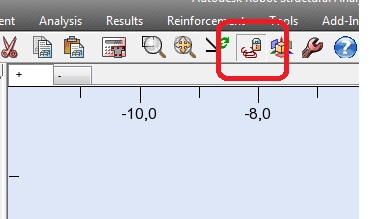
Rafal.Gaweda
Autodesk Support
Autodesk Support

reinffr.jpg


Rafal Gaweda
Message 8 of 13

Anonymous
Not applicable

Hi Rafal,


Similar to what's been discussed in this thread, I've manually drawn the reinforcement on a slab. However I can't get it to appear in the 'Slab -reinforcement' module or the Final Drawings; they both show the slab without reinforcement.


On previous slabs when I have automatically calculated the reinforcement in the provided reinforcement module then the reinforcement shows in the Final Drawings and the 'Slab - reinforcement' modules once its been calculated...


I have frozen the reinforcement, possibly before I pressed the calculate button, so my questions are: is this the reason that it isn't working? And if so how do I unfreeze the reinforcment? In the Results menu it only has freeze reinforcement, not unfreeze and freezing it twice doesn't seem to unfreeze it.


Thanks

Matt

0 Likes
Message 9 of 13

Anonymous
Not applicable
I should also add that I don't appear to have the reinforcement freeze icon/button in the toolbar as you show in message 7. But it says in the Calculation errors list and the Slab-reinforcement module as in message 4 that the reinforcement is frozen
0 Likes
Message 10 of 13

Rafal.Gaweda
Autodesk Support
Autodesk Support
File please.


Rafal Gaweda
0 Likes
Message 11 of 13

Anonymous
Not applicable

https://www.dropbox.com/s/6q3pedtm47rgzcs/Robot%20Slab%2018.9.14.rtd?dl=0


I apologies for the large file size. I know it ought to be opened in repair mode to compress it but I didn't want to lose the reinforcement.


And the calculation errors are due to a collegue creating the model 🙂 but that shouldn't affect this I don't think.


The button to unfreeze the reinforcement is in the correct place in the Slab-reinforcement module when the file has been created in Building Design but not when it has been created in Plate Design which is what this model was made in.


0 Likes
Message 12 of 13

Rafal.Gaweda
Autodesk Support
Autodesk Support

Unfreeze slab first


unfreezeslab.jpg


Rafal Gaweda
Message 13 of 13

Anonymous
Not applicable
Thanks
0 Likes