What is this Gun Symbol that appears on my Revit?

What is this Gun Symbol that appears on my Revit?

Anonymous
Not applicable
2,160 Views
14 Replies
Message 1 of 15

What is this Gun Symbol that appears on my Revit?

Anonymous
Not applicable

SnipImage.JPG

 What is this gun logo/symbol that keeps appearing in all my Revit views?  I have no other symptoms, everything still works fine.  Exit/restart does not fix it. 


I tried various searches, and it seems that no one else has posted anything about it.


Thanks.


0 Likes
Accepted solutions (1)
2,161 Views
14 Replies
Replies (14)
Message 2 of 15

kadmonkee
Advisor
Advisor

is it associated with a sheet or just a view?

is it in all views?

can you select it?

is it part of a family in the model?

if you unload a linked model does it go away?


If there is any information shared that is of value please give Kudos
If a solution is provided by any posters please mark them as Solved to benefit everyone else.
thank you
0 Likes
Message 3 of 15

David_Knight
Collaborator
Collaborator

What monitor do you use?

What video card do you use?


Does this show up on other programs too?


Its not revit.

I'm wondering if it is something tied to your video card or monitor.


Often on gaming monitors there are settings and this kinda looks like it might be that.

My uncle's monitor put a cross-hair in the middle of everything all the time.  I figured out how to get rid of it once I realized it was his monitor.


0 Likes
Message 4 of 15

Sahay_R
Mentor
Mentor

Interesting. By any chances, has a gun image snuck into your model? Look in Manage>>Manage Images.


Rina Sahay
Autodesk Expert Elite
Revit Architecture Certified Professional

If you find my post interesting, feel free to give a Kudo.
If it solves your problem, please click Accept to enhance the Forum.
0 Likes
Message 5 of 15

Anonymous
Not applicable

All views and sheets.

Cannot select it.  It stays in "absolute" positioning in the window. (IOW it does not move when I pan the model view, it remains fixed in relation to the Revit window.)

No linked models in the project.  Also has appeared in other projects.

It is not a monitor thing since it will move to stay in the Revit window if I resize the Revit window.

It is a Revit thing. Only appears in Revit, not the first time this has happened.  Only appears for a couple seconds at full opacity, then goes down to about 10% opacity aka: "ghosted".


Can't select it.  It appears on its own, in different projects.  It's not related to any family or model, or project.  It is a Revit system notification, no data on the meaning of the notification. I am just wondering if anyone knows what it means. Or if there is a fix.


0 Likes
Message 6 of 15

Sahay_R
Mentor
Mentor

Do you see this on a different machine?

Can you share a file where this behavior occurs? This would help to solve the Mystery of the Fantom Firearm.


Rina Sahay
Autodesk Expert Elite
Revit Architecture Certified Professional

If you find my post interesting, feel free to give a Kudo.
If it solves your problem, please click Accept to enhance the Forum.
0 Likes
Message 7 of 15

David_Knight
Collaborator
Collaborator

what monitor and video card do you use?


Since it stays in place and shows up on multiple files; I still think its a monitor and/or video card setting that is on for certain programs using hardware acceleration.


0 Likes
Message 8 of 15

Anonymous
Not applicable

It is definitely not part of Revit.  What is your monitor model and brand? Also what kind of video card do you have?


I'm guessing your monitor has a gaming mode and it recognizes that Revit is a 3D program and thinks it needs to shift to game mode.


Knowing the monitor info can help diagnose the issue.

0 Likes
Message 9 of 15

David_Knight
Collaborator
Collaborator
Accepted solution

I think i found it....


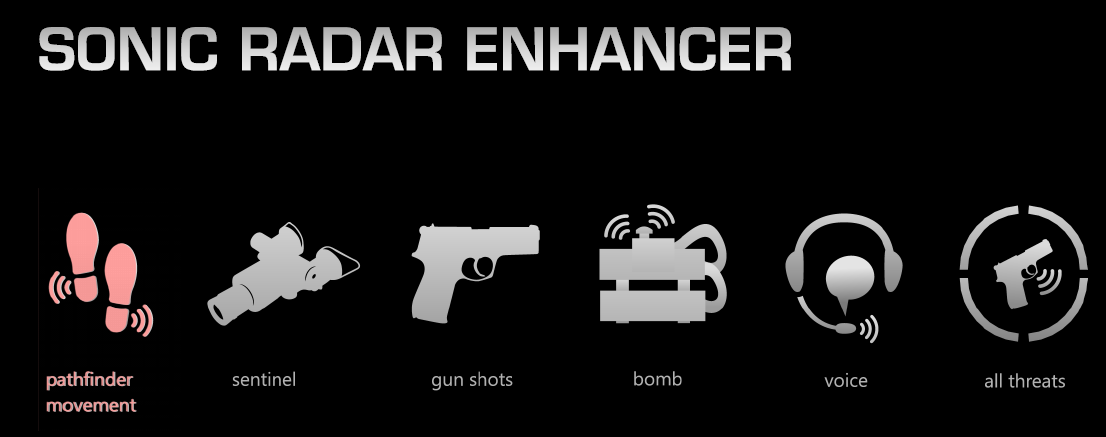
Its an asus feature (part of the motherboard / sound card likely).

It is a 3d gaming enhancement.


Its called "Asus Sonic Radar"


Screenshot i found is attached as well, but here is an image of menu


See on the right? "All Threats"

information on it:

http://www.anandtech.com/show/7022/asus-rog-press-conference-sonic-radar-gaming-software


How to disable it:

https://forums.geforce.com/default/topic/567237/asus-sonic-radar/


  •  think you can go into Realtek HD Audio Manager to do the settings.
  • Or, press <Right Ctrl> + Numeric Pad <0> (or <1>...dont remember exactly) to hide/show the Radar display.

Give that a try.

Message 10 of 15

Anonymous
Not applicable

Thought it looked familiar....I have that installed at home too.  But it has never popped up on me while I had Revit open.

0 Likes
Message 11 of 15

Anonymous
Not applicable

Great job finding the icon.  Unfortunately, none of those suggestions worked.  I may just uninstall the Realtek Audio manager.  Any other ideas?


0 Likes
Message 12 of 15

Anonymous
Not applicable

No, uninstall the Sonic Radar...the realtek is your sound card drivers, which will just reinstall the next time Windows opens.


Or...you probably have a round floating circle on your screen somewhere....go into the options for that and disable or just close it and remove it from the startup menu.


Now I remember what that icon is for...it is supposed to pop up if the sound of gunfire is heard while in game.  What the heck are you listening to while working?


0 Likes
Message 13 of 15

David_Knight
Collaborator
Collaborator

It's probably auto enabled when any hardware graphic program is launched.

The icon itself doesn't mean "gunfire"... It's a radar and it lights up around the gun icon depending on where the sound is relative to you.


I ran across a few posts that suggest uninstalling the ROG drivers, and replacing then with the standard Realtek drivers will remove the sonic radar "feature"


you might try this:

http://www.realtek.com/downloads/downloadsView.aspx?Langid=1&PNid=8&PFid=14&Level=3&Conn=2


I do not know which version of the driver you need.  You would want to check your device manager before you uninstall them to ensure you have the correct ones selected (it should say which they are).  Or tell me your motherboard you have and I can look it up for you.

0 Likes
Message 14 of 15

Anonymous
Not applicable

@Anonymous,


I played with this on my computer this morning....in your start bar/running apps, you should see an icon similar to your icon you are having issues with.


Right click the Icon/App and uncheck everything shown in the menu.  It won't come back until you run the program again from the start menu.  I disabled mine months ago and is the reason it looked familiar, but totally forgot about it.

Message 15 of 15

ToanDN
Consultant
Consultant

I totally want these symbols if they can be activated on demand when I do screen demonstration in this office.

0 Likes