Visibility Parameters for Text

Visibility Parameters for Text

Anonymous
Not applicable
26,463 Views
16 Replies
Message 1 of 17

Visibility Parameters for Text

Anonymous
Not applicable

Hello,


I'm creating a detail family in Revit. 


I have created multiple visibility parameters that can toggle on and off. I have multiple hatch regions that are associated with a parameter. 


Can we add text to fall into a visibility parameter? I need to be able to toggle the visibility for the text on and off along with the hatch regions that it sits on top off. 


Thanks,

Farhaan


0 Likes
Accepted solutions (3)
26,464 Views
16 Replies
Replies (16)
Message 2 of 17

Sahay_R
Mentor
Mentor
Accepted solution

Yes. Any object - text or labels - can be controlled by a yes/no visibility parameter.

In the properties, click on the button next to Visibility. It will bring up a dialog box that lists all the visibility controls that exist - pick the one that you need to have controlling the visibility of the object. In my case, as shown here - I will need to click on the New Parameter button (highlighted) to create a new parameter to control my text.

Capture.JPG


Rina Sahay
Autodesk Expert Elite
Revit Architecture Certified Professional

If you find my post interesting, feel free to give a Kudo.
If it solves your problem, please click Accept to enhance the Forum.
Message 3 of 17

kadmonkee
Advisor
Advisor

have you considered creating types to manage how things are displayed?

"Detail Family" has 3 types


Detail Family 1 has 3 things associated to a YES / NO Parameter

Detail Family 2 has 4 things associated to a YES / NO Parameter

Detail Family 3 has 2 things associated to a YES / NO Parameter

see images below

Family Type 1.PNGFamily Type 2.PNGFamily Type 3.PNG

each type is managed by the YES/NO TYPE Parameter

when used in a project the user will select the option needed.


If there is any information shared that is of value please give Kudos
If a solution is provided by any posters please mark them as Solved to benefit everyone else.
thank you
0 Likes
Message 4 of 17

ToanDN
Consultant
Consultant

@Anonymous wrote:


I have created multiple visibility parameters that can toggle on and off. I have multiple hatch regions that are associated with a parameter. 


Can we add text to fall into a visibility parameter? I need to be able to toggle the visibility for the text on and off along with the hatch regions that it sits on top off. 


Select the hatch regions and the associated text/labels and assign the same Visibility parameter.  Step is per @Sahay_R illustration.


Use Instance Visibility parameter if you need freedom turn them on and off for each instance in project.  Use Type parameters if you need standardized configurations, aka Types, per @kadmonkee's suggestion.


0 Likes
Message 5 of 17

deepesh_wig
Contributor
Contributor

No parameter option is visible in Revit 2017. Is there is separate setting that must be changed before the option becomes available?

0 Likes
Message 6 of 17

ToanDN
Consultant
Consultant
They were talking about text in families, not in project. In project, just right clock and hide elements in view or delete it.
0 Likes
Message 7 of 17

deepesh_wig
Contributor
Contributor
Text in families does not have the option either.

Re text in projects, I don’t want to delete it – I want to vary it based on who is doing the work. E.g. “Final connection by main contractor” v/s “Final connection by sub-contractor”
0 Likes
Message 8 of 17

ToanDN
Consultant
Consultant

Capture.PNG

Message 9 of 17

deepesh_wig
Contributor
Contributor

Nope...

0 Likes
Message 10 of 17

ToanDN
Consultant
Consultant
Strange. Is it a Generic Annotation family?
0 Likes
Message 11 of 17

deepesh_wig
Contributor
Contributor

No, it is a detail family just like the initial query. I have also tried (and failed to find) this in a generic metric family. 

0 Likes
Message 12 of 17

ToanDN
Consultant
Consultant
Accepted solution

Oh, so it is a Detail family. No you cannot have any visibility parameter for text in a detail family.  You need to create a Generic Annotation (not Generic Model) Family and add text or labels there.  You can load it directly in your project or you can load it in your detail family.  There, you can associate the visibility parameter of the text/label from the Generic Annotation family to a visibility parameter of the detail family.


Message 13 of 17

Anonymous
Not applicable

What you can do is to create notes in AutoCAD and load them into Revit family and then you can control it's visibility.

0 Likes
Message 14 of 17

Sahay_R
Mentor
Mentor
Accepted solution
I would not recommend bringing in any elements from Autocad. Revit does not appreciate Autocad content at all.

Rina Sahay
Autodesk Expert Elite
Revit Architecture Certified Professional

If you find my post interesting, feel free to give a Kudo.
If it solves your problem, please click Accept to enhance the Forum.
Message 15 of 17

Anonymous
Not applicable

Hi, 
I believe this is relevant to this topic. I have a structural foundation tag, in it i have 2 labels (Type mark & Elevation at Top) - is it possible to turn the "Elevation at top" off with the visibility parameter? I'd like to select the structural foundation tag in the project and turn the elevation off in the properties.

Thanks,

Pete

0 Likes
Message 16 of 17

Anonymous
Not applicable

If you once set the visibility of the text to invisible... how can you change it to visible again? You dont even know that there is a text somewhere. 

0 Likes
Message 17 of 17

Anonymous
Not applicable

Hello,


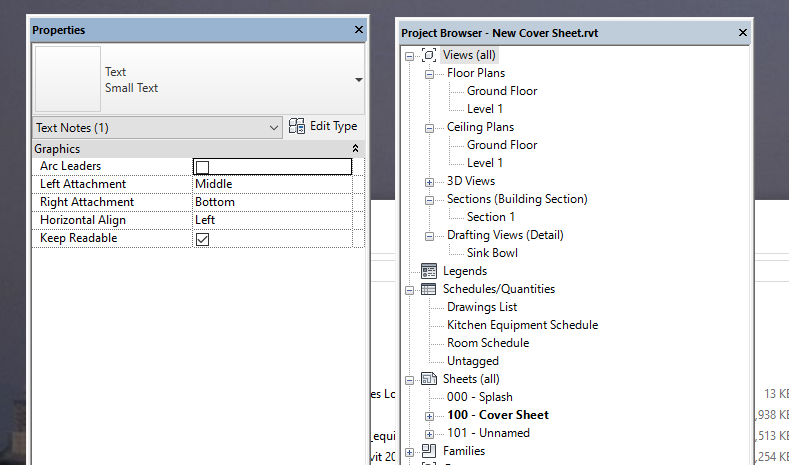
This is helpful but for some reason the visibility option under properties - graphics - is not showing. It shows horizontal align and keep readable but not the visibility option to add the parameter.


Any reason why?


Thanks

0 Likes