To join Automatically floor and walls

To join Automatically floor and walls

TomasoCardia
Advocate Advocate
4,218 Views
7 Replies
Message 1 of 8

To join Automatically floor and walls

TomasoCardia
Advocate
Advocate

Hi all, How can I do to join all the walls with all the floors automatically (without to go to all single wall and "join" with his floor) ? in the picture are the structure part of the wall that is not joint with the structure part of the floor. 

Thank you! 

Captura.JPG

0 Likes
4,219 Views
7 Replies
Replies (7)
Message 2 of 8

barthbradley
Consultant
Consultant

No. And it's not just a Join. It's a negative height offset from level as well. 

0 Likes
Message 3 of 8

TomasoCardia
Advocate
Advocate

Captura.JPGSo to obtain this (subtract floor finishing), I have to do manually always ?

0 Likes
Message 4 of 8

barthbradley
Consultant
Consultant

...another approach would be to modify the structural layer of the wall to have a negative base offset on placement. It won't automatically join to the floor's structural layer, but it will contact the structural layer of the floor. 

0 Likes
Message 5 of 8

ToanDN
Consultant
Consultant

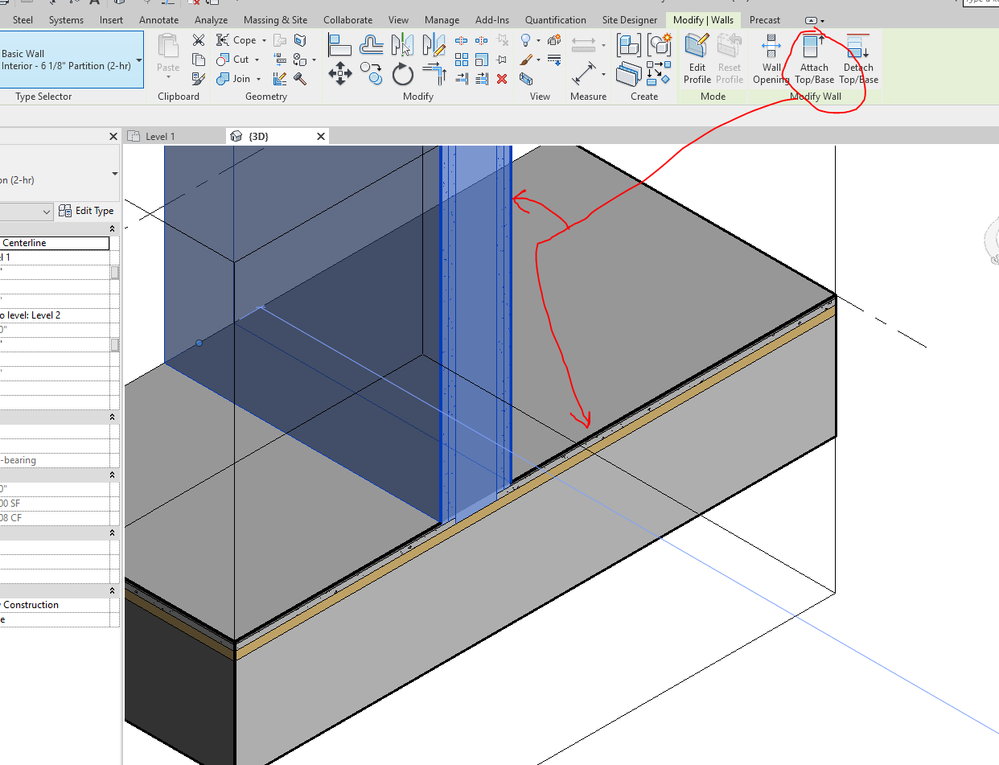
You don't need to manually cut the floor. but you need to Attached wall base to the floor, or manually Join Geometry.  Wall core will extend to meet Floor core; Wall finishes will stop at Floor Finish.


Capture.PNG


Message 6 of 8

barthbradley
Consultant
Consultant

DUH. Attach to BASE.  My senior moment for the day -- at least I hope it's the only one.  Smiley Wink


Kudos @ToanDN 

0 Likes
Message 7 of 8

Anonymous
Not applicable

Its a bug. 
The way i fixed it is by detaching the walls from the floor, moving the floor to a different level then moving it back to the original level, then attach the wall again. 

0 Likes
Message 8 of 8

lamquangvietthinh
Explorer
Explorer

Never thought one day I will have to use thisss !!! thanks !!

0 Likes