Message 1 of 9

- Mark as New
- Bookmark
- Subscribe
- Mute
- Subscribe to RSS Feed
- Permalink
- Report
With the latest update for Revit there is all of a sudden a ucs icon in my views. How do I turn this off?
Solved! Go to Solution.

 Participant
With the latest update for Revit there is all of a sudden a ucs icon in my views. How do I turn this off?
Solved! Go to Solution.
... hi @A.Bauer2013
... yes , it is a well known issue with the 2020.2 update
… and YES it is annoying
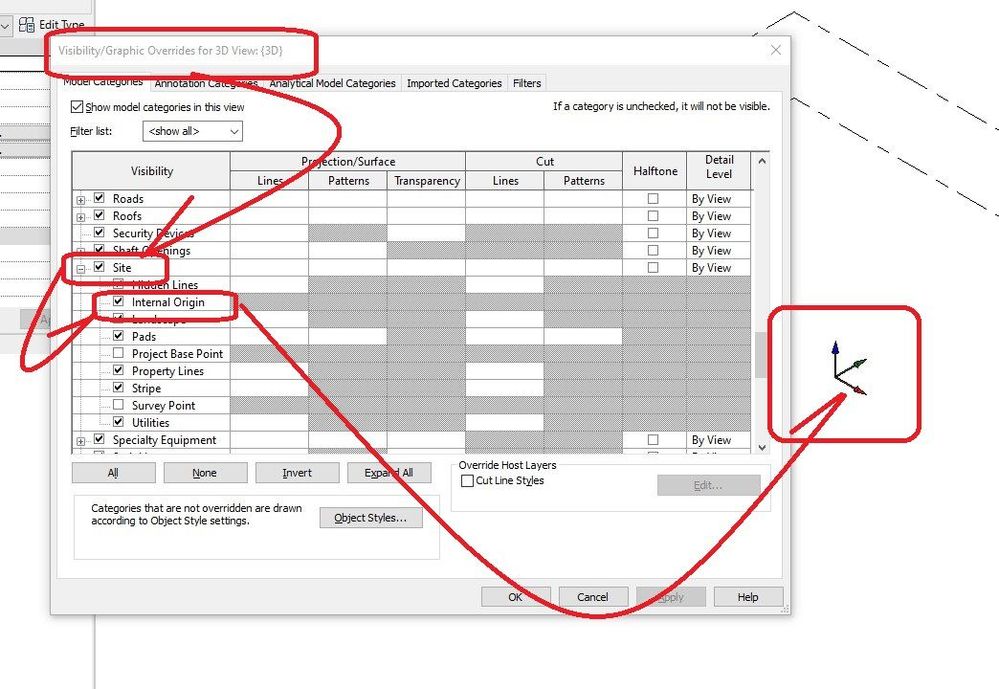
... goto VG
... site
... and un-check the internal origin
… this thread has been around a lot since the update
… sometimes existing 2020 files are seeing the internal origin category being turned on in 2020.2
… sometimes upgraded projects from prior to 2020 versions are not affected
... it is a new addition to the REVIT layout in 2020.2 internal origin point
… top-5-best-new-features-in-revit-2020.2
…. they don’t print… so no problem … just get use to those
… also take a look at this forum discussion / explanation
... showing how to hide it with some dynamo application
… changing-internal-origin-default
aRcHiTeCt.JM
REVIT EXPERT ELITE
➪ ➪ ➪ ➪ ➪ ➪ ➪ ➪ ➪ ➪ ➪ ➪ ➪ ➪ ➪ ➪ ➪ ➪ ➪ ➪ ➪ ➪ is it working for you ? ➪ ⇩ 'Accept as solution' ⇩ ⇦
Do everything aRcHiTeCt.JM said and put it in a View Template and apply the VT to your views.
Howard Munsell
Did you find this post helpful? Feel free to Like this post.
Did your question get successfully answered? Then click on the ACCEPT SOLUTION button.
There is also a Dynamo Routine to turn it off in all Views.
http://revitoped.blogspot.com/2019/12/internal-origin-follow-up.html
Not sure having to delpoy a Dynamo workaround is a "solution" but the new "feature" of a 3D UCS symbol in a 2d view is causing much more work for us. Nots sure who needs an UCS arrow on an orthographic view? I usually can tell the difference from a plan vs section / elevation view in Revit since the nature of buildings is based on gravity ( or world UCS).
Now, with 2020.2 my project sheets with dozens details, are more of hassle to toggle through to select the right view from the sheet.
Given this new UCS things seems functionally meaningless in an orthographic view, perhaps there can be another hotfix to only show it in a 3d view or not at all?
Completely agree. Meaningless addition with zero benefit.
If you actually look into this, it was not intended and only affects projects that were started before the update. Projects created after the update do not show the icons unless they are turned on.